GeM Direct Purchase Rules & New Financial Thresholds: Complete 2025 Guide for MSME Sellers
GeM Direct Purchase Rules & New Financial Thresholds: Complete 2025 Guide for MSME Sellers
menu_book Table of Contents
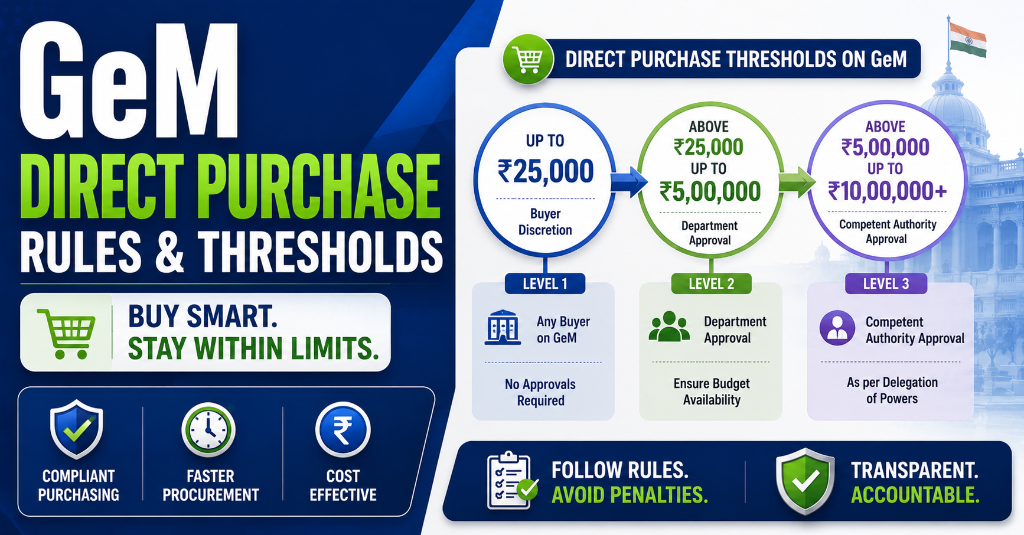
The ₹5.43 Lakh Crore Opportunity: Why GeM Direct Purchase Matters
In Fiscal Year 2024–25, the Government e-Marketplace (GeM) processed ₹5,43,041 crore in Gross Merchandise Value (GMV) across 72,36,852 orders — a historic milestone that makes GeM the largest government e-procurement platform in the world, surpassing even South Korea's KONEPS in transaction value. For the comprehensive end-to-end framework, consult our master government tender guide 2026. To understand foundational rules, refer to our complete GeM portal guide. (See also: GeM Seller vs Buyer Dashboard Differences Guide).
Key Stat: The services segment alone accounted for 62% of total GMV (₹2.54 lakh crore), growing nearly 100% year-on-year. With 350 service categories and 10,730 product categories, GeM has become a one-stop procurement ecosystem for 1,67,961 government buyers.
But here's what most sellers don't realize: a significant portion of these orders never went through a formal bidding process. They were placed through Direct Purchase and L1 Comparison — methods where the buyer finds your product, clicks "Add to Cart," and places the order. No bid document. No reverse auction. No waiting period.
The Passive Order Opportunity:
| Order Type | Value Range | Orders Share | Seller Effort |
|---|---|---|---|
| Direct Purchase | Up to ₹50,000 | ~15% of orders | Zero — passive |
| L1 Comparison | ₹50,000 – ₹10,00,000 | ~25% of orders | Zero — passive |
| Bid/RA | Above ₹10,00,000 | ~60% of orders | High — active bidding |
For MSMEs, Direct Purchase and L1 Comparison represent the fastest path to government revenue. You don't need a bid team. You don't need tender tracking software. You just need a properly optimized GeM catalogue.
🎯 CTA: Before reading further, check if your GeM seller profile score is above 70% — profiles below 70% are automatically filtered out by many buyers.

Get the GeM Success Toolkit
Register, list, bid, and win on GeM without losing a single rupee in deposits or caution money.
- ✓ 150-Point Pre-Submission Checklist (PDF)
- ✓ EMD & BG Format Verification Guide + Excel Checker
- ✓ GST / PAN / TAN Cross-Verification Guide
- ✓ MSME EMD Exemption Claim Letters (4 Formats)
🔒 256-Bit Secure Razorpay Checkout · Lifetime Access · Instant Digital Delivery
What Is GeM Direct Purchase? The Zero-Bidding Revenue Stream
GeM Direct Purchase is the simplest procurement method on the Government e-Marketplace. A government buyer browses the GeM catalogue, finds a product that matches their requirements, and places an order directly — without publishing a tender, inviting bids, or running an auction.
How Direct Purchase Works: The 3-Click Process
┌─────────────────────────────────────────────────────────────────┐
│  BUYER JOURNEY: Direct Purchase on GeM                          │
├─────────────────────────────────────────────────────────────────┤
│  Step 1: Buyer logs into GeM → searches product category         │
│  Step 2: Buyer applies filters (Golden + Silver Parameters)      │
│  Step 3: Buyer views eligible products → checks seller rating    │
│  Step 4: Buyer adds product to cart → enters delivery details    │
│  Step 5: Buyer verifies financial approval → places order        │
│  Step 6: Seller receives order notification → confirms dispatch  │
│  Step 7: GeM processes payment → seller ships → buyer receives   │
└─────────────────────────────────────────────────────────────────┘
Instant Tender Eligibility & Risk Audit
Upload any 500-page NIT / BOQ PDF. Extract hidden disqualification traps, EMD waiver clauses, and complete eligibility criteria in under 45 seconds.
Key Characteristics of Direct Purchase
| Feature | Direct Purchase Specification |
|---|---|
| Who initiates | Buyer (government department) |
| Seller involvement | Passive — no bid submission |
| Order value | Up to ₹50,000 |
| Product requirement | Must be listed in GeM standard catalogue |
| Competition | Buyer sees all eligible sellers; chooses based on need |
| Pricing | Listed price (no negotiation) |
| Delivery timeline | As per seller's listed terms |
| Payment | Processed through GeM SPV (7–10 days) |
| EMD | Not applicable |
| MSME price preference | Not applicable (no competitive comparison) |
| Order confirmation time | Minutes to hours |
What Buyers Typically Buy Through Direct Purchase
| Category | Examples | Average Order Value |
|---|---|---|
| Office Supplies | Stationery, files, folders, staplers | ₹500 – ₹5,000 |
| IT Peripherals | Mouse, keyboard, cables, pen drives | ₹300 – ₹15,000 |
| Cleaning Materials | Detergents, mops, bins, gloves | ₹1,000 – ₹10,000 |
| Electrical Consumables | Bulbs, switches, wires, plugs | ₹500 – ₹8,000 |
| Printer Supplies | Toner cartridges, ink, paper | ₹2,000 – ₹20,000 |
| Safety Equipment | Masks, gloves, first-aid kits | ₹500 – ₹15,000 |
| Kitchen/Canteen | Utensils, storage containers | ₹1,000 – ₹10,000 |
GeM Procurement Methods: The Complete Threshold Framework
Understanding the full spectrum of GeM procurement methods is essential for sellers to know which orders they can capture passively and which require active bidding.
The Three-Tier GeM Procurement System
┌─────────────────────────────────────────────────────────────────────┐
│  TIER 1: DIRECT PURCHASE                                            │
│  Value: Up to ₹50,000                                               │
│  Process: Buyer browses → selects → orders directly                 │
│  Seller Action: List product, optimize catalogue                    │
│  Competition: All eligible sellers in category                       │
├─────────────────────────────────────────────────────────────────────┤
│  TIER 2: L1 COMPARISON                                              │
│  Value: ₹50,001 to ₹10,00,000                                       │
│  Process: Buyer compares 3+ OEMs → system recommends L1             │
│  Seller Action: List product, price competitively, optimize filters  │
│  Competition: L1 wins; non-L1 requires Bid/RA                       │
├─────────────────────────────────────────────────────────────────────┤
│  TIER 3: BID / REVERSE AUCTION (RA)                                 │
│  Value: Above ₹10,00,000                                            │
│  Process: Formal bid publication → seller submission → evaluation   │
│  Seller Action: Active bidding, technical + financial bid prep      │
│  Competition: Lowest qualified bidder wins (L1 or QCBS)             │
└─────────────────────────────────────────────────────────────────────┘
Complete Comparison: All Three Methods
| Parameter | Direct Purchase | L1 Comparison | Bid / Reverse Auction |
|---|---|---|---|
| Value Range | Up to ₹50,000 | ₹50,001 – ₹10,00,000 | Above ₹10,00,000 |
| GFR Basis | Rule 149 (Direct Purchase) | Rule 149 (L1 Comparison) | Rules 161–162 |
| Buyer Action | Browse & order | Compare 3+ OEMs | Publish bid/RA |
| Seller Action | Passive listing | Passive listing | Active bid submission |
| Bid Document | No | No | Yes |
| DSC Required | No | No | Yes |
| EMD Required | No | No | Yes (if >₹25 lakh) |
| Time to Order | Minutes | 1–3 days | 15–45 days |
| Price Basis | Listed price | Listed price | Bid price |
| Negotiation | No | No | Possible in RA |
| MSME Preference | N/A | L1 + 15% matching | L1 + 15% matching |
| Seller Rating Impact | High (buyer sees rating) | High (filterable) | Medium (technical gate) |
| Order Volume Share | ~15% | ~25% | ~60% |
| Best For Sellers | High-volume, low-margin | Standard products | Custom/niche products |
Direct Purchase (Up to ₹50,000): Rules, Process & Seller Strategy
Direct Purchase is the entry point for most MSMEs into government procurement. It's where a stationery supplier gets their first government order, where an IT peripheral dealer builds a track record, and where micro-enterprises generate revenue without a bidding team.
Rules Governing Direct Purchase
- Value Cap: Orders must be ₹50,000 or below per consignee per order.
- Catalogue Requirement: The product must be listed in GeM's standard catalogue (not Custom Bid).
- No Comparison Mandate: Unlike L1 Comparison, the buyer does NOT need to compare 3 sellers. They can pick any eligible seller.
- Rate Reasonableness: The buyer must certify that the rate is reasonable as per GFR Rule 149.
- No EMD: No earnest money deposit is required.
- No DSC: Digital Signature Certificate is not required for the seller.
- Payment: Processed through GeM SPV within 7–10 days of delivery confirmation.
The Direct Purchase Order Flow
BUYER SIDE                           SELLER SIDE
──────────                           ───────────
Login to GeM  ───────────────────→   [Product already listed]
Search category
Apply filters    ─────────────────→   [Filters match your listing]
View products
Check seller rating
Add to cart      ─────────────────→   [Order notification received]
Enter consignee details
Upload financial approval
Verify with OTP
Place order      ─────────────────→   [Order appears in dashboard]
                                   Confirm availability & dispatch
                                   Upload delivery proof
                                   Invoice through GeM
BUYER confirms   ←─────────────────   [Payment released by GeM SPV]
receipt
Seller Strategy for Direct Purchase
Strategy 1: Volume Play
Direct Purchase orders are small but frequent. A seller receiving 50 orders of ₹10,000 each generates ₹5 lakh monthly with minimal effort.
Strategy 2: Category Dominance
Instead of listing 100 products across 20 categories, list 50 products in 2–3 high-demand categories where government buyers purchase frequently (office supplies, IT peripherals, cleaning materials).
Strategy 3: Competitive Pricing
Since buyers can see all sellers, price competitively but not destructively. Aim for L1 or L2 position in your category for common products.
Strategy 4: Rating Maintenance
Maintain a seller rating above 4.0/5. Buyers often filter by rating, and low-rated sellers are invisible even if priced lowest.
L1 Comparison (₹50,000 to ₹10,00,000): The Automated Matrix Decoded
L1 Comparison is where GeM's automated procurement intelligence shines. It's a semi-competitive method where the system — not just the buyer — determines who wins.
How L1 Comparison Works
Step 1: Buyer Selects Product Category The buyer navigates to the GeM marketplace and selects the required product category (e.g., "Laptops," "Air Conditioners," "Office Chairs").
Step 2: Buyer Applies Golden Parameters The buyer selects mandatory specifications (Golden Parameters) such as:
- Brand / Make
- Model / Variant
- Capacity / Size
- Warranty period
- Key technical features
Step 3: System Displays Eligible Products GeM displays products from at least 3 different OEMs that match the Golden Parameters. Products are ranked from lowest to highest price.
Step 4: L1 Product Identification The system automatically identifies the L1 product — the lowest-priced product that fully matches all Golden Parameters and meets quality/delivery requirements.
Step 5: Buyer Decision Point
- If buyer selects L1: Direct order placement. No bidding required.
- If buyer selects non-L1: The system mandates Bid/RA. The buyer cannot directly purchase a non-L1 product in this value range.
Step 6: Order Placement The buyer adds the L1 product to cart, enters delivery details, uploads financial approval, and places the order.
The L1 Comparison Screen
| Product | Seller | Price | Delivery | Rating | Action |
|---|---|---|---|---|---|
| L1: Dell Vostro 15" Laptop | TechServe Pvt. Ltd. | ₹45,000 | 7 days | 4.5★ | ✅ Add to Cart |
| HP 15s Laptop | CompSolutions Ltd. | ₹48,500 | 5 days | 4.2★ | ⚠️ Bid/RA Required |
| Lenovo V15 Laptop | InfraTech Systems | ₹47,200 | 10 days | 4.0★ | ⚠️ Bid/RA Required |
Critical Insight: The buyer is strongly incentivized to pick the L1 product because choosing non-L1 triggers a lengthy Bid/RA process. This means being L1 in your category is incredibly valuable.
Bid/RA (Above ₹10,00,000): When Competition Becomes Mandatory
For orders exceeding ₹10,00,000, GeM mandates formal competitive bidding through either:
- Bid (L1 or QCBS): Sellers submit sealed technical and financial bids
- Reverse Auction (RA): Technically qualified sellers compete in a live price-reduction auction
- Bid-to-RA: Technical bids are evaluated first; top 50% of qualified bidders proceed to RA
When Bid/RA Is Triggered
| Scenario | Mandatory Method |
|---|---|
| Order value > ₹10,00,000 | Bid or RA mandatory |
| Buyer wants non-L1 product in L1 range | Bid/RA mandatory |
| Custom specifications not in standard catalogue | Custom Bid (min. ₹5 lakh) |
| Multiple line items (BOQ) | BOQ Bid or RA |
| Services with complex scope | Custom Bid + QCBS |
🔗 Internal Link: Learn how to win Bid/RA competitions in our detailed guide: Decoding the GeM L1 Bidding & Automated Comparison Matrix
Golden Parameters vs Silver Parameters: What Determines Your L1 Rank
Understanding the difference between Golden Parameters and Silver Parameters is the single most important factor in winning L1 Comparison orders.
Golden Parameters (Yellow Filters)
Golden Parameters are mandatory specifications that determine L1 comparison eligibility. If your product doesn't match the buyer's selected Golden Parameters, it won't even appear in the comparison.
Examples of Golden Parameters:
| Product Category | Golden Parameters |
|---|---|
| Air Conditioner | Type (Window/Split), Capacity (1.5 Ton), Inverter/Non-Inverter, Star Rating |
| Laptop | Screen Size, Processor (i5/i7), RAM (8GB/16GB), Storage (SSD/HDD) |
| Office Chair | Material (Mesh/Leather), Adjustability (Height/Armrest), Load Capacity |
| Printer | Type (Laser/Inkjet), Color/Mono, Print Speed (PPM), Connectivity |
| Generator | Capacity (kVA), Fuel Type (Diesel/Petrol), Phase (Single/Three) |
Key Rule: All 3 compared products must match all selected Golden Parameters. A 1.5 Ton 5-Star Inverter AC will only be compared with other 1.5 Ton 5-Star Inverter ACs — not with 1 Ton ACs or 3-Star ACs.
Silver Parameters (Grey Filters)
Silver Parameters are additional search filters that help buyers narrow down options but do NOT impact the L1 comparison logic.
Examples of Silver Parameters:
| Product Category | Silver Parameters |
|---|---|
| Air Conditioner | Color, Brand preference, Specific features (Wi-Fi, Anti-bacteria) |
| Laptop | Color, Weight, Specific ports, Pre-installed software |
| Office Chair | Color, Warranty extension, Specific brand |
| Printer | Brand, Additional features (Duplex, ADF) |
Key Rule: Silver Parameters filter the display but not the comparison logic. A buyer might filter by "Wi-Fi enabled" but the L1 comparison still happens on the base Golden Parameters.
Golden vs Silver: Impact on Seller Strategy
| Aspect | Golden Parameters | Silver Parameters |
|---|---|---|
| Color coding on GeM | Yellow | Grey |
| Mandatory for comparison | ✅ Yes | ❌ No |
| Impact on L1 ranking | Direct — must match | Indirect — filters display |
| Seller optimization priority | Critical — must match buyer specs | Medium — nice-to-have features |
| Number per category | 3–6 core specs | 10–20 additional specs |
| Example | "1.5 Ton, 5-Star, Inverter" | "Wi-Fi, White Color, Anti-bacteria" |
The GeM L1 Comparison Matrix: How the Algorithm Actually Works
The GeM L1 Comparison Matrix is an automated algorithm that ranks products based on total landed cost. Understanding its mechanics gives sellers a massive competitive advantage.
The L1 Ranking Formula
L1 Rank = f(Total Landed Cost, Seller Rating, Delivery Timeline)

Where:
Total Landed Cost = Base Price + GST + Packing & Forwarding + Freight

The algorithm ranks products by Total Landed Cost (lowest first).
If two products have identical landed cost, the tie-breaker is:
1. Higher seller rating
2. Shorter delivery timeline
3. Earlier listing date
Worked Example: L1 Comparison for Office Chairs
Buyer Requirement: Office Chair, Mesh, Height Adjustable, 120kg Capacity
| Seller | Base Price | GST (18%) | P&F | Freight | Total Landed | Rating | L1 Rank |
|---|---|---|---|---|---|---|---|
| A | ₹4,500 | ₹810 | ₹200 | ₹0 (Free) | ₹5,510 | 4.5★ | L1 |
| B | ₹4,300 | ₹774 | ₹500 | ₹300 | ₹5,874 | 4.2★ | L2 |
| C | ₹4,600 | ₹828 | ₹0 | ₹0 (Free) | ₹5,428 | 3.8★ | Would be L1 but rating < 4.0 |
Analysis:
- Seller A wins L1 despite having a higher base price (₹4,500 vs B's ₹4,300) because their lower P&F and free freight result in a lower total landed cost.
- Seller C actually has the lowest landed cost (₹5,428) but is filtered out due to a low seller rating (3.8★) — many buyers set minimum rating filters.
- Lesson: The headline price is NOT what wins. The total landed cost is what the algorithm compares.
The "Hidden Cost" Trap
Many sellers lose L1 because they don't account for:
| Hidden Cost | Impact on L1 Rank | Solution |
|---|---|---|
| High P&F charges | +2–5% on landed cost | Offer "Free Shipping" or minimal P&F |
| Freight not included | Buyer adds freight to total | Quote "FOR Destination" (freight inclusive) |
| GST calculation errors | Disqualification or higher cost | Ensure HSN code and rate are correct |
| Warranty not matching | Filtered out of comparison | Match standard warranty periods |
How to Optimize Your GeM Catalogue for Direct Purchase & L1 Wins
Your GeM catalogue is your 24/7 storefront for 1.67 lakh government buyers. Here's how to optimize it for maximum passive orders.
1. Complete Every Field in Your Product Listing
| Field | Why It Matters | Optimization Tip |
|---|---|---|
| Product Title | Searchability | Include brand, model, key spec, and category keyword |
| Description | Buyer understanding | 200+ words, bullet points, use cases |
| Golden Parameters | L1 comparison eligibility | Match standard category parameters exactly |
| Silver Parameters | Search filtering | Add all relevant features |
| Images | Trust and clarity | 5+ high-res images, white background, spec sheet included |
| Price | L1 ranking | Competitive but sustainable |
| GST Rate | Total landed cost | Correct HSN code and rate |
| Delivery Timeline | Buyer decision | Shorter is better; be realistic |
| Warranty | Comparison filter | Match or exceed category standard |
| Stock Availability | Order feasibility | Update weekly; show "In Stock" |
| Seller Rating | Buyer trust | Maintain 4.0+ through excellent fulfillment |
2. Price Optimization Strategy
The "L1 Zone" Pricing:
Market Research → Identify L1 price in your category → Price at L1 or L1 + 3%

Why L1 + 3% works:
- If you're L1: You capture direct orders
- If you're L1 + 3%: You still appear in comparison; buyers may choose you for rating/delivery
- If you're L1 + 15%: You trigger MSME price preference (if applicable)
- If you're L1 + 20%+: You're invisible in L1 comparison
3. Category Selection Strategy
High-Demand Government Categories for Direct Purchase & L1:
| Category | Monthly Government Demand | Competition Level | Margin Potential |
|---|---|---|---|
| Office Stationery | Very High | High | 8–12% |
| IT Peripherals | Very High | Very High | 5–8% |
| Cleaning Materials | High | Medium | 12–18% |
| Electrical Fittings | High | Medium | 10–15% |
| Safety Equipment | Medium | Low | 15–20% |
| Kitchen Appliances | Medium | Low | 12–18% |
| Printer Consumables | Very High | High | 10–15% |
| Furniture (Office) | Medium | Medium | 15–25% |
4. The "GeM Seller Profile Score" Hack
GeM assigns a Profile Score to every seller based on:
- Catalogue completeness (30%)
- Document verification (25%)
- Order fulfillment history (25%)
- Seller rating (20%)
Target: 80+ Profile Score
| Score Range | Buyer Visibility | Order Likelihood |
|---|---|---|
| 90–100 | Top placement | Very High |
| 80–89 | High placement | High |
| 70–79 | Standard placement | Medium |
| 60–69 | Filtered by many buyers | Low |
| Below 60 | Hidden for most buyers | Very Low |
MSME Advantages in Direct Purchase & L1 Comparison
1. EMD Exemption (Always Applicable)
Direct Purchase and L1 Comparison never require EMD. But when an L1 Comparison order triggers a Bid/RA (if buyer selects non-L1), Udyam-registered MSEs are exempt from EMD.
2. 15% Price Preference in L1 Comparison
Here's the game-changer: If an MSE's price is within L1 + 15%, the buyer may offer the MSE a chance to match L1 and take the order.
How It Works:
L1 (Large Company): ₹1,00,000
MSE Quote: ₹1,12,000 (12% higher than L1)

Result: MSE is within 15% band → Can match L1 at ₹1,00,000 → Wins order
Important: This applies when the L1 is a non-MSE and the MSE is within 15%. If L1 itself is an MSE, no preference is triggered.
3. Make in India (MII) Preference
Class-I Local Suppliers (MII compliant) get L1 + 20% price matching opportunity against non-local L1 bidders.
4. GeM MSME Dashboard Priority
- MSME products get priority display in search results
- Dedicated "MSME" filter for buyers
- Faster onboarding and verification
5. Startup India Benefits
DPIIT-recognized startups get:
- EMD exemption
- Relaxed eligibility criteria
- "Startup Runway" promotional visibility on GeM
Case Studies: MSMEs Earning Lakhs Through Passive GeM Orders
Case Study 1: The Stationery Micro-Enterprise
Company: PaperMax Solutions (Micro Enterprise, Udyam Registered, Delhi) Category: Office Stationery & Supplies GeM Registration: 18 months
Strategy:
- Listed 45 office stationery products on GeM
- Priced at L1 or L1 + 2% for all items
- Maintained 4.6★ seller rating
- Kept stock updated weekly
Results (Last 12 Months):
| Metric | Value |
|---|---|
| Total Orders | 340 |
| Average Order Value | ₹8,500 |
| Total Revenue | ₹28.9 lakh |
| Direct Purchase Orders | 220 (65%) |
| L1 Comparison Orders | 120 (35%) |
| Active Bidding Required | 0 |
| Average Margin | 12% |
| Net Profit | ₹3.47 lakh |
Key Insight: Zero bidding effort. Zero EMD. Zero bid preparation cost. Pure passive income from catalogue optimization.
Case Study 2: The IT Peripheral Seller Who Optimized Golden Parameters
Company: TechLink Distributors (Small Enterprise, Bangalore) Category: IT Peripherals (Keyboards, Mice, Cables) Challenge: Initially receiving only 2–3 orders per month
What Changed:
| Before Optimization | After Optimization |
|---|---|
| Generic product titles | Keyword-rich titles ("Logitech USB Wireless Mouse M235") |
| 1 product image | 5 images + spec sheet |
| Missing Golden Parameters | All parameters matched to category standards |
| Price 8% above L1 | Price at L1 + 1% |
| 3.9★ rating | 4.4★ rating (improved delivery speed) |
| Stock status not updated | Daily stock updates |
Results:
| Metric | Before | After (6 Months) |
|---|---|---|
| Monthly Orders | 3 | 28 |
| Monthly Revenue | ₹25,000 | ₹2.8 lakh |
| Order Source | Mixed | 90% Direct Purchase + L1 |
Key Insight: Catalogue optimization is the highest-ROI activity for GeM sellers. A few hours of work generated 10x revenue growth.
Case Study 3: The MSE That Won Through Price Preference
Company: SafeGuard Equipment (Small Enterprise, Mumbai) Category: Safety Equipment (Helmets, Gloves, Masks) Tender Type: L1 Comparison for Safety Kits
Scenario:
- L1 (Large Company): ₹8,50,000
- SafeGuard Quote: ₹9,60,000 (12.9% higher)
- SafeGuard Status: Udyam-registered Small Enterprise
Outcome: Buyer invoked MSME Purchase Preference. SafeGuard matched L1 at ₹8,50,000 and was awarded 25% of the order quantity (₹2,12,500 value).
Key Insight: Even when you're not the cheapest, MSME status can still win you a portion of the order in L1 Comparison scenarios.
7 Mistakes That Kill Your Direct Purchase & L1 Chances
Mistake 1: Incomplete Product Listings
Impact: Products don't appear in search or comparison Fix: Fill every field. Upload 5+ images. Write 200+ word descriptions.
Mistake 2: Pricing Without Total Landed Cost in Mind
Impact: You think you're L1, but P&F/freight pushes you to L3 Fix: Always calculate total landed cost (price + GST + P&F + freight) before listing
Mistake 3: Ignoring Seller Rating
Impact: Buyers filter out sellers below 4.0★; you're invisible Fix: Fulfill orders on time, respond to queries, resolve disputes quickly
Mistake 4: Stock Status Not Updated
Impact: Buyer orders, you can't fulfill → order cancellation → rating drop Fix: Update stock status weekly; use GeM's bulk update tools
Mistake 5: Wrong HSN Code / GST Rate
Impact: Total landed cost calculation is wrong; you lose L1 by pennies Fix: Verify HSN codes with your CA; cross-check with GST portal
Mistake 6: Not Monitoring Competitor Prices
Impact: You're priced 20% above L1; zero orders for months Fix: Check L1 prices in your category monthly; adjust pricing dynamically
Mistake 7: Missing Golden Parameter Matches
Impact: Your product doesn't appear in L1 comparison at all Fix: Study category standards; ensure your product specs match exactly
Direct Purchase & L1 Comparison Checklist for Sellers
Catalogue Setup Checklist
- Profile Score: Is your GeM seller profile score 80+?
- Product Images: 5+ high-resolution images per product?
- Golden Parameters: All mandatory specs filled accurately?
- Silver Parameters: All relevant features added?
- Pricing: Competitive against current L1 in category?
- GST: Correct HSN code and rate applied?
- Delivery: Realistic timeline stated?
- Warranty: Matches or exceeds category standard?
- Stock: Updated and showing "In Stock"?
- Description: 200+ words with keywords and use cases?
Ongoing Maintenance Checklist
- Weekly: Update stock status for all products
- Bi-weekly: Check competitor pricing in your top 3 categories
- Monthly: Review seller rating and address any negative feedback
- Monthly: Analyze order sources (Direct vs L1 vs Bid)
- Quarterly: Add new products based on government demand trends
- Quarterly: Review and optimize underperforming listings
Frequently Asked Questions (FAQs)
Q1. What is the GeM Direct Purchase limit in 2025?
A: Under GeM Direct Purchase rules updated in 2024–2025, government buyers can directly place orders up to ₹50,000 without any comparison or bidding. For orders between ₹50,000 and ₹10,00,000, buyers must use the L1 Comparison method — comparing at least 3 different OEM products on GeM and selecting the lowest-priced eligible option. For orders above ₹10,00,000, a formal Bid or Reverse Auction (RA) is mandatory.
Q2. How does the GeM L1 Comparison process work?
A: In GeM L1 Comparison (for orders ₹50,000 to ₹10,00,000), the buyer selects a product category, applies filters (Golden Parameters), and the system displays eligible products from at least 3 different OEMs. The products are ranked from lowest to highest price. The buyer can only add the system-recommended L1 product to the cart. If the buyer chooses any non-L1 product, a formal Bid/RA becomes mandatory.
Q3. Can MSMEs get government orders on GeM without bidding?
A: Yes. MSMEs with active GeM seller accounts and properly listed products can receive Direct Purchase orders up to ₹50,000 and L1 Comparison orders up to ₹10,00,000 without submitting any bid. These are passive orders — buyers find your product, compare it, and place the order directly. Udyam-registered MSEs also benefit from EMD exemption and 15% price preference in L1 comparison scenarios.
Q4. What are Golden Parameters and Silver Parameters on GeM?
A: Golden Parameters (shown in yellow on GeM) are mandatory product specifications that determine L1 comparison eligibility — such as brand, model, capacity, and warranty. All 3 compared products must match the selected Golden Parameters. Silver Parameters (shown in grey) are additional search filters that help buyers narrow down options but do not impact the L1 comparison logic.
Q5. What is the difference between Direct Purchase, L1 Comparison, and Bid/RA on GeM?
A: Direct Purchase (up to ₹50,000): Buyer picks any product and orders directly — no comparison needed. L1 Comparison (₹50,000 to ₹10,00,000): Buyer must compare 3+ OEM products; only the system-recommended L1 (lowest price) can be added to cart. Bid/RA (above ₹10,00,000): Formal competitive bidding or reverse auction is mandatory. Sellers submit bids; lowest qualified bidder wins.
Q6. How is L1 calculated on GeM?
A: L1 is calculated based on total landed cost, not just the base price. The formula is: Total Landed Cost = Base Price + GST + Packing & Forwarding + Freight. The product with the lowest total landed cost that matches all Golden Parameters is declared L1. If two products have identical landed cost, the tie-breaker is seller rating, then delivery timeline.
Q7. Can I win a GeM order if my price is higher than L1?
A: Yes, in specific cases. If you are a Udyam-registered MSE and your price is within L1 + 15% of a non-MSE L1 bidder, the buyer may offer you a chance to match L1 and take up to 25% of the order. Similarly, Class-I Local Suppliers (Make in India) can match within L1 + 20%. However, in pure Direct Purchase (below ₹50,000), buyers can choose any seller regardless of price.
Q8. What is the GeM seller profile score and why does it matter?
A: The GeM seller profile score (0–100) is calculated based on catalogue completeness (30%), document verification (25%), order fulfillment history (25%), and seller rating (20%). Sellers with scores below 70% are automatically filtered out by many buyers. Scores above 80 get priority placement in search results and L1 comparisons.
Q9. Do I need to pay EMD for Direct Purchase or L1 Comparison orders?
A: No. Direct Purchase and L1 Comparison orders never require EMD. EMD is only required for Bid/RA orders above ₹25 lakh (and Udyam-registered MSEs are exempt even then). This makes Direct Purchase and L1 Comparison completely zero-capital-risk methods for MSMEs to generate government revenue.
Q10. How can I increase my GeM seller rating?
A: Your seller rating is based on: (1) On-time delivery rate, (2) Order acceptance rate, (3) Product quality (returns/rejections), (4) Buyer feedback, and (5) Response time to queries. To improve: deliver before the promised date, accept all feasible orders, ensure product quality matches description, proactively communicate with buyers, and resolve disputes within 48 hours.
Conclusion & 30-Day Action Plan
GeM Direct Purchase and L1 Comparison represent the most underutilized revenue stream for MSMEs in government procurement. While most sellers obsess over complex Bid/RA processes, the smart sellers are quietly building lakhs in passive revenue through catalogue optimization.
The Math is Simple:
- 1.67 lakh government buyers are browsing GeM right now
- 40% of GeM orders (by volume) happen through Direct Purchase + L1 Comparison
- Zero bidding effort required
- Zero EMD required
- Payment in 7–10 days through GeM SPV
Key Takeaways
- Three-Tier System: Direct Purchase (≤₹50K) → L1 Comparison (₹50K–₹10L) → Bid/RA (>₹10L)
- Total Landed Cost Wins L1: Not base price — include GST, P&F, and freight
- Golden Parameters Are Everything: Match them exactly or become invisible
- Seller Rating is Your Reputation: Maintain 4.0+ or be filtered out
- Catalogue Optimization = Passive Income: A few hours of work = months of orders
- MSME Benefits Compound: EMD exemption + 15% price preference + priority display
Your 30-Day Action Plan
| Week | Action | Expected Outcome |
|---|---|---|
| Week 1 | Audit your GeM profile score; complete all missing fields | Profile score 80+ |
| Week 1 | Review top 10 products; optimize titles, images, and descriptions | Better search visibility |
| Week 2 | Research L1 prices in your top 3 categories; reprice competitively | L1 or L2 ranking achieved |
| Week 2 | Verify all HSN codes and GST rates with your CA | Accurate landed cost |
| Week 3 | Update stock status for all products; set weekly reminder | Zero stock-related cancellations |
| Week 3 | Check seller rating; address any pending disputes or negative feedback | Rating 4.0+ |
| Week 4 | Add 5 new products in high-demand government categories | Expanded order potential |
| Week 4 | Set up weekly competitor price monitoring process | Sustained L1 competitiveness |
Related Articles (Topical Authority Cluster)
- Decoding the GeM L1 Bidding & Automated Comparison Matrix
- Custom Bid Creation vs Boilerplate Specs on GeM Portal
- How to Register on GeM Portal: Step-by-Step Guide for MSMEs
- GeM Reverse Auction Strategy: How to Win Without Underpricing
- Udyam Registration Complete Guide: Benefits, Process & Documents
- GFR 2017 Amendments (July 2024): What Changed for MSME Suppliers
- EMD Forfeiture Rules & Appeal Process: Complete 2025 Guide
- Single Tender Enquiry (STE) Rules Under GFR 2017
Disclaimer: This article is for informational purposes only and does not constitute legal or financial advice. GeM rules and thresholds are subject to change; verify current provisions from the official GeM portal (gem.gov.in) and GFR 2017.
About TenderFlow Pro: TenderFlow Pro is India's leading AI-powered tender intelligence platform for MSMEs. We help sellers optimize their GeM presence, discover high-value bids, and win government contracts with 10x efficiency. Start your free trial today.
Last Updated: 18 July 2025 | Reviewed by: TenderFlow Pro Advisory Panel