GeM Seller vs Buyer: 15 Critical Differences in 2026
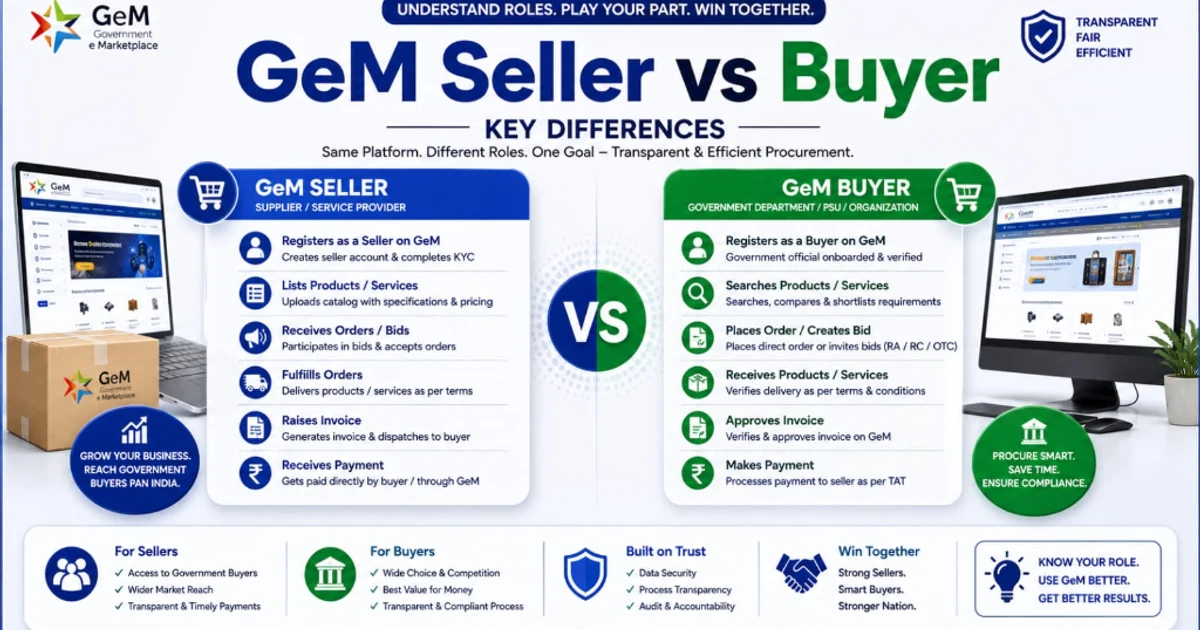
Same Platform. Different Roles. One Goal. Discover the fundamental differences between selling to the government and buying for government departments on the Government e-Marketplace.
menu_book Table of Contents
The Confusion Costing Businesses ₹50,000+ in Rejected Applications {#the-stat}
Shocking Stat: GeM's 2026 verification data reveals that 23% of seller registration rejections occur because applicants mistakenly select "Buyer" during sign-up, upload private business documents, and then wonder why their application is stuck in "Pending Ministry Verification" for weeks. Conversely, 18% of government buyer registrations are delayed because nodal officers attempt to register as "Sellers" and get caught in the Vendor Assessment workflow meant for OEMs.
The GeM portal has two entirely separate ecosystems — one for sellers (private businesses) and one for buyers (government entities). They look similar on the surface. Both require Aadhaar. Both need PAN. Both have dashboards. But beneath the login screen, the architecture, rules, workflows, and financial obligations diverge completely.
A seller registering as a buyer will never get approved — because GeM cross-references buyer applications against the government's DDO (Drawing and Disbursing Officer) database, and your private limited company is not in it. A buyer registering as a seller will trigger OEM verification protocols that government departments are not designed to pass.
This guide eliminates that confusion permanently. Whether you are an MSME founder deciding if GeM is worth your time, a government procurement officer setting up your department's account, or a consultant advising clients — these 15 differences will save you weeks of wasted effort and thousands of rupees in compliance costs.
💡 Not sure if GeM is right for your business? Use TenderFlow Pro's Bid/No-Bid Scorer to evaluate whether your product category has active government demand before you invest in registration.
Download GeM Vendor Registration Checklist
Get the 50-point step-by-step checklist to avoid common registration pitfalls, caution money issues, and catalog approval delays.
Who Can Register? Eligibility Matrix: Seller vs Buyer {#eligibility}
Before comparing processes, you must know which side of the marketplace you belong to. GeM's eligibility rules are non-negotiable and enforced by automated verification.
Seller Eligibility
| Entity Type | Can Register? | Example |
|---|---|---|
| Sole Proprietorship | ✅ Yes | Individual running a trading business |
| Partnership Firm | ✅ Yes | CA firm, legal partnership |
| Private Limited Company | ✅ Yes | Manufacturing company, IT services firm |
| LLP (Limited Liability Partnership) | ✅ Yes | Consultancy LLP |
| Public Limited Company | ✅ Yes | Large manufacturer listed on stock exchange |
| Society / Trust | ✅ Yes | NGO selling handicrafts |
| MSME (Udyam-registered) | ✅ Yes | Small manufacturing unit |
| Startup (DPIIT-recognized) | ✅ Yes | Tech startup offering SaaS |
| OEM (Original Equipment Manufacturer) | ✅ Yes | Factory making LED lights |
| Reseller / Authorized Dealer | ✅ Yes | Distributor selling branded products |
| Service Provider | ✅ Yes | IT maintenance, transport, consultancy |
| Private Individual (no business) | ❌ No | Cannot register without business entity |
Buyer Eligibility
| Entity Type | Can Register? | Example |
|---|---|---|
| Central Government Ministry | ✅ Yes | Ministry of Defence, Ministry of Finance |
| State Government Department | ✅ Yes | Maharashtra PWD, Gujarat Education Dept |
| PSU (Public Sector Undertaking) | ✅ Yes | ONGC, NTPC, BHEL, NHAI |
| Autonomous Body | ✅ Yes | IITs, NITs, CSIR labs, ICAR institutes |
| Local Government / Municipality | ✅ Yes | Municipal Corporation of Delhi |
| Panchayati Raj Organization | ✅ Yes | Gram Panchayat procurement cell |
| Educational Institution | ✅ Yes | Government schools, universities |
| Central Armed Police Force | ✅ Yes | CRPF, BSF, ITBP |
| Private Company | ❌ No | Cannot register as buyer |
| Individual Citizen | ❌ No | Cannot register as buyer |
| NGO (non-government) | ❌ No | Cannot register as buyer |
⚠️ Critical Rule: If your organization does not have a government email domain (`@gov.in`, `@nic.in`, or department-specific domain), buyer registration requires additional authorization letters and takes longer.
The 15 Critical Differences: Side-by-Side Comparison {#15-differences}
Here is the master comparison table. Print this. Share it with your team. Bookmark it.
| # | Parameter | GeM Seller | GeM Buyer | Impact |
|---|---|---|---|---|
| 1 | Who Can Register | Private businesses, MSMEs, startups, manufacturers, resellers, service providers | Government departments, PSUs, autonomous bodies, educational institutions, local governments | Private companies cannot be buyers; government cannot be sellers |
| 2 | Registration Fee | ₹0 (free) | ₹0 (free) | Both free, but sellers have hidden costs |
| 3 | Caution Money | ₹5,000–₹25,000 (exempt for Udyam MSMEs) | ₹0 | Sellers bear financial risk; buyers pay nothing |
| 4 | EMD in Bids | Required in competitive bids (exempt for Udyam MSEs) | Not applicable — buyers receive EMD, don't pay it | MSME sellers save 1–2% per bid |
| 5 | Primary Verification | PAN + Aadhaar OTP + GST + Bank | Aadhaar + Organization PAN + DDO Code | Buyers verified against government database |
| 6 | Approval Time | 3–7 working days | 1–3 working days | Buyers approved faster |
| 7 | Vendor Assessment | Mandatory for OEMs in Q2/Q3 categories | Not required | Only sellers face capability audits |
| 8 | Dashboard Purpose | Upload products, manage catalogues, bid on orders, track payments | Search catalogues, publish bids, place orders, track deliveries, process payments | Completely different workflows |
| 9 | Procurement Methods Available | Can only respond to bids; cannot create bids | Can create Direct Purchase, L1 Bid, Reverse Auction, Custom Bid | Buyers control the procurement process |
| 10 | MSME Benefits | EMD exemption, L1+15% matching, 25% reservation, caution money exemption | None — buyers don't qualify as MSMEs | Massive advantage stack for seller-MSMEs |
| 11 | Payment Direction | Receives payment from government buyer | Makes payment to seller via PFMS/IFMS | Sellers worry about receivables; buyers use government treasury |
| 12 | Payment Timeline Risk | 30-day mandated timeline; delays possible | No risk — payment is government obligation | Sellers must track receivables; buyers have no cash flow risk |
| 13 | Consignee Rating Impact | Seller ratings affect search ranking and bid eligibility | Buyer ratings/performance tracked internally | Sellers live and die by ratings |
| 14 | Product/Service Listing | Must create and maintain catalogues | Browses and purchases from existing catalogues | Sellers invest in catalogue quality |
| 15 | Account Suspension Risk | High — 3 consignee rejections = 90-day suspension | Low — buyers have dispute resolution, not suspension | Sellers face stricter accountability |
Registration Process: Seller (9 Steps) vs Buyer (6 Steps) {#registration-process}
GeM Seller Registration: 9-Step Process
| Step | Action | Time Required |
|---|---|---|
| 1 | Visit gem.gov.in → Sign Up → Select "Seller" | 2 minutes |
| 2 | Choose registration method (Aadhaar or PAN) | 1 minute |
| 3 | Aadhaar/PAN OTP verification | Instant |
| 4 | Fill business details (name, type, address, email, phone) | 10 minutes |
| 5 | Enter bank account information | 5 minutes |
| 6 | Upload mandatory documents (PAN, GST, Udyam, Bank Proof) | 15 minutes |
| 7 | Select product/service categories | 10 minutes |
| 8 | Pay caution money (if not Udyam MSME) | 5 minutes |
| 9 | Submit and wait for verification | 3–7 working days |
📋 Deep Dive: Read our GeM Registration Complete Guide 2026 for screenshot-level detail on each step.
GeM Buyer Registration: 6-Step Process
| Step | Action | Time Required |
|---|---|---|
| 1 | Visit gem.gov.in → Sign Up → Select "Buyer" | 2 minutes |
| 2 | Enter Aadhaar number and verify via OTP | 2 minutes |
| 3 | Fill organization details (name, type, address, DDO code) | 10 minutes |
| 4 | Create user ID, password, and security questions | 5 minutes |
| 5 | Upload organization documents (PAN, Authorization Letter, Address Proof) | 10 minutes |
| 6 | Verify official email and await approval | 1–3 working days |
📋 Deep Dive: Read our GeM Buyer Registration Process Guide for the complete buyer walkthrough.
Key Process Difference
Sellers must complete Vendor Validation (all) and potentially Vendor Assessment (OEMs in Q2/Q3). Buyers only need organization verification against existing government records. This is why seller approval takes 2x longer.
Document Requirements: What Sellers Need vs What Buyers Need {#documents}
Seller Document Checklist
| Document | Mandatory? | Format | Common Rejection Reason |
|---|---|---|---|
| Individual PAN Card | ✅ Yes | JPEG/PDF <5MB | Blurred scan |
| Business PAN Card | ✅ Yes (for companies/LLPs) | JPEG/PDF <5MB | Using individual PAN instead |
| Aadhaar Card (linked to mobile) | ✅ Yes | JPEG/PDF <5MB | Mobile not linked to Aadhaar |
| GST Certificate | ✅ Yes (most categories) | Expired GST; name mismatch | |
| Udyam Certificate | ⚠️ Recommended | Not updated; wrong turnover class | |
| Bank Cancelled Cheque / Passbook | ✅ Yes | JPEG/PDF <5MB | Account name ≠ business name |
| Company Incorporation Certificate | ✅ Yes (Pvt Ltd/LLP/OPC) | Old name after amendment | |
| Partnership Deed | ✅ Yes (Partnership) | Not notarized | |
| Trademark Certificate | ✅ Yes (OEMs) | Expired | |
| Factory License / SSI | ✅ Yes (OEMs) | Address mismatch | |
| ITR (last 3 years) | ⚠️ Sometimes | Not filed |
Buyer Document Checklist
| Document | Mandatory? | Format | Common Rejection Reason |
|---|---|---|---|
| Organization PAN Card | ✅ Yes | Blurred scan | |
| GST Certificate (if applicable) | ⚠️ Sometimes | Not required for all departments | |
| Authorization Letter for Signatory | ✅ Yes | Missing designation or seal | |
| Aadhaar & PAN of Primary User | ✅ Yes | JPEG/PDF <5MB | Mobile not linked |
| Official Department ID / Email | ✅ Yes | — | Using personal email (@gmail.com) |
| Department Bank Account Details | ✅ Yes | — | Wrong IFSC code |
| Office Address Proof | ✅ Yes | JPEG/PDF <5MB | Old address; utility bill >3 months |
⚠️ 2026 Update: Sellers now face stricter BIS/IS certification enforcement for mandatory categories. Electrical goods, safety equipment, TMT bars, food products (FSSAI), and children's items without valid BIS licenses are subject to immediate listing removal.
Fees & Financial Obligations: Caution Money, EMD & Commissions {#fees}
Caution Money: Only Sellers Pay
| Annual Turnover | Seller Caution Money | Buyer Caution Money |
|---|---|---|
| Below ₹1 crore | ₹5,000 | ₹0 |
| ₹1 crore – ₹10 crore | ₹10,000 | ₹0 |
| Above ₹10 crore | ₹25,000 | ₹0 |
| Udyam-registered MSME | ₹0 (exempt) | N/A |
2026 Critical Update: Sellers who have not paid caution money are now blocked from uploading new products or brands until payment is completed. This makes caution money effectively mandatory for active selling.
EMD: Sellers Pay (Unless MSME); Buyers Receive
| Bid Type | Seller EMD | Buyer EMD |
|---|---|---|
| Direct Purchase | ₹0 | N/A |
| L1 Selection Bid | 1–2% of estimated value (waived for Udyam MSE) | N/A |
| Reverse Auction | 1–2% of estimated value (waived for Udyam MSE) | N/A |
| Custom Bid | 2–5% of estimated value (waived for Udyam MSE) | N/A |
Buyers collect EMD from sellers as a performance guarantee. If a seller withdraws or defaults, the buyer retains the EMD. MSME sellers are exempt from paying EMD under GFR Rule 170.
📋 Deep Dive: Read our EMD Exemption MSME How to Claim Guide and Earnest Money Deposit Complete Guide.
Transaction Charges
| Fee Type | Seller | Buyer |
|---|---|---|
| Registration Fee | ₹0 | ₹0 |
| Caution Money | ₹5,000–₹25,000 | ₹0 |
| EMD | 1–5% per bid (waived for MSE) | N/A |
| Commission/Service Charge | None explicitly; payment processing via PFMS | None |
| DSC (Digital Signature) | Optional (e-Sign via OTP available) | Sometimes required for high-value approvals |
Dashboard & Features: What Sellers See vs What Buyers See {#dashboard}
Seller Dashboard Features
| Feature | Purpose |
|---|---|
| Catalogue Manager | Upload, edit, and manage product/service listings |
| Bid Participation | View active bids, submit quotes, participate in reverse auctions |
| Order Management | Track orders from placement to delivery to CRAC |
| Payment Tracker | Monitor invoice status, payment timelines, and receivables |
| Consignee Ratings | View ratings and feedback from government buyers |
| Bid Health Score | AI-generated score based on performance, compliance, and pricing |
| Compliance Status Tracker | Alerts for expiring certifications (GST, Udyam, BIS, ISO) |
| Analytics Dashboard | Bid win rate, average order value, repeat buyer %, category performance |
| Mobile App | Accept orders, submit invoices, track delivery, respond to queries |
| TReDS Integration | Bill discounting for early payment |
Buyer Dashboard Features
| Feature | Purpose |
|---|---|
| Catalogue Search | Browse 10,730+ product categories and 350+ service categories |
| Demand Generation | Create requisitions and route for approval |
| Bid Creation | Publish L1 bids, reverse auctions, and custom bids |
| Seller Comparison | Compare 3+ sellers side-by-side on price, rating, and delivery |
| Order Placement | Direct purchase, L1 award, or RA winner selection |
| Delivery Tracking | Track dispatch, transit, and delivery via QR code |
| PRC/CRAC Generation | Provisional Receipt and Consignee Receipt & Acceptance Certificate |
| Payment Processing | Forward bills to paying authority; track PFMS status |
| MSME Filter | Filter search results to show only Udyam-registered MSEs |
| Startup Corner | Dedicated section for DPIIT-recognized startup offerings |
| Women-Led / SC-ST Filter | Preference filters for social category sellers |
Procurement Methods: Who Can Use What {#procurement-methods}
This is where the seller-buyer divide becomes most visible. Buyers create procurement events. Sellers respond to them.
What Buyers Can Do (Sellers Cannot)
| Method | Buyer Action | Seller Action |
|---|---|---|
| Direct Purchase | Browse catalogue → Add to cart → Place order | Receive order → Accept → Deliver |
| L1 Selection Bid | Create bid with specs → Invite sellers → Award to L1 | Submit quote → Wait for evaluation |
| Reverse Auction | Set starting price → Launch 30–120 min auction → Award to lowest bidder | Enter initial bid → Lower price progressively → Win/lose |
| Custom Bid / BoB | Write detailed technical specs → Evaluate technical + financial bids | Submit technical bid + financial bid → Wait for evaluation |
What Sellers Can Do (Buyers Cannot)
| Action | Description |
|---|---|
| Create Catalogues | Build product listings with images, specs, pricing, and delivery terms |
| Pair with OEM | Resellers pair their inventory with OEM master catalogues |
| Request Brand/OEM Registration | Apply for registered, unregistered, or unbranded product status |
| Set Auto-Accept | Automatically accept direct purchase orders below a threshold |
| Submit Invoices | Generate e-invoices and track payment status |
| Request Bill Discounting | Use TReDS integration for early payment |
MSME Benefits: Why Only Sellers Get Them {#msme-benefits}
This is the most important distinction for MSME founders. MSME benefits on GeM are seller-side only. Government departments are not "businesses" in the MSME sense, so buyer accounts have no MSME status to claim.
The 5 MSME Advantages (Seller-Only)
| Benefit | What It Saves | GFR Rule / Policy |
|---|---|---|
| EMD Exemption | 1–2% of bid value per tender | GFR Rule 170 |
| L1+15% Price Matching | Revenue from otherwise lost bids | Public Procurement Policy for MSEs |
| 25% Procurement Reservation | Guaranteed market access | MSMED Act Section 11 |
| Caution Money Exemption | ₹5,000–₹25,000 one-time | GeM Policy 2024 |
| Experience & Turnover Relaxation | Access to higher-value bids | DPIIT Guidelines |
📋 Deep Dive: Read our MSME Tender Benefits Complete Guide 2026 for the full advantage stack across GeM, CPPP, and state portals.
What Buyers MUST Do for MSMEs
While buyers don't receive MSME benefits, they are legally mandated to support MSME sellers:
| Mandate | Buyer Obligation | Consequence of Non-Compliance |
|---|---|---|
| 25% Procurement from MSEs | 25% of annual procurement value must go to MSEs | Audit objection; CAG scrutiny |
| EMD Exemption for MSEs | Cannot demand EMD from Udyam-registered MSEs | Bid invalid; complaint to CVC |
| L1+15% Matching | Must allow MSEs to match L1 and receive 25% order share | Violation of Public Procurement Policy |
| 3-Month Payment Timeline | Must pay MSEs within 30 days (10 days after CRAC) | Interest liability @ 3x bank rate |
| MSE-Only Bids | Must float MSE-only bids where feasible | Ministry-level review |
Can You Be Both? The Dual Account Myth {#dual-account}
Short answer: No.
GeM's architecture explicitly prevents the same individual or organization from holding both a seller and a buyer account. Here is why:
| Scenario | What Happens | Why It is Blocked |
|---|---|---|
| Government department tries to register as seller | Vendor Assessment triggered; department fails manufacturing capability check | Government entities cannot be OEMs |
| Private company tries to register as buyer | DDO code verification fails; company not in government database | Only government entities can spend public money |
| Same PAN used for both accounts | System flags duplicate; second registration rejected | Prevents conflict of interest |
| Same Aadhaar used for both accounts | OTP linked to existing account; new registration blocked | Prevents identity fraud |
The Workaround (For Government-Owned Enterprises)
Some PSUs and government-owned companies operate as both buyers and sellers in practice:
- ●As buyers: They purchase raw materials and equipment on GeM for their operations
- ●As sellers: They sell their finished products to other government departments
⚠️ Do not attempt to game this system. GeM's AI-driven duplicate detection flags same-address, same-director, and same-phone registrations. Attempting to create dual accounts can result in permanent blacklisting of all associated entities.
Common Mistakes: Seller Applying as Buyer & Vice Versa {#mistakes}
Mistake 1: Private Business Selects "Buyer" During Sign-Up
What happens: Application gets stuck in "Pending Ministry Verification" indefinitely because your private company is not in the government's DDO database.
Fix: Close the application. Re-register as a Seller. Use the same email and phone — GeM will allow it once the buyer application is cancelled.
Mistake 2: Government Officer Selects "Seller" During Sign-Up
What happens: The officer gets routed to Vendor Assessment, where they are asked for factory licenses, production capacity data, and BIS certifications — none of which a government department possesses.
Fix: Cancel the seller application. Re-register as a Buyer using your official government email and DDO code.
Mistake 3: Using Personal Email for Buyer Registration
What happens: GeM prioritizes `@gov.in` and `@nic.in` emails. Personal Gmail/Yahoo registrations face additional scrutiny and longer approval times.
Fix: Obtain an official department email before starting registration. If unavailable, submit a detailed authorization letter on department letterhead.
Mistake 4: Uploading Personal Aadhaar for Business Buyer Account
What happens: Primary buyer registration requires the nodal officer's Aadhaar — but the system expects this Aadhaar to be linked to the organization's official mobile number, not the officer's personal phone.
Fix: Use the department's designated mobile number for OTP verification, or ensure the nodal officer's personal mobile is formally authorized in writing.
Mistake 5: Confusing "Primary Buyer" and "Secondary Buyer" Roles
What happens: The head of department creates a "Secondary Buyer" account for themselves, then cannot approve purchases above their authorization limit.
Fix: The Primary Buyer must be the highest authority (Head of Office, Deputy Secretary, or equivalent). They create secondary accounts for procurement officers. The primary user does not place orders — they authorize them.
Quick Decision Framework: Which Account Do You Need? {#decision-framework}
Answer these 3 questions:
| Question | If YES → | If NO → |
|---|---|---|
| Are you a government entity, PSU, or educational institution? | You need a Buyer account | Continue to next question |
| Do you want to sell products or services to government buyers? | You need a Seller account | You don't need GeM |
| Are you a private business, MSME, startup, or manufacturer? | You need a Seller account | You don't need GeM |
Scenario Matrix
| Who You Are | Account Type | First Action |
|---|---|---|
| MSME manufacturing LED lights | Seller | Complete Udyam → Register on GeM → Upload catalogue |
| IIT Delhi procurement officer | Buyer | Get DDO code → Register primary buyer → Add secondary users |
| Startup offering AI analytics | Seller | Get DPIIT recognition → Register on GeM → List in Startup Corner |
| Maharashtra PWD engineer | Buyer | Get nodal officer authorization → Register department → Start direct purchase |
| Reseller of branded stationery | Seller | Get OEM authorization → Register → Pair with OEM catalogue |
| CRPF quartermaster | Buyer | Use defence buyer dashboard → Register unit → Procure equipment |
| Individual wanting to buy for personal use | Neither | GeM is B2G only; use Amazon/Flipkart for personal purchases |
GeM Bidding Master Toolkit (₹299)
Includes instant Excel L1 comparison matrices, OEM authorization declaration formats, and buyer compliance checklists.
Frequently Asked Questions (FAQs) {#faqs}
What is the main difference between GeM seller and buyer accounts?
GeM seller accounts are for private businesses (MSMEs, startups, manufacturers, resellers, service providers) who want to sell goods and services to government buyers. GeM buyer accounts are exclusively for government entities — central/state ministries, departments, PSUs, autonomous bodies, educational institutions, and local governments. Private companies cannot register as buyers.
📋 Related: GeM Portal Complete Guide 2026
Can a private company register as a buyer on GeM?
No. Only government organizations, PSUs, autonomous bodies, educational institutions, panchayati raj organizations, and local governments can register as buyers on GeM. Private companies, partnerships, LLPs, and individuals can only register as sellers.
📋 Related: GeM Buyer Registration Process Guide
Is GeM registration free for both sellers and buyers?
Yes, basic registration is free for both. However, sellers must pay caution money (₹5,000–₹25,000 based on turnover) unless they are Udyam-registered MSMEs, who are exempt. Buyers pay zero registration fees and zero caution money.
📋 Related: GeM Caution Money Rules & Refund
Can the same person have both a GeM seller and buyer account?
No. GeM does not allow the same individual or organization to hold both a seller and a buyer account simultaneously. A government department cannot sell products on GeM through its buyer account, and a private business cannot purchase through its seller account. The two account types are mutually exclusive by design.
Do buyers need Aadhaar and PAN for GeM registration?
Yes. Primary buyers (nodal officers) need Aadhaar-linked mobile verification and the organization's PAN. Secondary buyers need their individual PAN and Aadhaar. Sellers also need Aadhaar-linked mobile, PAN (individual + business), GSTIN, and bank account details.
What procurement methods are available to GeM buyers?
GeM buyers can use four procurement methods: (1) Direct Purchase up to ₹25,000 (₹2 lakh for research institutions); (2) L1 Selection Bid for competitive procurement; (3) Reverse Auction for high-volume standardized products; and (4) Custom Bid / BoB for complex requirements above ₹5 lakh.
📋 Related: GeM Direct Purchase Rules | GeM Reverse Auction Strategy
Do GeM buyers pay any transaction fees?
No. GeM buyers do not pay any registration fees, transaction fees, or caution money. The platform is completely free for government buyers. Sellers bear the cost of caution money and any applicable commissions or service charges.
What is the role of a Primary Buyer vs Secondary Buyer on GeM?
The Primary Buyer (nodal officer) is the head of the organization who registers the department, creates secondary user accounts, assigns roles, and approves high-value purchases. Secondary Buyers are procurement officers who search catalogues, place orders, process payments, and manage day-to-day procurement. Consignees are secondary users who receive and accept deliveries.
📋 Related: GeM Buyer Registration Process Guide
Do MSME benefits apply to GeM buyers?
No. MSME benefits on GeM — including EMD exemption, L1+15% price matching, 25% procurement reservation, and caution money exemption — apply exclusively to sellers who are Udyam-registered MSMEs. Buyers are government entities, not businesses, so MSME status is irrelevant for buyer accounts.
📋 Related: MSME Tender Benefits Complete Guide 2026
How long does buyer approval take compared to seller approval on GeM?
Buyer approval typically takes 1–3 working days because government organizations are pre-verified through their DDO codes and ministry records. Seller approval takes 3–7 working days due to document verification (PAN, GST, Udyam, bank details, and sometimes Vendor Assessment for OEMs).
Conclusion & Action Plan {#conclusion}
The GeM seller vs buyer distinction is not a minor administrative detail — it is a fundamental architectural divide built into India's largest procurement platform. One side exists to spend public money efficiently. The other exists to earn it fairly. The rules, workflows, fees, and benefits are designed to serve these two entirely different purposes.
If you are a private business founder: Stop wondering if you can "also buy things" on GeM. You cannot. Focus 100% on becoming the best seller in your category. Complete your Udyam registration. Upload a world-class catalogue. Master the L1+15% matching provision. That is where your ₹18.4 lakh crore opportunity lives.
If you are a government procurement officer: Stop trying to "sell surplus equipment" through your buyer account. You cannot. Focus on compliant procurement. Use the MSME filters. Meet your 25% MSE reservation target. Process payments within 30 days. That is how you serve both your department and the nation's MSME ecosystem.
Your 3-Step Action Plan
| Step | If You Are a Seller | If You Are a Buyer |
|---|---|---|
| 1. Verify | Confirm your business entity type qualifies for seller registration | Confirm your department has DDO code and nodal officer authorization |
| 2. Register | Complete Udyam → Register on GeM as Seller → Pay caution money (if not MSME) | Register as Primary Buyer → Verify official email → Add secondary users |
| 3. Activate | Upload 5 catalogue items → Enable e-invoicing → Start bidding | Link PFMS/IFMS → Set procurement limits → Place first direct purchase order |
🚀 Ready to dominate GeM? Whether you are selling or buying, TenderFlow Pro's AI tools streamline your GeM workflow. Sellers: Use our Compliance Matrix Builder to ensure 100% bid compliance. Buyers: Use our Tender Checklist to verify every procurement follows GFR 2017. Explore all tools →
Related Guides from TenderFlow Pro
| Guide | Why Read It |
|---|---|
| GeM Portal Complete Guide 2026 | The master pillar — everything about GeM in one place |
| GeM Registration Complete Guide 2026 | Step-by-step seller registration with document checklist |
| GeM Buyer Registration Process Guide | Complete buyer registration for government departments |
| MSME Tender Benefits Complete Guide 2026 | Every MSME advantage across all procurement channels |
| GeM vs CPPP Difference | Where to bid: GeM, CPPP, or state portals |
| GeM Caution Money Rules & Refund | Full caution money policy and refund process |
| EMD Exemption MSME How to Claim | Save lakhs in working capital with EMD exemption |
| Udyam Registration Complete Guide | The first step every MSME must take before GeM |
Last Updated: August 11, 2026 Research Sources: GeM Official Portal (gem.gov.in), GeM Buyer FAQs, GFR 2017 (July 2024 Amendments), Public Procurement Policy for MSEs (Order 2012), Ministry of Commerce & Industry Circulars, Vendor Assessment Guidelines (RITES 2026).
Accelerate Your GeM Bidding Success
Join thousands of Indian businesses using TenderFlow Pro to audit tender documents, build compliance matrices, and win government contracts faster.