Udyam Registration Complete Guide 2026: Step-by-Step Process, Documents & NIC Codes for MSMEs
Home → Blog → Udyam Registration Guide For the comprehensive end-to-end framework, consult our government tender guide for MSMEs. (See also: 4% SC/ST MSME Tender Reservation Guide). (See also: 3% Women Entrepreneur Procurement Quota Guide). (See also: MSME Sambandh Procurement Analytics Dashboard). (See also: MSME Turnover Calculation & Thresholds Guide). (See also: Udyam Re-Registration & Mandatory Update Guide). (See also: DPIIT Startup Zero-Experience Tender Benefits).
Last Updated: July 6, 2026 · Reading Time: 22 minutes · Written by: TenderFlow Pro Research Team
menu_book Table of Contents
Applying Udyam benefits to government bids? Run our tender document checker to verify mandatory turnover and experience exemption clauses.
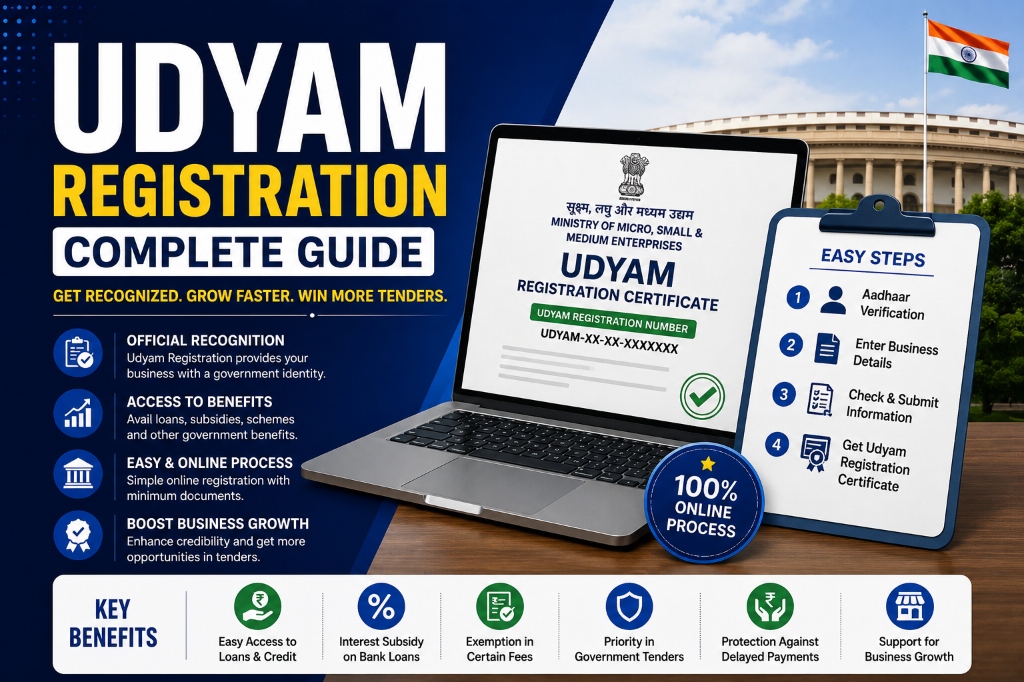
Introduction: Why Udyam Registration Is the Foundation of MSME Success
Udyam Registration is the single most important document for any Indian Micro, Small or Medium Enterprise (MSME) that wants to participate in government procurement. Launched in July 2020 by the Ministry of MSME, Udyam replaced the older Udyog Aadhaar Memorandum (UAM) system with a fully paperless, self-declaration-based platform that auto-verifies data from Aadhaar, PAN, and GST databases. To understand foundational rules, refer to our MSME benefits in government tenders.
As of 2026, over 5.5 crore enterprises are registered on the Udyam portal, making it one of the largest MSME databases in the world. Yet, industry estimates suggest that over 40% of eligible Indian businesses remain unregistered — missing out on EMD exemptions, price preferences, tax benefits, and priority lending.
Why Udyam registration matters for your business:
- Gateway to GeM: Without Udyam, you cannot claim MSME benefits on the Government e-Marketplace, including EMD exemption and 15% price preference.
- EMD Exemption: Save 1–3% of tender value on every government bid you submit.
- Priority Lending: Banks and NBFCs offer collateral-free loans under schemes like CGTMSE exclusively to Udyam-registered MSMEs.
- Tax Benefits: Eligibility for income tax exemptions, GST composition scheme benefits, and capital subsidy schemes.
- Payment Protection: File delayed payment complaints on the MSME Samadhaan portal only if you have a valid Udyam number.
- Credibility: A Udyam certificate with a dynamic QR code instantly verifies your MSME status to buyers, lenders, and government departments.
In this guide, we cover everything you need to know about Udyam registration in 2026 — from classification criteria and NIC codes to the step-by-step process, common mistakes, and how to link your Udyam profile to GeM for maximum tender success.
🏢
Register on Udyam & Start Winning Tenders
Udyam registration is free and takes 20 minutes. Once registered, use TenderFlow Pro's AI tender scanner to find government contracts matched to your MSME profile. First scan is FREE.
Analyze My Tenders FREE →

Get the MSME Advantage Toolkit
Claim every statutory exemption, track document renewals, and enforce price preferences.
- ✓ 150-Point Pre-Submission Checklist (PDF)
- ✓ Document Expiry & Renewal Tracker (Excel)
- ✓ GST / PAN / TAN Cross-Verification Guide
- ✓ MSME EMD Exemption Claim Kit (4 Letters)
🔒 256-Bit Secure Razorpay Checkout · Lifetime Access · Instant Digital Delivery
What Is Udyam Registration? Understanding the 2020 Framework
Udyam Registration is India's official MSME registration system, governed by the MSME Development Act, 2006 (as amended in 2018 and 2020) and notified under the Udyam Registration Rules, 2020. It is a single-window, paperless registration platform operated by the Ministry of MSME at udyamregistration.gov.in.
Key Features of Udyam Registration (2026):
| Feature | Udyam Registration | Old Udyog Aadhaar (UAM) |
|---|---|---|
| Launch Date | July 1, 2020 | September 2015 |
| Registration Fee | FREE | FREE |
| Process | Fully online, paperless | Online but required document uploads |
| Data Verification | Auto-fetches from Aadhaar, PAN, GSTN | Manual entry only |
| Validity | Lifetime (no renewal) | Required periodic renewal |
| Certificate | Dynamic QR code for instant verification | Static PDF |
| NIC Codes | Up to 10 codes allowed | Limited codes |
| Update Facility | Online self-update available | Limited update options |
| GeM Integration | Direct auto-link | Manual linking |
📊
[Infographic: Udyam vs Udyog Aadhaar Comparison]
Side-by-side comparison showing the technological and procedural upgrades in Udyam 2020.
Important: The Udyog Aadhaar portal was officially discontinued for new registrations in 2020. All existing UAM holders must migrate to Udyam to continue receiving MSME benefits. If you are still operating on an old UAM number, your benefits may be suspended.
Who Can Register for Udyam? (Entity Types & Eligibility)
Udyam registration is open to a wide range of business entities engaged in manufacturing, production, processing, preservation of goods, or providing services. Here is the complete eligibility breakdown:
Eligible Entity Types:
| Entity Type | Manufacturing | Services | Special Notes |
|---|---|---|---|
| Proprietorship | ✅ | ✅ | Aadhaar of proprietor required |
| Partnership Firm | ✅ | ✅ | Aadhaar of managing partner |
| Hindu Undivided Family (HUF) | ✅ | ✅ | Aadhaar of Karta required |
| Private Limited Company | ✅ | ✅ | Aadhaar of authorized signatory |
| Public Limited Company | ✅ | ✅ | Aadhaar of authorized signatory |
| One Person Company (OPC) | ✅ | ✅ | Aadhaar of director |
| Limited Liability Partnership (LLP) | ✅ | ✅ | Aadhaar of designated partner |
| Co-operative Society | ✅ | ✅ | Aadhaar of authorized person |
| Trust | ✅ | ✅ | Aadhaar of trustee |
| Association of Persons (AOP) | ✅ | ✅ | Aadhaar of authorized member |
Who CANNOT Register:
- Businesses engaged purely in trading (without manufacturing or service provision) — Note: This is a common misconception. Traders CAN register if they are engaged in wholesale/retail trade as per NIC codes, but they may not be eligible for certain manufacturing-specific subsidies.
- Enterprises exceeding Medium enterprise thresholds (investment > ₹50 crore or turnover > ₹250 crore)
- Unincorporated entities without a PAN or Aadhaar
Instant Tender Eligibility & Risk Audit
Upload any 500-page NIT / BOQ PDF. Extract hidden disqualification traps, EMD waiver clauses, and complete eligibility criteria in under 45 seconds.
MSME Classification Criteria: Micro, Small & Medium (2026)
Your Udyam classification determines which benefits you qualify for. The classification is based on investment in plant and machinery or equipment and annual turnover — whichever parameter qualifies you into the higher category.
Revised MSME Classification (Effective July 2020, Valid 2026):
| Category | Manufacturing / Services (Investment in Plant & Machinery/Equipment) | Annual Turnover |
|---|---|---|
| Micro | Up to ₹1 crore | Up to ₹5 crore |
| Small | Up to ₹10 crore | Up to ₹50 crore |
| Medium | Up to ₹50 crore | Up to ₹250 crore |
📊
[Infographic: MSME Classification Chart 2026]
Visual flowchart showing investment and turnover thresholds for Micro, Small, and Medium classification.
How Classification Works (Composite Criteria):
The higher of your investment or turnover category determines your classification. For example:
- Investment: ₹80 lakh (Micro level) + Turnover: ₹35 crore (Small level) = Classified as SMALL
- Investment: ₹8 crore (Small level) + Turnover: ₹4 crore (Micro level) = Classified as SMALL
- Investment: ₹50 lakh (Micro level) + Turnover: ₹3 crore (Micro level) = Classified as MICRO
Important: Investment and turnover figures are self-declared during registration. The portal auto-fetches data from your latest Income Tax Return (ITR) and GST returns where available. If you have not filed returns, you manually enter estimated figures.
Investment Calculation Rules:
- Plant & Machinery: Original cost excluding cost of pollution control, R&D equipment, and safety devices.
- For Manufacturing: Include all machinery used for production.
- For Services: Include equipment, computers, furniture, and vehicles used for service delivery.
- Exclude: Cost of land, building, and certain ancillary items.
Documents Required for Udyam Registration (Complete Checklist)
Udyam registration is 100% paperless. You do NOT upload any physical documents, scans, or certificates. The system verifies data in real-time from government databases. However, you must have the following information ready before starting:
Mandatory Information Required:
- Aadhaar Number (12 digits) — Of the proprietor, managing partner, Karta, or authorized signatory. Must be linked to a mobile number for OTP.
- PAN Number — Of the business entity (for companies/LLPs) or individual (for proprietorship). Auto-verified from Income Tax database.
- GSTIN (if applicable) — Auto-fetched from GST Network if your business is GST-registered.
- Bank Account Details — Account number and IFSC code (should be in the enterprise's name or proprietor's name).
- Business Address — Complete address with PIN code, state, and district.
- NIC Codes — Up to 10 National Industrial Classification codes for your business activities.
- Investment Figure — Value of plant and machinery/equipment (self-declared or from ITR).
- Turnover Figure — Annual business turnover (self-declared or from GST/ITR).
- Employee Count — Approximate number of employees (self-declared).
- Business Name — As you want it to appear on the certificate.
📋
[Infographic: Udyam Registration Documents Checklist]
Quick-reference graphic showing the 10 information items needed for paperless Udyam registration.
What You Do NOT Need (Common Myths):
- ❌ No scanned copies of PAN card
- ❌ No Aadhaar card scan
- ❌ No GST certificate upload
- ❌ No bank statement upload
- ❌ No photograph upload
- ❌ No physical visit to DIC office
- ❌ No registration fee payment
Beware of Fraud: The official portal is udyamregistration.gov.in only. The government charges ZERO fees. Never pay any third-party website or "consultant" for Udyam registration.
NIC Codes: How to Select the Right Business Activity Codes
NIC (National Industrial Classification) codes classify your business activity for statistical and regulatory purposes. Selecting the correct NIC codes is critical because:
- They determine your eligibility for sector-specific schemes
- They affect how buyers find you on GeM and other portals
- Incorrect codes can lead to benefit disqualification
How to Find Your NIC Code:
- Visit the Udyam registration portal
- During registration, click on the NIC code selection field
- Search by keyword (e.g., "software," "construction," "textiles")
- Select your primary activity (manufacturing OR services — only one can be primary)
- Add up to 9 secondary activities
Popular NIC Codes for Common MSME Activities:
| Business Activity | NIC Code (2-digit) | Description |
|---|---|---|
| Food Processing | 10 | Manufacture of food products |
| Textiles | 13, 14 | Manufacture of textiles, wearing apparel |
| Software/IT | 62 | Computer programming, consultancy |
| Construction | 41, 42, 43 | Construction of buildings, civil engineering |
| Retail Trade | 47 | Retail trade (except of motor vehicles) |
| Wholesale Trade | 46 | Wholesale trade (except of motor vehicles) |
| Manufacturing (General) | 25, 28 | Manufacture of fabricated metal products, machinery |
| Transportation | 49 | Land transport and transport via pipelines |
| Professional Services | 69, 70 | Legal, accounting, architectural services |
| Healthcare | 86 | Human health activities |
Pro Tip: Choose broad NIC codes that cover your current AND future business activities. You can register up to 10 codes, so include adjacent activities you might expand into. This increases your visibility on GeM and tender portals.
Udyam Registration Process: Step-by-Step Guide (2026)
The entire Udyam registration process is fully online, free, and typically completed in 15–20 minutes. Here is the exact step-by-step process:
Step 1: Gather Information & Documents
Before starting, ensure you have:
- Aadhaar number and mobile access (for OTP)
- PAN number
- GSTIN (if registered)
- Bank account number and IFSC
- Estimated investment and turnover figures
- List of NIC codes
⏱️ Time: 5 minutes
Step 2: Visit Official Portal & Select Registration Type
- Go to https://udyamregistration.gov.in
- On the homepage, you will see three options:
- "For New Entrepreneurs who are not Registered yet as MSME or those with EM-II" — For fresh registrations
- "For those already having registration as UAM" — For UAM migration
- "For those already having registration as UAM through Assisted filing" — For assisted UAM migration
- Click the appropriate option for your situation.
⏱️ Time: 2 minutes
Step 3: Aadhaar Verification via OTP
- Enter your 12-digit Aadhaar number
- Enter the name exactly as it appears on your Aadhaar card
- Click "Validate and Generate OTP"
- Select OTP delivery method: Mobile or Email
- Enter the OTP received
- The system verifies your Aadhaar with the UIDAI database in real-time
⏱️ Time: 3–5 minutes
Step 4: PAN Verification (Auto-Fetch)
- Enter your PAN number (business PAN for companies/LLPs; personal PAN for proprietorship)
- Click "Validate PAN"
- The system auto-fetches your PAN details from the Income Tax database
- If your Aadhaar is linked to PAN, verification is instant. If not, you may need to link them first.
⏱️ Time: 1–2 minutes
Step 5: Fill Enterprise Details & NIC Codes
After PAN verification, the Udyam registration form appears. Fill in:
A. Organization Details:
- Type of Organization: Proprietorship / Partnership / Company / LLP / etc.
- Name of Enterprise: As you want it on the certificate
- Date of Commencement: When your business started
- Official Address: Complete address with PIN, state, district
B. Business Activity:
- Select Primary Activity: Manufacturing OR Services (only one)
- Select up to 9 Secondary Activities
- Enter NIC Codes for each activity
C. Employee Details:
- Approximate number of employees (self-declared)
⏱️ Time: 5–7 minutes
Step 6: Declare Investment & Turnover
- The system attempts to auto-fetch your investment and turnover from your latest ITR and GST returns
- If data is available, review and confirm the figures
- If no returns are filed, self-declare your:
- Investment in plant and machinery/equipment (₹ value)
- Annual turnover (₹ value)
- The system auto-classifies your enterprise as Micro, Small, or Medium based on the composite criteria
- Review the classification — if incorrect, check your figures
⏱️ Time: 3–5 minutes
Step 7: Enter Bank Account Details
- Enter your bank account number
- Enter IFSC code of your bank branch
- The system partially verifies via NPCI database
- Ensure the account is in the enterprise's name (or proprietor's name for proprietorships)
⏱️ Time: 2 minutes
Step 8: Review, Submit & Download Certificate
- Review all details carefully on the final summary page
- Check the declaration box confirming all information is true
- Click "Submit and Get Final OTP"
- Enter the final OTP sent to your mobile/email
- Click "Submit"
- Your Udyam Registration Number (URN) is generated instantly
- The Udyam Registration Certificate is sent to your registered email
- Download the certificate from the portal using the Print/Verify section
⏱️ Time: 2 minutes
📅
[Infographic: Udyam Registration Timeline]
Visual timeline showing the 8-step process from portal access to certificate download.
Udyam Registration for Existing Udyog Aadhaar (UAM) Holders
If you registered under the old Udyog Aadhaar Memorandum (UAM) system, you must migrate to Udyam to continue receiving MSME benefits. The UAM system has been discontinued for new registrations, and many government portals now require the 19-digit Udyam Registration Number.
Migration Process:
- Visit udyamregistration.gov.in
- Click "For those already having registration as UAM"
- Enter your existing Udyog Aadhaar Number
- Select OTP method: Mobile or Email (as registered in UAM)
- Click "Validate and Generate OTP"
- Enter the OTP
- The system pre-fills your existing UAM data
- Review and update any missing or changed details:
- Add PAN (if not in UAM)
- Update investment/turnover figures
- Add NIC codes
- Update bank details
- Submit and receive your new Udyam Registration Number
Important: Your old UAM number becomes invalid after migration. Update your new URN on GeM, bank records, and all government portals immediately.
How to Download & Verify Your Udyam Certificate
Downloading Your Certificate:
- Visit udyamregistration.gov.in
- Click on "Print/Verify" tab
- Select "Print Udyam Certificate"
- Enter your 19-digit Udyam Registration Number (format: UDYAM-XX-XX-XXXXXXX)
- Enter your registered mobile number
- Select OTP method and click "Validate & Generate OTP"
- Enter OTP and click "Validate OTP and Login"
- View and print/download your certificate
Verifying Any Udyam Registration:
- Visit udyamregistration.gov.in
- Click on "Print/Verify" tab
- Select "Verify Udyam Registration Number"
- Enter the 19-digit URN
- Enter the Captcha code
- Click "Verify"
- The system displays the enterprise name, address, and classification
This verification feature is useful when buyers or lenders want to confirm your MSME status. The certificate also contains a dynamic QR code that can be scanned for instant verification.
How to Link Udyam Registration to GeM (Critical Step)
Linking your Udyam registration to GeM is the most important step after obtaining your URN. Without this link, you cannot claim any MSME benefits on GeM — including EMD exemption (learn how in our EMD Exemption Claim Guide), 15% price preference, and access to reserved tenders.
Step-by-Step Linking Process:
- Log in to your GeM seller dashboard at gem.gov.in
- Go to "Profile" → "MSME Details"
- Enter your 19-digit Udyam Registration Number
- Upload your Udyam Registration Certificate (PDF)
- Click "Verify" — the system auto-verifies with the Udyam portal
- Once verified, your profile displays the "MSME Verified" badge
What Happens After Linking:
- ✅ EMD exemption automatically applies to eligible tenders
- ✅ 15% price preference flag appears on relevant bids
- ✅ Access to MSME-reserved tenders (learn more in our 25% Procurement Reservation Guide)
- ✅ Priority in buyer search results
- ✅ Eligibility for women-owned and SC/ST sub-quotas (if applicable)
Without linking, you will NOT get any of these benefits — even if you have a valid Udyam certificate. Understand the price matching strategy in our MSME Price Preference Guide.
Learn more about maximizing your MSME benefits in our detailed MSME tender benefits guide.
Common Udyam Registration Mistakes & How to Avoid Them
| Mistake | Impact | How to Avoid |
|---|---|---|
| Wrong NIC code selection | Missed tenders, wrong category benefits | Research NIC codes before registration; select broad codes |
| Incorrect turnover declaration | Wrong MSME classification | Use actual GST/ITR figures; update if business grows |
| Aadhaar not linked to mobile | Cannot receive OTP | Link Aadhaar to active mobile at UIDAI portal first |
| PAN-Aadhaar not linked | PAN verification fails | Link PAN and Aadhaar via Income Tax portal |
| Using fraudulent third-party sites | Money lost, data stolen | Use ONLY udyamregistration.gov.in |
| Forgetting to migrate from UAM | Benefits suspended | Migrate immediately if you have an old UAM number |
| Not updating after business growth | Classification mismatch | Update investment/turnover annually |
| Wrong entity type selection | Certificate errors | Select entity type exactly as per your incorporation |
| Not linking to GeM | No MSME benefits on GeM | Link Udyam to GeM within 7 days of registration |
| Ignoring GST linking | Incomplete auto-verification | Ensure GSTIN is active and matches PAN |
Avoid tender disqualifications due to mismatched MSME status by reviewing our guide to common tender rejection reasons.
Udyam Registration Timeline: From Start to Certificate
| Phase | Duration | Action Items |
|---|---|---|
| Preparation | 5–10 minutes | Gather Aadhaar, PAN, GSTIN, bank details, NIC codes |
| Online Registration | 15–20 minutes | Fill form, verify OTP, submit |
| Certificate Generation | Instant | URN generated immediately; e-certificate emailed |
| Download Certificate | 2–5 minutes | Login to portal, verify OTP, download PDF |
| Link to GeM | 5 minutes | Upload URN and certificate on GeM profile |
| Total Time | 30–45 minutes | From zero to fully verified MSME on GeM |
📅
[Infographic: Udyam Registration Complete Timeline]
Visual 45-minute timeline from information gathering to GeM-linked MSME status.
State-wise Udyam Registration Support & MSME Cells
While Udyam is a central portal, every state has dedicated MSME cells and District Industries Centres (DICs) that provide support:
| State | MSME Support Portal | Special Scheme |
|---|---|---|
| Maharashtra | mahamsmedc.org | Additional 5% price preference for MSMEs |
| Karnataka | msme.karnataka.gov.in | Startup fund for first-time MSME bidders |
| Tamil Nadu | msme.tn.gov.in | SC/ST MSME additional reservation |
| Gujarat | industries.gujarat.gov.in | Interest subsidy on GeM orders |
| Delhi | delhi.gov.in | Women-owned MSME priority processing |
| Telangana | tsipass.telangana.gov.in | T-Hub integration for tech startups |
| Rajasthan | msme.rajasthan.gov.in | Artisan product MSME benefits |
| Uttar Pradesh | udyamup.com | ODOP (One District One Product) scheme |
| West Bengal | wbsme.gov.in | MSME credit card scheme |
| Madhya Pradesh | mpsmec.mp.gov.in | Tribal MSME special packages |
Pro Tip: After Udyam registration, register on your state's MSME portal for additional state-specific benefits. Many states offer subsidies, interest rebates, and marketing support exclusively to Udyam-registered enterprises.
How TenderFlow Pro Uses Your Udyam Profile for Tender Matching
TenderFlow Pro's AI engine is designed to maximize your MSME advantage after Udyam registration:
1. Automatic MSME Benefit Detection
Upload any tender PDF and our AI instantly flags EMD exemption clauses, 15% price preference windows, and 25% reservation quotas — so you never miss a benefit.
2. Eligibility Matching Against Your Udyam Profile
Enter your Udyam classification (Micro/Small/Medium), NIC codes, and turnover once. Our AI compares your profile against every tender's eligibility criteria and gives a Go/No-Go verdict in seconds.
3. Reserved Tender Alerts
Get instant notifications when MSE-only, women-reserved, or SC/ST-reserved tenders matching your NIC codes are published on GeM, CPPP, or state portals.
4. Compliance Matrix Auto-Generation
Convert tender requirements into a structured checklist in 2 minutes. Track every mandatory document and MSME-specific clause to ensure your bid is never disqualified.
5. Udyam-GeM Link Verification
Our system checks whether your GeM profile is properly linked to your Udyam registration and alerts you if the link is missing — preventing benefit loss.
FAQs About Udyam Registration
Q1: Is Udyam registration free?
A: Yes, Udyam registration is completely free of charge on the official government portal udyamregistration.gov.in. The Ministry of MSME does not charge any fee. Beware of fraudulent third-party websites and agents that charge ₹500–₹5,000 for "assisted" Udyam registration.
Q2: How long does Udyam registration take?
A: The online Udyam registration process takes 15–20 minutes if you have all details ready. The Udyam Registration Number (URN) and e-certificate are generated instantly upon submission. There is no manual approval delay.
Q3: What is the difference between Udyam and Udyog Aadhaar?
A: Udyog Aadhaar (UAM) was the old MSME registration system (2015–2020). Udyam Registration replaced UAM in July 2020 with significant upgrades: fully paperless process, auto-fetch from GST/PAN databases, lifetime validity (no renewal), dynamic QR code certificate, and direct GeM integration. Existing UAM holders must migrate to Udyam.
Q4: Can I register on Udyam without GST?
A: Yes, GST is not mandatory for Udyam registration. If your business is not GST-registered, you can self-declare your investment and turnover figures. However, having GST helps the portal auto-verify your turnover data.
Q5: What documents are required for Udyam registration?
A: Udyam registration is paperless — no document uploads required. You only need: Aadhaar number (of proprietor/partner/authorized signatory), PAN number (auto-verified), and bank account details. The system fetches data from UIDAI, Income Tax, and GSTN databases automatically.
Q6: How do I download my Udyam certificate?
A: Visit udyamregistration.gov.in, click "Print/Verify", select "Print Udyam Certificate", enter your 19-digit URN, verify via OTP sent to your registered mobile, and download/print the PDF certificate with the dynamic QR code.
Q7: What is a NIC code in Udyam registration?
A: NIC (National Industrial Classification) code classifies your business activity for statistical and regulatory purposes. You can select up to 10 NIC codes during Udyam registration. Choose codes that accurately represent your primary and secondary business activities to maximize tender visibility.
Q8: Is Udyam registration mandatory for GeM?
A: Udyam registration is not mandatory for basic GeM seller registration, but it is mandatory to claim MSME benefits on GeM — including EMD exemption, 15% price preference, 25% procurement reservation, and priority in search results. Without Udyam linking, you bid as a non-MSME entity.
Q9: Can I update my Udyam registration details?
A: Yes, you can update details like investment, turnover, and business address through the "Update Udyam Registration" option on the portal. However, some fields like enterprise name and constitution type require specific conditions or may need fresh registration.
Q10: What happens if my turnover exceeds the MSME limit after registration?
A: If your investment or turnover exceeds the MSME threshold, your enterprise is reclassified accordingly. You must update your Udyam registration. If you cross into the Medium or Large category, you lose Micro/Small benefits (like EMD exemption) but retain the Udyam certificate for record purposes.
Conclusion: Your Udyam Success Action Plan
Udyam registration is the foundational step for every Indian MSME that wants to access government procurement, priority lending, and tax benefits. The process is free, paperless, and takes less than 30 minutes — yet over 40% of eligible businesses remain unregistered.
Your 7-day action plan:
- Day 1: Gather Aadhaar, PAN, GSTIN, bank details, and NIC codes (30 minutes)
- Day 2: Complete Udyam registration on udyamregistration.gov.in (20 minutes)
- Day 3: Download your Udyam certificate and save the URN securely
- Day 4: Link Udyam to your GeM seller profile (critical for MSME benefits)
- Day 5: Register on your state's MSME portal for additional benefits
- Day 6: Update your business records (bank, GST, etc.) with the new URN
- Day 7: Start bidding on MSME-reserved tenders using TenderFlow Pro's AI scanner. Review the bidding process in our Earnest Money Deposit (EMD) Complete Guide.
Once registered and linked to GeM, use TenderFlow Pro's AI tender analysis tool to find government contracts matched to your MSME profile, detect every benefit clause automatically, and generate compliance reports that win bids.
From Udyam Registration to Winning Tenders
Udyam is just the beginning. The real advantage comes from finding the right tenders, analyzing documents in minutes, and claiming every MSME benefit you're entitled to. TenderFlow Pro's AI does the heavy lifting.