GeM Product Listing Approval Guide (2026): From Registration to First Order
Breadcrumb: Home > Blog > GeM Product Listing Approval Guide ---menu_book Table of Contents
Matching product catalog specifications with tender requirements? Run the BOQ parser for GeM to extract detailed item specifications.
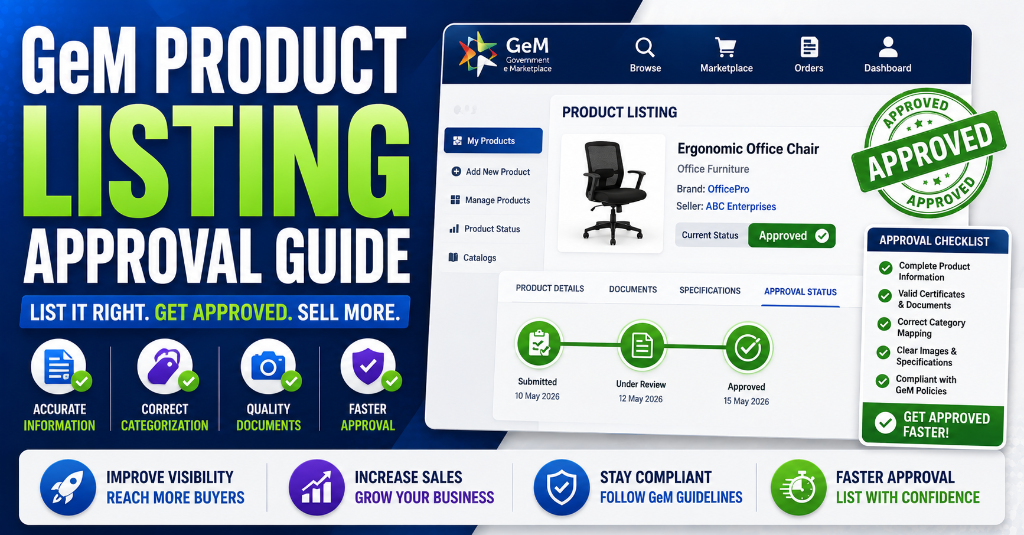
The GeM Opportunity: ₹4+ Lakh Crore Marketplace
Government e-Marketplace (GeM) is India's largest public procurement platform, with cumulative GMV exceeding ₹4 lakh crore and growing at 40%+ annually. In FY 2025–26, GeM processed over 4.66 million orders worth ₹3.24 lakh crore in just the first part of the year. For the comprehensive end-to-end framework, consult our ultimate guide to Indian government tenders. To understand foundational rules, refer to our complete GeM portal guide.
Unlike CPPP (which handles complex tenders), GeM operates as a transactional marketplace—government buyers search product catalogues, add items to cart, and place orders directly. For sellers, this means:
- Direct visibility to 50,000+ government buyers without traditional tendering
- Faster procurement cycles (direct purchases complete in days, not weeks)
- MSME-first policies including 25% mandatory procurement quota
- Startup exemptions from prior experience and turnover requirements
But none of this matters if your products aren't listed, approved, and optimized.
---
Get the GeM Success Toolkit
Register, list, bid, and win on GeM without losing a single rupee in deposits or caution money.
- ✓ 150-Point Pre-Submission Checklist (PDF)
- ✓ EMD & BG Format Verification Guide + Excel Checker
- ✓ GST / PAN / TAN Cross-Verification Guide
- ✓ MSME EMD Exemption Claim Letters (4 Formats)
🔒 256-Bit Secure Razorpay Checkout · Lifetime Access · Instant Digital Delivery
GeM Seller Registration: Prerequisites & 2026 Updates
Before listing products, you must complete GeM seller registration (refer to our step-by-step GeM Registration Complete Guide). The 2026 process includes several critical updates:
Mandatory Prerequisites
| Document | Requirement | 2026 Update |
|---|---|---|
| PAN Card | Mandatory for all sellers | Must match business name exactly |
| GST Registration | Mandatory for taxable goods/services | e-Invoice integration required for >₹5 Cr turnover |
| Bank Account | Active current account for settlements | Must support NEFT/RTGS |
| Aadhaar | For proprietorships/individuals | Mobile-linked Aadhaar OTP now mandatory |
| Udyam Registration | Recommended for MSME benefits | Effectively mandatory for price matching (see our MSME Price Preference Guide) & EMD exemption (see our EMD Complete Guide) |
Caution Money Structure (2026)
| Annual Turnover | Caution Money | MSME Exemption |
|---|---|---|
| Below ₹1 Crore | ₹5,000 | Significant reduction |
| ₹1 Crore – ₹10 Crore | ₹10,000 | Partial reduction |
| Above ₹10 Crore | ₹25,000 | Limited |
Enhanced Verification (2026)
- Aadhaar Verification: Mobile-linked Aadhaar OTP is now mandatory. Update your Aadhaar-mobile linkage through UIDAI before registration.
- Product Quality Standards: BIS/IS certification enforcement has tightened. Listing products in mandatory-certification categories without valid certificates results in listing removal and potential account suspension.
Understanding the Product Listing Workflow
GeM product listing follows a five-stage workflow:
| Stage | Action | Stakeholder | Timeline |
|---|---|---|---|
| 1. Category Selection | Choose exact category/sub-category | Seller | Immediate |
| 2. Brand Request | Add new brand or select existing | Seller → GeM | Up to 15 days |
| 3. Product Data Entry | Fill specifications, pricing, images | Seller | 30–60 min |
| 4. Submission & Review | Submit for approval | Seller → GeM/OEM | 4 days |
| 5. Publication | Product goes live on marketplace | GeM/OEM | Post-approval |
Instant Tender Eligibility & Risk Audit
Upload any 500-page NIT / BOQ PDF. Extract hidden disqualification traps, EMD waiver clauses, and complete eligibility criteria in under 45 seconds.
Brand Approval vs Product Approval: The Critical Difference
Many sellers confuse these two processes. They are separate, with different timelines and requirements.
Brand Approval
| Attribute | Details |
|---|---|
| Purpose | Validate that your brand is legitimate and not misrepresented |
| Who Approves | GeM Review Team |
| SLA | 15 working days |
| Requirements | Brand name, non-GeM website URL, manufacturer details |
| Outcomes | Approve, Reject, On-Hold, or Pair |
- GeM validates brands through web search or pindjaonline.gov.in
- Registered company brands are approved automatically
- Brands in conflict with known trademarks are rejected with warnings
- Unverifiable brands are placed "On-Hold" pending seller documentation
Product Approval
| Attribute | Details |
|---|---|
| Purpose | Ensure product meets category specifications, pricing norms, and image standards |
| Who Approves | GeM (or OEM for Q2 categories) |
| SLA | 4 working days |
| Requirements | Complete specifications, images, certifications, pricing |
| Outcomes | Approve, Reject, or Notify (for corrections) |
Step-by-Step: Uploading Your First Product
Step 1: Login & Navigate
Log into your GeM seller dashboard. Go to Catalogue → Add New Product.
Step 2: Select Category
Choose the most specific category and sub-category. Incorrect categorization is a top rejection reason. Use GeM's category tree search to find the exact match.
Step 3: Brand Selection
- If your brand exists: Select from dropdown
- If your brand is new: Click "Request New Brand" and fill:
- Brand name (exact spelling)
- Brand website URL (non-GeM link, mandatory)
- Manufacturer/OEM details
- Authorization documents (for resellers)
Step 4: Enter Golden Parameters
These are the mandatory technical specifications for your category. Examples:
- Laptops: Processor type, RAM, storage, screen size, OS
- Furniture: Material, dimensions, color, load capacity
- Electrical: Voltage, wattage, BIS certification number
Step 5: Catalogue Information
- Product Name: Use keyword-rich, descriptive titles (e.g., "HP LaserJet Pro M404n Monochrome Laser Printer")
- Model Number: Exact OEM model number
- Description: Detailed features, use cases, and differentiators
Step 6: Pricing & Offer Details
- MRP: Maximum Retail Price with supporting document
- Offer Price: Your selling price to government buyers (must be competitive)
- Quantity Available: Current stock
- Delivery Locations: Pin codes you can serve
- Country of Origin: Mandatory for Make in India preferences
Step 7: Upload Images
- Minimum resolution: 1000 × 1000 pixels
- Maximum file size: 5MB
- Background: White or transparent
- Angles required: Front, side/back, interior/close-up
- No watermarks, text overlays, or promotional material
Step 8: Documents & Certifications
Upload mandatory certificates based on category:
- BIS/ISI mark (electrical, safety equipment, construction materials)
- FSSAI license (food products)
- Test reports from NABL labs (where required)
- OEM authorization letter (for resellers)
Step 9: Review & Submit
Double-check every field. Once submitted, you cannot edit until approval/rejection. Track status in your seller dashboard.
---Image Requirements & Visual Optimization
Images are the #1 factor influencing buyer decisions on GeM. Government buyers see your images before they see your price.
Technical Specifications
| Parameter | Requirement | Pro Tip |
|---|---|---|
| Resolution | Minimum 1000×1000 px | Use 1500×1500 for zoom clarity |
| File Size | Max 5MB per image | Compress without quality loss |
| Background | White or light neutral | Use lightbox or editing software |
| Format | JPG or PNG | JPG preferred for photos |
| Angles | Minimum 3, ideally 5 | Front, side, back, detail, packaging |
| Editing | No watermarks or text | Clean, professional look |
Image Optimization Strategy
- Hero Image (First Image): Show the product in standard use context
- Feature Callouts: Use subsequent images to highlight key specifications
- Scale Reference: Include common objects for size context
- Certification Marks: Close-up of BIS/ISI marks where applicable
Mandatory Certifications by Category (BIS, FSSAI, ISO)
GeM has tightened enforcement of quality standards in 2026. Listing without mandatory certifications results in removal and potential account suspension.
| Product Category | Mandatory Certification | Issuing Authority |
|---|---|---|
| Electrical Goods | BIS/ISI mark | BIS (Bureau of Indian Standards) |
| Safety Equipment | BIS or NABL test report | BIS / NABL Labs |
| Construction Materials (TMT bars, cement) | BIS certification | BIS |
| Food Products | FSSAI license | FSSAI |
| Children's Items | BIS safety standards | BIS |
| Medical Devices | CDSCO / NABL | CDSCO |
| IT Products | BIS registration (select categories) | BIS |
| Pesticides | CIBRC registration | CIBRC |
OEM Panel vs Reseller: Who Can List What?
GeM categorizes sellers into OEMs and resellers with different listing privileges:
OEM (Original Equipment Manufacturer)
| Capability | Details |
|---|---|
| Upload New Products | Yes, full catalogue creation |
| Manage Brand | Yes, controls all brand listings |
| Authorize Resellers | Yes, can authorize specific resellers |
| Q2 Category Control | Exclusive upload rights in Q2 categories |
Reseller / Authorized Seller
| Capability | Details |
|---|---|
| Upload New Products | Only in non-Q2 categories; must pair with OEM in Q2 |
| Brand Management | No; must select existing approved brand |
| Authorization Required | Yes, OEM authorization letter mandatory for Q2 |
| Pricing Flexibility | Yes, within OEM's suggested price range |
In Q2 categories, only OEMs can upload and manage product catalogues. Resellers can only "pair" with existing OEM listings and sell at their authorized price. This prevents unauthorized sellers from flooding the market with incorrect specifications.
---GeM Catalogue Approval Timelines & SLAs
| Approval Type | Standard SLA | Clock Starts | Restart Conditions |
|---|---|---|---|
| Brand Approval | 15 working days | Submission date | On-hold documentation requests |
| Product Approval | 4 working days | Submission date | Rejection and resubmission |
| OEM Approval (Q2) | Variable | OEM response | If OEM delays, GeM takes over |
Top 10 Reasons GeM Rejects Product Listings (And Fixes)
| Rank | Rejection Reason | Fix |
|---|---|---|
| 1 | Incomplete Specifications | Fill all mandatory and optional golden parameters |
| 2 | Poor Quality Images | Use 1000×1000+ px, white background, professional photography |
| 3 | Missing Mandatory Certificates | Verify BIS/FSSAI requirements before submission |
| 4 | Incorrect Categorization | Use category search; read category definitions carefully |
| 5 | Unreasonable Pricing | Benchmark against similar products; stay within market range |
| 6 | Duplicate Listings | Search existing catalogues before creating new |
| 7 | Brand Misrepresentation | Ensure brand name matches registered trademark exactly |
| 8 | Invalid MRP Documents | Upload clear MRP labels or official price lists |
| 9 | Missing OEM Authorization | Resellers must upload valid authorization letters |
| 10 | Incorrect Country of Origin | Verify manufacturing location; upload supporting documents |
Catalogue Optimization: 8 Strategies to Rank Higher
GeM's search algorithm prioritizes certain listing attributes. Optimize these to appear at the top of buyer searches:
1. Keyword-Rich Product Titles
Bad: "Printer" Good: "HP LaserJet Pro M404n Monochrome Laser Printer, 40ppm, A4, USB/Ethernet"2. Complete Attribute Filling
Fill every mandatory and optional attribute. Incomplete listings rank lower.
3. Competitive Pricing
GeM shows price comparisons. Stay within the bottom 20% for your category while maintaining viability.
4. High Seller Rating
Maintain 4.5+ stars through:
- On-time delivery
- Accurate product descriptions
- Responsive customer service
- Quality packaging
5. Nationwide Delivery Capability
Enable delivery to maximum pin codes. Restricted delivery reduces visibility.
6. Regular Price Updates
Stale prices signal inactive sellers. Update offer prices monthly.
7. Inventory Accuracy
Out-of-stock listings drop in rankings. Update quantities weekly.
8. Make in India Badge
For indigenous products, upload relevant certificates to get preference in buyer searches.
---Case Study: How a Stationery Supplier Got 50+ Orders in 60 Days
Company: OfficeMart Supplies, Delhi Category: Office Stationery & Consumables Challenge: Registered on GeM for 8 months with zero orders. Products were approved but buried in search results. Diagnosis:- Product titles were generic ("Pen", "Notebook")
- Only 2 images per product
- Prices were 15% above market average
- Delivery restricted to Delhi NCR only
- No Udyam registration for MSME benefits
- Title Rewrite: Changed "Pen" to "Cello Finegrip Ball Pen, 0.7mm, Blue, Pack of 50"
- Image Expansion: Added 5 angles per product including packaging and usage shots
- Price Adjustment: Reduced margin from 25% to 12% to capture volume
- Delivery Expansion: Enabled shipping to all 28 states
- Udyam Registration: Completed to access MSME-specific orders
- Inventory Sync: Updated stock levels daily to maintain active status
- Product views increased from 12/week to 340/week
- Direct purchase orders: 47 orders
- Bid participation invitations: 8 tenders
- Total revenue: ₹8.4 lakh
- Seller rating improved from 3.2 to 4.7 stars
Key Insight: On GeM, catalogue optimization is sales optimization. Buyers cannot inspect products physically—they buy based on titles, images, and ratings.---
Managing Inventory, Pricing & Orders Post-Approval
Inventory Management
- Update stock quantities in real-time or daily
- Set low-stock alerts to prevent overselling
- For seasonal products, plan inventory 30 days ahead
Pricing Strategy
- Monitor competitor pricing on GeM weekly
- Adjust for raw material cost fluctuations
- Factor in GeM's payment cycle (typically 7–10 days post-delivery)
Order Fulfillment
- Ship within 48 hours for direct purchases
- Upload tracking details immediately
- Include GST invoice with HSN codes and e-invoice QR (if applicable)
Rating Maintenance
- Respond to buyer queries within 4 hours
- Resolve disputes proactively
- Request feedback from satisfied buyers
TenderFlow Pro: Bulk Catalogue Management & Approval Tracking
Managing hundreds of GeM listings manually is error-prone and time-consuming. TenderFlow Pro provides:
📦 Bulk Product UploadUpload hundreds of products via Excel template instead of one-by-one dashboard entry. Auto-map categories, attributes, and images.
🔍 Approval Status TrackerReal-time dashboard showing brand approval, product approval, and OEM response status across your entire catalogue.
⚠️ Compliance Pre-CheckBefore submission, our engine verifies that all mandatory certifications, image specifications, and pricing norms are met—reducing rejection rates by up to 80%.
📊 Competitor Price IntelligenceSee pricing ranges for your exact product category to position your offer competitively.
🤖 Auto-Update EngineSync inventory levels and prices from your ERP directly to GeM. Never oversell or price stale again.
👉 Start Your GeM Catalogue Optimization ---FAQs: GeM Product Listing Mastery
Q1. How do I list products on GeM?Complete seller registration, select category, enter product details with specifications and images, upload mandatory documents, and submit for approval.
Q2. What is the GeM product approval time?Standard product approval: 4 working days. Brand approval: up to 15 working days. OEM-managed categories may take longer.
Q3. What documents are required for GeM product listing?Product images (1000×1000px, white background), technical specifications, brand authorization (resellers), BIS/FSSAI certificates (mandatory categories), OEM authorization, and MRP documents.
Q4. Why was my GeM product listing rejected?Top reasons: incomplete specs, poor images, missing certificates, wrong category, unreasonable pricing, duplicate listings, or brand misrepresentation.
Q5. Can resellers list products on GeM?Yes, with OEM authorization. In Q2 categories, resellers can only pair with existing OEM listings.
Q6. What are the image requirements for GeM products?Minimum 1000×1000 pixels, max 5MB, white background, multiple angles, no watermarks.
Q7. What is GeM caution money?Security deposit: ₹5,000 (<₹1 Cr turnover), ₹10,000 (₹1–10 Cr), ₹25,000 (>₹10 Cr). MSMEs get exemptions.
Q8. How do I optimize my GeM catalogue for more orders?Use keyword-rich titles, complete all attributes, maintain competitive pricing, upload high-quality images, update inventory, and maintain 4.5+ star rating.
Q9. What is the GeM direct purchase limit?₹25,000 per transaction in 2026. Buyers can order directly without bidding below this threshold.
Q10. Can I edit product specifications after approval?No. Specifications are locked post-approval. Only offer price and quantity can be updated.
---Your 20-Day GeM Launch Action Plan
Days 1–3: Registration & Verification- Complete GeM seller registration with GST, PAN, bank details
- Verify Aadhaar-mobile linkage
- Complete Udyam registration for MSME benefits
- Pay caution money (or claim exemption)
- Request brand approval with valid website URL
- Prepare brand authorization documents (if reseller)
- Gather all product certifications (BIS, FSSAI, etc.)
- Select 10–20 priority products for initial listing
- Research exact category placement for each
- Write keyword-optimized product titles and descriptions
- Shoot/procure compliant product images
- Submit products for approval
- Monitor dashboard daily for rejection reasons
- Correct and resubmit any rejected listings immediately
- Set competitive pricing based on competitor analysis
- Enable maximum delivery pin codes
- Update inventory levels
- Activate order notifications
Conclusion
GeM is not just another e-commerce platform—it is a government-mandated procurement channel with built-in buyer demand. But demand only flows to sellers who have mastered the listing, approval, and optimization process.
Your product catalogue is your sales team on GeM. Invest in precise categorization, professional imagery, complete certifications, and competitive pricing. The sellers who treat GeM as a strategic channel—not an afterthought—are the ones capturing the ₹4+ lakh crore opportunity.
Ready to scale your GeM presence? Get TenderFlow Pro and manage hundreds of listings with bulk upload, compliance pre-checks, and price intelligence. --- Related Articles: Meta Tags: