Financial Bid Rejection: How to Avoid Mistakes in Government Tenders India 2026
Home → Blog → Financial Bid Rejection Guide For the comprehensive end-to-end framework, consult our step-by-step government tender bidding process.
Last Updated: July 11, 2026 · Reading Time: 26 minutes · Written by: TenderFlow Pro Research Teammenu_book Table of Contents
Before submitting pricing sheets, always check document compliance with our AI tool to prevent technical disqualification before envelope opening.
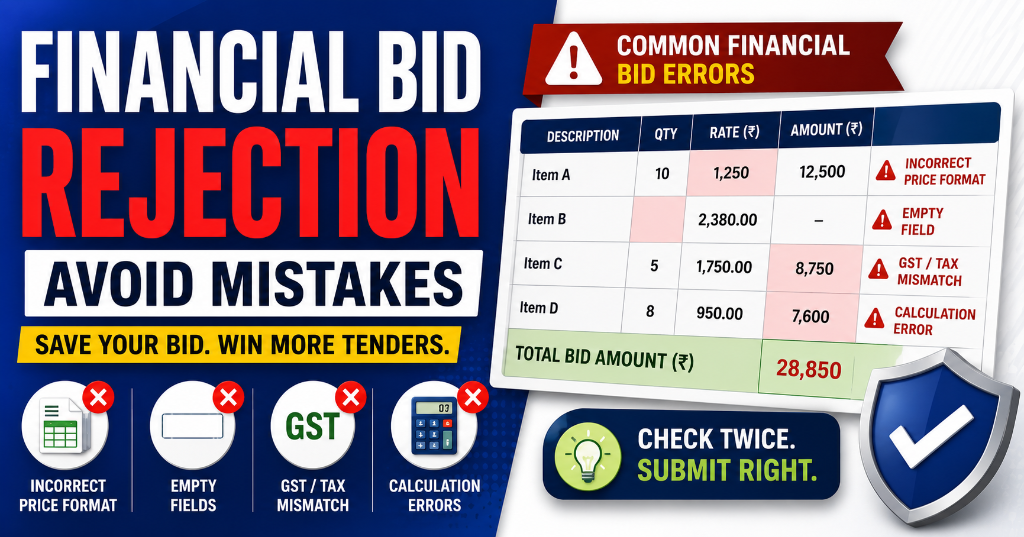
- Reason 1: Arithmetic Errors in Price Calculations To understand foundational rules, refer to our BOQ analysis for government tenders.
- Reason 2: GST Not Included or Wrong Rate Applied
- Reason 3: BOQ (Bill of Quantities) Mismatch
- Reason 4: Unrealistically Low or Abnormally Low Bids
- Reason 5: Price Not in Prescribed Format
- Reason 6: Conditional Pricing or Alternative Offers
- Reason 7: Missing Cost Components
- Reason 8: Price Variation Clauses Not as Per Tender Terms
- Reason 9: Currency or Decimal Errors
- Reason 10: Financial Bid Opened Before Technical Qualification
- The Complete Pricing Calculator: How to Structure Your Bid
- GST Calculation in Tenders: Rates, IGST vs CGST+SGST
- BOQ Filling Guide: Item-by-Item Breakdown
- Abnormally Low Bid: When Low Price Becomes a Problem
- Financial Bid vs Technical Bid: What Goes Where
- Real-World Case Studies: Financial Rejections & Wins
- How TenderFlow Pro's Pricing Validator Prevents Financial Rejection
- FAQs About Financial Bid Rejection
- Conclusion: Price It Right, Win the Contract
Introduction: Why Your Perfect Technical Bid Means Nothing If Your Price Is Wrong
You passed technical evaluation. Your documents were flawless. Your certifications were valid. Your experience was verified. You made it to the financial bid opening — the final stage where contracts are won or lost.
And then your bid was rejected for a pricing error.
It happens more often than you think. Industry data suggests that 8–12% of financial bids are rejected after passing technical evaluation. The reasons? Arithmetic mistakes, GST errors, BOQ mismatches, unrealistically low bids, and format violations — errors that take minutes to prevent but cost months of effort when they happen.
The financial bid is where the contract is actually awarded. Under GFR 2017, the L1 (lowest) bidder among technically qualified bidders wins — provided their financial bid is responsive. One arithmetic error, one missing GST line, one BOQ mismatch, and you're out. Not because you weren't capable. Because your price was wrong.
This guide covers every financial bid rejection reason, how financial evaluation works, and the exact steps to price your bid correctly and win the contract. Learn the fundamentals of bid pricing in our Financial Bid Preparation Guide. For non-price related rejection factors, read our comprehensive overview of Why Tenders Get Rejected in India.
💰→✅Validate Your Bid Price Before Submission
Upload any tender and TenderFlow Pro's AI checks arithmetic, GST calculations, BOQ completeness, and cost realism — before you submit. Catch pricing errors before evaluators do.
---
Get the Rejection Recovery Toolkit
Prevent disqualifications with strict audit checklists + lawyer-grade appeal letters.
- ✓ 150-Point Pre-Submission Checklist (PDF)
- ✓ 50-Point Technical Bid Compliance Audit
- ✓ 30-Point Financial Bid Accuracy Verification
- ✓ 5 Post-Rejection Appeal Letter Formats (GFR 171)
🔒 256-Bit Secure Razorpay Checkout · Lifetime Access · Instant Digital Delivery
What Is a Financial Bid? Understanding Price Submission in Government Tenders
A financial bid is the price quotation submitted by bidders in government tenders. In the two-bid system under GFR 2017 Rule 163, it is submitted in a separate sealed envelope and opened only after technical evaluation is complete.
What the Financial Bid Contains:
| Component | Description | Example |
|---|---|---|
| Item-wise Unit Rates | Price per unit for each BOQ item | ₹500 per meter of cable |
| Quantities | Number of units (from tender BOQ) | 1,000 meters |
| Line Item Total | Unit Rate × Quantity | ₹500 × 1,000 = ₹5,00,000 |
| GST | Tax at applicable rate (5%, 12%, 18%, 28%) | ₹5,00,000 × 18% = ₹90,000 |
| Freight & Insurance | Transportation costs | ₹25,000 |
| Installation & Commissioning | Setup costs (if applicable) | ₹50,000 |
| Training | User training costs (if applicable) | ₹10,000 |
| Warranty/AMC | Annual maintenance (if applicable) | ₹30,000 |
| Grand Total | Sum of all components | ₹7,05,000 |
Financial Bid vs Technical Bid:
| Aspect | Technical Bid | Financial Bid |
|---|---|---|
| Contents | Documents, specs, certifications | Pricing only |
| Opened When | First (Day 1) | Second (after technical results) |
| Evaluated By | Tender Evaluation Committee | Financial Evaluation Committee |
| Evaluation Criteria | Compliance, eligibility, specifications | Price competitiveness, arithmetic accuracy |
| Rejection Rate | ~30-35% | ~8-12% |
| Common Errors | Missing docs, spec mismatch | Arithmetic, GST, BOQ, format |
Learn more about the two-bid system in our technical bid rejection guide.
---How Financial Bid Evaluation Works: From Opening to L1 Selection
Understanding the evaluation process helps you prepare better bids.
Stage 1: Technical Results Declaration
- TEC declares list of technically qualified bidders
- Only these bidders proceed to financial bid opening
- Technically rejected bidders' financial bids remain unopened and are returned
Stage 2: Financial Bid Opening
- Financial bids of technically qualified bidders opened in public
- Each bidder's total price read aloud
- Prices recorded in opening sheet
Stage 3: Arithmetic Verification
- Evaluators verify:
- Unit Rate × Quantity = Line Item Total
- Sum of Line Item Totals = Subtotal
- Subtotal + GST + Other Costs = Grand Total
- Any arithmetic error may result in rejection or correction as per tender terms
Stage 4: Responsiveness Check
- Evaluators check:
- Price in correct format
- All BOQ items priced
- No conditional pricing
- No alternative offers
- Costs include all required components
Stage 5: L1 Determination
| Step | Action |
|---|---|
| Step 1 | List all technically qualified, financially responsive bids |
| Step 2 | Sort by Grand Total (lowest to highest) |
| Step 3 | L1 = Lowest bidder |
| Step 4 | Check if L1 is abnormally low |
| Step 5 | If L1 is acceptable, recommend for award |
| Step 6 | If L1 withdraws, consider L2 |
Stage 6: Contract Award
- L1 bidder notified
- Performance Security (5-10% of contract value) demanded
- Contract signed within stipulated period
[Infographic: Financial Bid Evaluation Flowchart]
Visual 6-stage flow from technical results to L1 selection and contract award.
---Instant Tender Eligibility & Risk Audit
Upload any 500-page NIT / BOQ PDF. Extract hidden disqualification traps, EMD waiver clauses, and complete eligibility criteria in under 45 seconds.
The 10 Most Common Financial Bid Rejection Reasons (With Solutions)
Reason 1: Arithmetic Errors in Price Calculations
Frequency: ~25% of financial rejections Impact: Disqualification or forced correction Fix Difficulty: Very EasyWhat Goes Wrong:
| Error Type | Example | Consequence |
|---|---|---|
| Unit Rate × Quantity ≠ Total | ₹500 × 100 = ₹45,000 (should be ₹50,000) | Bid may be rejected or corrected |
| Subtotal doesn't sum line items | 3 items totaling ₹1,50,000; subtotal shows ₹1,40,000 | Arithmetic discrepancy |
| Grand total wrong | Subtotal ₹1,00,000 + GST ₹18,000 = ₹1,28,000 (should be ₹1,18,000) | Disqualification |
| Decimal place error | ₹10,000.00 entered as ₹1,00,000.00 | 10x price error |
| Rounding errors | Multiple items rounded inconsistently | Minor discrepancy, may be accepted |
The Arithmetic Correction Rule:
Under standard tender conditions:
- If total is higher than sum of items: Total prevails (you pay more)
- If total is lower than sum of items: Total prevails (you get less)
- Major discrepancies: Bid may be rejected
Solution:
- Use a Spreadsheet Calculator:
| S.No. | Item Description | Unit | Qty | Unit Rate (₹) | Amount (₹) |
|---|---|---|---|---|---|
| 1 | PVC Cable 2.5 sq mm | Meter | 1,000 | 45.00 | 45,000.00 |
| 2 | PVC Cable 4 sq mm | Meter | 500 | 65.00 | 32,500.00 |
| 3 | Cable Glands | Each | 200 | 12.50 | 2,500.00 |
| Subtotal | 80,000.00 | ||||
| GST @ 18% | 14,400.00 | ||||
| Freight & Insurance | 3,000.00 | ||||
| GRAND TOTAL | 97,400.00 |
- Triple-Check Before Submission:
- Check 1: You calculate
- Check 2: Colleague recalculates independently
- Check 3: Software/Excel verification
- Use Excel Formulas: Never calculate manually for large BOQs
Reason 2: GST Not Included or Wrong Rate Applied
Frequency: ~20% of financial rejections Impact: Disqualification or price disadvantage Fix Difficulty: EasyWhat Goes Wrong:
| GST Error | Example | Consequence |
|---|---|---|
| GST not included | Quoted ₹1,00,000 exclusive; buyer expects inclusive | Bid considered incomplete |
| Wrong GST rate | Applied 12% instead of 18% | Underpricing, potential rejection |
| IGST vs CGST+SGST confusion | Inter-state supply charged CGST+SGST | Tax calculation error |
| GST not shown separately | Included in lump sum without breakdown | Non-transparent pricing |
| Wrong HSN code | HSN code doesn't match product | GST applicability question |
GST Rates for Common Tender Items:
| Product/Service Category | GST Rate | HSN Code Range |
|---|---|---|
| Essential goods (food grains, milk) | 0% | Various |
| Common goods (tea, coffee, spices) | 5% | 0901–0910 |
| Processed foods, textiles | 5% | Various |
| Computers, printers, IT goods | 18% | 8471–8473 |
| Electrical equipment, cables | 18% | 8544–8547 |
| Construction materials, machinery | 18% | 7308–8429 |
| Furniture, fixtures | 18% | 9401–9403 |
| Luxury goods, automobiles | 28% | 8703–8705 |
| Services (consulting, IT) | 18% | SAC 9983–9987 |
GST Calculation Formula:
For Intra-State (CGST + SGST):
  Taxable Value = Unit Rate × Quantity
  CGST = Taxable Value × (GST Rate / 2)
  SGST = Taxable Value × (GST Rate / 2)
  Total GST = CGST + SGST
  Grand Total = Taxable Value + Total GST + Other Costs

For Inter-State (IGST):
  Taxable Value = Unit Rate × Quantity
  IGST = Taxable Value × GST Rate
  Grand Total = Taxable Value + IGST + Other Costs
Solution:
- Verify Correct GST Rate:
- Check HSN code for your product
- Verify rate on cbic-gst.gov.in
- Confirm if tender specifies inclusive or exclusive pricing
- Show GST Separately:
| Component | Amount (₹) |
|---|---|
| Subtotal (Taxable Value) | 1,00,000.00 |
| CGST @ 9% | 9,000.00 |
| SGST @ 9% | 9,000.00 |
| Total GST | 18,000.00 |
| Freight & Insurance | 5,000.00 |
| GRAND TOTAL | 1,23,000.00 |
- Include GST Registration Number in the bid
Reason 3: BOQ (Bill of Quantities) Mismatch
Frequency: ~18% of financial rejections Impact: Non-responsive bid Fix Difficulty: EasyWhat Goes Wrong:
| BOQ Error | Example | Consequence |
|---|---|---|
| Missing line items | BOQ has 10 items; you priced only 8 | Incomplete bid |
| Added extra items | You added items not in BOQ | Non-responsive |
| Wrong quantities | Changed tender quantities | Non-responsive |
| Wrong units | BOQ says "meters"; you priced "feet" | Calculation error |
| Blank rates | Left some items unpriced | Incomplete bid |
| "As per site" pricing | Instead of fixed rates | Conditional pricing, rejected |
The BOQ Rule:
> "The Bill of Quantities forms part of the tender. Bidders must price all items exactly as listed. Altering quantities, adding items, or leaving items blank results in rejection."
Solution:
- Copy BOQ Exactly:
- Same item descriptions
- Same quantities
- Same units
- Same sequence
- Price Every Single Line:
- Even if quantity is zero
- Even if item seems irrelevant
- Use "₹0.00" if genuinely not applicable (with justification)
- BOQ Verification Checklist:
- Number of items in your bid = Number in tender BOQ
- Item descriptions match exactly
- Quantities unchanged
- Units unchanged
- Every item has a unit rate
- Every item has a line total
- No items added or deleted
📋
[Infographic: BOQ Filling Template]
Side-by-side comparison showing correct vs incorrect BOQ filling with common error highlights.
---Reason 4: Unrealistically Low or Abnormally Low Bids
Frequency: ~12% of financial rejections Impact: Disqualification or enhanced scrutiny Fix Difficulty: MediumWhat Goes Wrong:
| Scenario | Example | Buyer Action |
|---|---|---|
| Bid 50% below estimate | Estimated ₹10L; bid ₹5L | Request justification; reject if unsatisfactory |
| Bid 30% below next lowest | L1: ₹8L; L2: ₹12L | Suspect quality compromise; enhanced scrutiny |
| Below cost price | Cost ₹9L; bid ₹8L | Reject as unsustainable |
| Missing cost components | Excluded freight, installation | Considered incomplete |
Abnormally Low Bid Thresholds (Typical):
| Comparison | Threshold | Action |
|---|---|---|
| vs Department Estimate | >20% below | Justification required |
| vs Average of All Bids | >25% below | Justification required |
| vs L2 (Second Lowest) | >15% below | Enhanced scrutiny |
| vs Market Rate | Significantly below | Potential rejection |
Solution:
- Calculate True Cost Before Bidding:
| Cost Component | Amount (₹) |
|---|---|
| Raw Materials | 50,000 |
| Labor | 20,000 |
| Overheads | 15,000 |
| Packaging | 5,000 |
| Freight | 5,000 |
| Installation | 10,000 |
| Total Cost | 1,05,000 |
| Margin (15%) | 15,750 |
| Minimum Bid Price | 1,20,750 |
- The 15% Rule: Don't bid more than 15% below your calculated minimum
- Include All Costs: Missing components make your bid artificially low
- Be Ready to Justify: If bidding low, prepare detailed cost breakdown
Reason 5: Price Not in Prescribed Format
Frequency: ~8% of financial rejections Impact: Non-responsive bid Fix Difficulty: Very EasyWhat Goes Wrong:
| Format Error | Example | Consequence |
|---|---|---|
| Wrong currency | Quoted in USD instead of INR | Rejection |
| Wrong decimal format | Used commas instead of decimal points | Misinterpretation |
| Not in BOQ format | Submitted separate price list instead of filled BOQ | Non-responsive |
| Handwritten prices | Tender requires typed; you wrote by hand | Rejection |
| No item-wise breakdown | Only grand total provided | Incomplete |
Solution:
- Use the Exact Format Provided:
- Download tender BOQ/Price Schedule
- Fill in the provided Excel/PDF template
- Don't create your own format
- Follow Format Instructions:
- Currency: INR (₹)
- Decimal: Two places (₹1,23,456.78)
- Typed, not handwritten
- Item-wise breakdown mandatory
---Reason 6: Conditional Pricing or Alternative Offers
Frequency: ~6% of financial rejections Impact: Non-responsive bid Fix Difficulty: EasyWhat Goes Wrong:
| Conditional Pricing | Example | Consequence |
|---|---|---|
| "Subject to availability" | "Price valid if material available" | Conditional, rejected |
| "Or best offer" | "₹1,00,000 or best offer" | Ambiguous, rejected |
| Alternative specifications | "Can supply Model B instead of Model A" | Alternative offer, rejected |
| "Price valid for 30 days only" | Shorter than bid validity | Non-compliant |
| "Excluding GST" | When tender requires inclusive | Incomplete |
The Rule:
> "Bids must be unconditional. Any condition, alternative, or limitation makes the bid non-responsive."
Solution:
- Quote one fixed price for the exact scope
- No "subject to," "or equivalent," or "if available" language
- Price valid for the full bid validity period
- Include all costs; no exclusions
Reason 7: Missing Cost Components
Frequency: ~5% of financial rejections Impact: Underpricing, potential losses Fix Difficulty: EasyCommonly Missed Costs:
| Cost Component | When Required | Impact of Missing |
|---|---|---|
| Freight & Insurance | Always for physical goods | Delivery cost not covered |
| Loading & Unloading | Heavy/large items | Labor cost not covered |
| Installation & Commissioning | Machinery, equipment | Setup cost not covered |
| Training | Technical equipment | User training not covered |
| Packing & Forwarding | Fragile items | Damage risk not covered |
| Warranty/AMC | Extended warranty required | Post-sale cost not covered |
| Site Survey | Custom installations | Pre-work cost not covered |
| GST | Always | Tax liability not covered |
Solution:
- Read the Scope of Work Carefully:
- What does the buyer expect to be included?
- What does "supply, installation, and commissioning" mean?
- The Complete Cost Checklist:
- Product/material cost
- Packaging and labeling
- Freight, transportation, insurance
- Loading and unloading
- Installation and commissioning
- Training (if applicable)
- GST at applicable rate
- Warranty/AMC (if applicable)
- Any other costs specified in tender
Reason 8: Price Variation Clauses Not as Per Tender Terms
Frequency: ~3% of financial rejections Impact: Non-responsive bid Fix Difficulty: MediumWhat Goes Wrong:
| Error | Example | Consequence |
|---|---|---|
| Proposed price escalation | "Price subject to 5% annual increase" | Not allowed unless tender permits |
| Different payment terms | "50% advance" when tender says "100% after delivery" | Non-compliant |
| Currency fluctuation clause | "Price subject to USD exchange rate" | Not allowed for INR tenders |
Solution:
- Accept tender payment terms exactly as stated
- No price variation unless explicitly permitted
- No currency hedging clauses for domestic tenders
Reason 9: Currency or Decimal Errors
Frequency: ~2% of financial rejections Impact: Major price discrepancy Fix Difficulty: Very EasyWhat Goes Wrong:
| Error | Example | Impact |
|---|---|---|
| Extra zero | ₹10,000 entered as ₹1,00,000 | 10x overpricing |
| Missing zero | ₹1,00,000 entered as ₹10,000 | 90% underpricing |
| Decimal error | ₹1,234.56 entered as ₹12,345.60 | 10x error |
| Wrong currency | Quoted USD instead of INR | Rejection |
| Lakhs/crores confusion | "1.5 lakhs" written as "1,50,000" vs "15,00,000" | Major discrepancy |
Solution:
- Use Number Formatting:
- Always write: ₹1,23,456.78
- Never write: 123456.78 or Rs. One lakh twenty-three thousand
- Verify in Words and Figures:
| In Figures | In Words |
|---|---|
| ₹1,23,456.78 | Rupees One Lakh Twenty-Three Thousand Four Hundred Fifty-Six and Seventy-Eight Paisa Only |
- Have a Second Person Verify: Fresh eyes catch decimal errors
Reason 10: Financial Bid Opened Before Technical Qualification
Frequency: ~1% of financial rejections Impact: Procedural violation Fix Difficulty: N/A (buyer error, but affects bidder)What Goes Wrong:
In rare cases, financial bids are accidentally opened before technical evaluation is complete. If this happens:
- The tender process may be cancelled
- Bidders may need to resubmit
- Causes delays and uncertainty
Solution:
- This is a buyer-side error
- If you notice it, document it formally
- Request cancellation and retendering if your competitive position is compromised
The Complete Pricing Calculator: How to Structure Your Bid
Use this framework for every tender bid:
Step 1: Calculate Direct Costs
| Cost Item | Calculation | Amount (₹) |
|---|---|---|
| Raw Materials | Per unit cost × quantity | |
| Labor | Hours × rate | |
| Subcontractor costs | As quoted | |
| Direct Costs Subtotal |
Step 2: Add Indirect Costs
| Cost Item | Calculation | Amount (₹) |
|---|---|---|
| Overheads (rent, utilities, admin) | % of direct costs | |
| Packaging & labeling | Actual cost | |
| Quality control & testing | Actual cost | |
| Indirect Costs Subtotal |
Step 3: Add Project-Specific Costs
| Cost Item | Calculation | Amount (₹) |
|---|---|---|
| Freight & transportation | Actual/estimated | |
| Insurance | % of goods value | |
| Loading & unloading | Actual cost | |
| Installation & commissioning | Actual cost | |
| Training | Actual cost | |
| Site survey | Actual cost | |
| Project Costs Subtotal |
Step 4: Calculate Total Cost
Total Cost = Direct Costs + Indirect Costs + Project Costs
Step 5: Add Margin
| Margin Level | When to Use | Typical Range |
|---|---|---|
| Thin margin | Strategic entry, repeat business | 5-10% |
| Standard margin | Normal competitive bidding | 10-20% |
| Premium margin | Unique product, limited competition | 20-30% |
Bid Price (Excl. GST) = Total Cost × (1 + Margin %)
Step 6: Add GST
GST Amount = Bid Price (Excl. GST) × GST Rate
Bid Price (Incl. GST) = Bid Price (Excl. GST) + GST Amount
Step 7: Final Review
- All costs included
- Margin is realistic
- GST rate correct
- Arithmetic verified
- Price in correct format
- Within abnormally low bid threshold
[Infographic: Complete Pricing Calculator Flowchart]
Visual 7-step flow from direct costs to final bid price with decision points.
---GST Calculation in Tenders: Rates, IGST vs CGST+SGST
GST Rate Determination:
| Step | Action | Resource |
|---|---|---|
| 1 | Identify HSN code for your product | cbic-gst.gov.in |
| 2 | Check GST rate for that HSN | GST Rate Finder |
| 3 | Confirm if tender specifies inclusive/exclusive | Tender NIT |
| 4 | Determine if supply is intra-state or inter-state | Buyer location |
IGST vs CGST+SGST:
| Supply Type | Tax Components | Applicability |
|---|---|---|
| Intra-State | CGST (Centre) + SGST (State) | Supplier and buyer in same state |
| Inter-State | IGST (Integrated) | Supplier and buyer in different states |
| Import | IGST + Customs Duty | Goods imported from outside India |
GST Calculation Examples:
Example 1: Intra-State Supply (Delhi to Delhi)| Component | Calculation | Amount (₹) |
|---|---|---|
| Taxable Value | 1,00,000 | |
| CGST @ 9% | 1,00,000 × 9% | 9,000 |
| SGST @ 9% | 1,00,000 × 9% | 9,000 |
| Total GST | 18,000 | |
| Grand Total | 1,00,000 + 18,000 | 1,18,000 |
| Component | Calculation | Amount (₹) |
|---|---|---|
| Taxable Value | 1,00,000 | |
| IGST @ 18% | 1,00,000 × 18% | 18,000 |
| Grand Total | 1,00,000 + 18,000 | 1,18,000 |
| Component | GST Rate | Amount (₹) |
|---|---|---|
| Goods (Principal Supply) | 18% | 80,000 |
| Services (Ancillary) | 18% | 20,000 |
| Total Taxable Value | 1,00,000 | |
| GST @ 18% | 18,000 | |
| Grand Total | 1,18,000 |
BOQ Filling Guide: Item-by-Item Breakdown
The BOQ Structure:
| S.No. | Item Description | Unit | Quantity | Unit Rate (₹) | Amount (₹) |
|---|---|---|---|---|---|
| 1 | As per tender | As per tender | As per tender | Your rate | Auto-calculate |
| 2 | As per tender | As per tender | As per tender | Your rate | Auto-calculate |
| ... | ... | ... | ... | ... | ... |
BOQ Filling Rules:
| Rule | Explanation | Consequence of Violation |
|---|---|---|
| Don't change item descriptions | Use exact text from tender | Non-responsive |
| Don't change quantities | Use exact numbers from tender | Non-responsive |
| Don't change units | Use exact units from tender | Calculation error |
| Don't add items | Only items in tender BOQ | Non-responsive |
| Don't delete items | Price every item | Incomplete bid |
| Don't leave blanks | Every item must have a rate | Incomplete bid |
| Use numbers, not text | "₹500" not "Five Hundred" | Format error |
Sample BOQ Filling:
Tender BOQ:| S.No. | Item Description | Unit | Quantity |
|---|---|---|---|
| 1 | PVC Insulated Cable 2.5 sq mm Copper Conductor | Meter | 2,500 |
| 2 | PVC Insulated Cable 4 sq mm Copper Conductor | Meter | 1,000 |
| 3 | Cable Glands Brass Nickel Plated 20mm | Each | 150 |
| 4 | Cable Tray Perforated GI 100mm × 50mm | Meter | 200 |
| S.No. | Item Description | Unit | Quantity | Unit Rate (₹) | Amount (₹) |
|---|---|---|---|---|---|
| 1 | PVC Insulated Cable 2.5 sq mm Copper Conductor | Meter | 2,500 | 42.50 | 1,06,250.00 |
| 2 | PVC Insulated Cable 4 sq mm Copper Conductor | Meter | 1,000 | 58.00 | 58,000.00 |
| 3 | Cable Glands Brass Nickel Plated 20mm | Each | 150 | 15.00 | 2,250.00 |
| 4 | Cable Tray Perforated GI 100mm × 50mm | Meter | 200 | 125.00 | 25,000.00 |
| Subtotal | 1,91,500.00 | ||||
| GST @ 18% | 34,470.00 | ||||
| Freight & Insurance | 8,000.00 | ||||
| GRAND TOTAL | 2,33,970.00 |
Abnormally Low Bid: When Low Price Becomes a Problem
What Is an Abnormally Low Bid?
An abnormally low bid is one that is significantly lower than:
- The department's estimated cost
- The average of all received bids
- The next lowest bid (L2)
- Market rates for similar procurements
Thresholds for Abnormal Bid Scrutiny:
| Comparison | Typical Threshold | Action |
|---|---|---|
| vs Department Estimate | >20% below | Justification required |
| vs Average of All Bids | >25% below | Detailed scrutiny |
| vs L2 (Second Lowest) | >15% below | Enhanced verification |
| vs Market Rate | Significantly below | Potential rejection |
What Happens If Your Bid Is Flagged as Abnormally Low:
| Step | Action | Timeline |
|---|---|---|
| 1 | Bid identified as abnormally low | During evaluation |
| 2 | Written request for price justification sent to bidder | Within evaluation period |
| 3 | Bidder submits detailed cost breakdown | Usually 7-10 days |
| 4 | Committee reviews justification | 3-5 days |
| 5 | Decision: Accept or Reject | Immediate |
How to Justify a Low Bid:
If asked to justify, provide:
- Detailed cost breakdown (material, labor, overheads)
- Evidence of bulk purchase discounts
- Efficient production methods
- Lower overhead structure (MSME advantage)
- Strategic pricing (entry into new market)
- Long-term relationship value
How to Avoid Being Flagged:
- Know Your True Cost: Don't bid below actual cost
- Research Market Rates: Check past similar tenders on CPPP
- The 15% Buffer: Don't bid more than 15% below estimated market rate
- Include All Costs: Missing components artificially lower your price
Financial Bid vs Technical Bid: What Goes Where
For a deeper comparative analysis of bid structures, see our detailed Technical Bid vs Financial Bid Guide.
Critical Rule:
> "The financial bid must contain ONLY pricing information. Any technical document in the financial bid envelope results in disqualification."
What Goes in Each Envelope:
| Item | Technical Bid ✅ | Financial Bid ✅ | Neither ❌ |
|---|---|---|---|
| Price quotation | ✅ | ||
| BOQ with rates | ✅ | ||
| GST calculations | ✅ | ||
| Product brochure | ✅ | ||
| Technical datasheet | ✅ | ||
| Certifications (BIS, ISO) | ✅ | ||
| Experience certificates | ✅ | ||
| EMD/BSD | ✅ | ||
| Compliance matrix | ✅ | ||
| Make in India declaration | ✅ | ||
| Bid submission form | ✅ | ||
| Cover letter explaining price | ❌ (Not allowed) |
Real-World Case Studies: Financial Rejections & Wins
Case Study 1: ₹5 Lakh Loss from Decimal Error
Business: Electrical contractor in Maharashtra Tender: Government office wiring, estimated ₹25 lakh Error: Entered ₹2,50,000.00 as ₹25,00,000.00 (extra zero) Result: Bid became L2 instead of L1; lost contract by ₹22.5 lakh margin Fix: Implemented two-person verification for all price entries Lesson: One decimal/zero error can cost lakhs. Always verify.Case Study 2: GST Omission Cost ₹3 Lakh Contract
Business: Furniture supplier in Karnataka Tender: Office furniture supply, estimated ₹15 lakh Error: Quoted ₹12,00,000 exclusive of GST; buyer expected inclusive pricing Result: After adding 18% GST, effective price became ₹14,16,000 — higher than L1 Fix: Now quotes all prices inclusive of GST; clearly states "inclusive of all taxes" Lesson: Always clarify if tender requires inclusive or exclusive pricing.Case Study 3: Abnormally Low Bid Rejected
Business: IT hardware supplier in Delhi Tender: 100 laptops for government school Bid: ₹28,00,000 (₹28,000 per laptop) Market Rate: ₹35,000–₹40,000 per laptop Result: Bid flagged as abnormally low; asked for justification Justification: Failed to provide convincing cost breakdown Final: Bid rejected; contract awarded to L2 at ₹38,00,000 Lesson: Don't bid below cost to win. It backfires.Case Study 4: BOQ Mismatch Saved by Double-Check
Business: Construction material supplier in Gujarat Tender: Road construction materials Pre-Submission Check: Used TenderFlow Pro's BOQ validator Error Detected: Had priced 8 items; BOQ had 10 items (2 missed) Fix: Added rates for remaining 2 items before submission Result: Bid accepted; won contract at ₹42 lakh Lesson: BOQ verification tools catch errors that eyes miss. ---How TenderFlow Pro's Pricing Validator Prevents Financial Rejection
TenderFlow Pro eliminates financial bid errors before submission:
1. Arithmetic Validator
Our AI checks:
- Unit Rate × Quantity = Line Total (every line)
- Sum of Line Totals = Subtotal
- Subtotal + GST + Other Costs = Grand Total
- Flags decimal errors, extra zeros, missing calculations
2. GST Calculator & Validator
- Auto-detects correct GST rate from HSN code
- Calculates IGST vs CGST+SGST based on buyer location
- Verifies GST is included/excluded as per tender requirement
- Flags wrong GST rates
3. BOQ Completeness Checker
- Compares your filled BOQ against tender BOQ
- Flags missing line items
- Flags added items not in tender
- Verifies quantities and units unchanged
4. Cost Realism Analyzer
- Compares your bid against historical data
- Flags bids more than 20% below market rate
- Suggests justification preparation for low bids
- Recommends optimal pricing range
5. Format Validator
- Checks price is in correct currency (INR)
- Verifies decimal formatting
- Ensures item-wise breakdown present
- Validates against tender's prescribed format
FAQs About Financial Bid Rejection
Q1: What is a financial bid in government tenders?
A: A financial bid is the price quotation submitted by bidders in government tenders. In the two-bid system under GFR 2017 Rule 163, the financial bid is submitted in a separate sealed envelope and opened only after technical evaluation. It contains the item-wise pricing, GST calculations, freight charges, installation costs, and total bid value. Only technically qualified bidders proceed to financial bid opening. The lowest bidder (L1) among financially responsive bids is typically awarded the contract.Q2: Why do financial bids get rejected?
A: Financial bids get rejected for these main reasons: (1) Arithmetic errors where totals don't match unit prices × quantities; (2) GST not included or wrong GST rate applied; (3) BOQ (Bill of Quantities) mismatch where quoted items don't match tender requirements; (4) Unrealistically low bids that raise quality concerns; (5) Price not in prescribed format or currency; (6) Conditional pricing or alternative offers not allowed; (7) Missing cost components like freight, installation, or AMC; (8) Price variation clauses not as per tender terms; and (9) Financial bid opened before technical qualification.Q3: What is the L1 bidder selection process?
A: L1 (Lowest Bidder) selection is the standard method for awarding government contracts. After technical evaluation, the financial bids of all technically qualified bidders are opened. The bidder with the lowest total evaluated price is designated as L1. For MSEs, price preference allows matching L1 price if within 15% (see our Price Preference Guide). If L1 withdraws or is disqualified, L2 (second lowest) is considered. The contract is awarded to L1 unless there are exceptional circumstances requiring negotiation or retendering.Q4: How should GST be calculated in tender bids?
A: GST in tender bids should be calculated as follows: (1) Identify the correct GST rate for your product/service (5%, 12%, 18%, or 28%); (2) Calculate GST amount = (Unit Price × Quantity) × GST Rate; (3) Total per line item = (Unit Price × Quantity) + GST Amount; (4) Grand Total = Sum of all line item totals. Always quote prices inclusive of GST unless the tender specifically asks for exclusive pricing. Include GST registration number in the bid. For inter-state supplies, use IGST; for intra-state, use CGST + SGST.Q5: What is a Bill of Quantities (BOQ) in tenders?
A: A Bill of Quantities (BOQ) is a document in tender bidding that lists all items, materials, and services required for the project with their quantities. Bidders fill in unit rates and calculate total costs. The BOQ ensures all bidders price the same scope of work, enabling fair comparison. Common BOQ errors include: missing line items, wrong quantities, unit rate mismatches, arithmetic errors in totals, and adding items not in the BOQ. Always verify your quoted BOQ matches the tender BOQ exactly.Q6: What happens if my bid price is too low?
A: If your bid price is unrealistically low (typically more than 15-20% below the estimated cost or next lowest bid), the buyer may: (1) Request a price justification with detailed cost breakdown; (2) Reject the bid if justification is unsatisfactory; (3) Suspect compromise on quality and disqualify; or (4) Accept with enhanced performance security. Under GFR 2017, abnormally low bids can be rejected to protect procurement integrity. Always base your price on actual cost + reasonable margin.Q7: Can I modify my financial bid after submission?
A: No, you cannot modify your financial bid after submission. Under GFR 2017 and standard tender conditions, bids are irrevocable once submitted. The only exceptions are: (1) If the buyer issues a corrigendum before the deadline, you may withdraw and resubmit; (2) During post-bid negotiations (rare in government tenders); or (3) If a manifest error is discovered and both parties agree. Attempting to modify after opening results in disqualification and EMD forfeiture.Q8: What costs should be included in my bid price?
A: Your bid price should include all costs required to complete the contract: (1) Product/material costs; (2) Packaging and labeling; (3) Freight, transportation, and insurance; (4) Loading and unloading; (5) Installation and commissioning (if required); (6) Training (if required); (7) GST at applicable rate; (8) Warranty and AMC costs; (9) Any other costs specified in the tender. Missing any component results in underpricing and potential losses. Read the tender scope carefully to identify all cost elements.Q9: How is abnormally low bid determined?
A: An abnormally low bid is determined by comparing the bid against: (1) The department's estimated cost (usually not disclosed); (2) The average of all received bids; (3) The next lowest bid (L2); and (4) Market rates for similar procurements. Typically, bids more than 15-20% below the estimated cost or significantly lower than other bids trigger scrutiny. The bidder may be asked to provide a detailed cost breakdown justifying the price. If justification is unsatisfactory, the bid may be rejected.Q10: What is the difference between unit rate and lump sum contracts?
A: In a unit rate contract, the bidder quotes a rate per unit (e.g., ₹500 per meter of cable) and the total is calculated based on actual quantities. In a lump sum contract, the bidder quotes a fixed total price for the entire scope regardless of actual quantities. Unit rate contracts are common in construction and supply tenders where quantities may vary. Lump sum contracts are used for turnkey projects and services with defined scope. The tender document specifies which type applies. ---Conclusion: Price It Right, Win the Contract
You made it past technical evaluation. Your documents were perfect. Your certifications were valid. Now, in the financial bid stage, the contract is won or lost on a spreadsheet.
The businesses that win consistently are not the ones with the lowest prices. They are the ones with the most accurate prices — prices that include every cost, calculate every tax, verify every arithmetic, and comply with every format requirement.
The 10 rejection reasons in this guide account for over 95% of all financial disqualifications. Master them, and you will pass financial evaluation in 9 out of 10 bids.
Your action plan:- Today: Create a pricing calculator spreadsheet with GST, freight, and all cost components
- Before every bid: Use the 7-step pricing framework; verify arithmetic with two people
- For GST: Always verify rate from HSN code; show tax separately; confirm inclusive/exclusive requirement
- For BOQ: Copy exactly; price every line; verify with a checklist
- For low bids: Calculate true cost first; don't bid below it; prepare justification if needed
- Ongoing: Use TenderFlow Pro's pricing validator to catch arithmetic errors, GST mistakes, BOQ mismatches, and cost realism issues before submission
Remember: The best technical bid in the world means nothing if your price is wrong. Get the price right, and the contract is yours.
🎯Never Lose a Tender to a Pricing Error
TenderFlow Pro's AI validates arithmetic, calculates GST, checks BOQ completeness, and analyzes cost realism — all before you submit. Catch pricing errors before evaluators do.