Tender Corrigendum: The Complete Guide to Tracking Changes, Protecting Your Bid & Never Missing an Amendment
Last Updated: July 17, 2026 | Reading Time: 16 minutes | Author: TenderFlow Pro Procurement Intelligence Team
Quick Answer: A corrigendum is a legally binding amendment to a tender document. It can change dates, specifications, eligibility, or financial terms. Bidders must track corrigenda on CPPP (eprocure.gov.in), GeM, and state portals daily — missing one can lead to automatic disqualification. Under CVC guidelines, bidders have the right to modify or withdraw bids if a corrigendum materially alters the tender scope.
menu_book Table of Contents
Spotted restrictive post-bid amendments? You can protest corrigendum manipulation under GFR Rule 148 to demand fair retendering.
What Is a Tender Corrigendum?
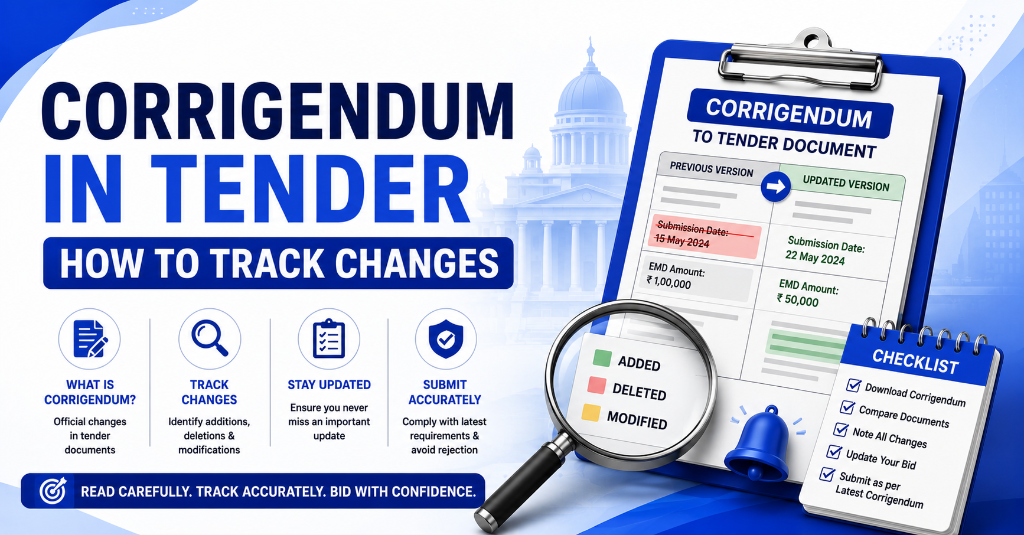
A corrigendum (plural: corrigenda) is an official amendment or correction issued by the tendering authority after the original tender notice has been published but before the bid submission deadline. In Indian public procurement, governed by GFR 2017 and CVC guidelines, a corrigendum holds the same legal weight as the original tender document and becomes an integral part of the bidding conditions. To understand foundational rules, refer to our GFR 2017 tender rules explained.
Definition Box: Corrigendum — A formal document issued by a procuring entity to correct errors, modify terms, extend deadlines, or clarify ambiguities in a published tender. Once issued, all bidders are deemed to have notice of its contents, regardless of whether they actually viewed it.
Why Corrigendum Tracking Is Critical in 2026
- GeM processed 72+ lakh orders in FY 2024–25; corrigenda volume scales with tender volume.
- CAG Audit Report 2025 flagged multiple instances where bidders were disqualified for non-compliance with corrigenda-related document requirements.
- CPPP (eprocure.gov.in) publishes thousands of corrigenda monthly across central ministries, PSUs, and autonomous bodies.
- A single missed corrigendum can invalidate months of bid preparation and forfeit EMD (Earnest Money Deposit).

Get the GFR Compliance Toolkit
Know every GFR rule, protect deposits, and challenge restrictive clauses with confidence.
- ✓ 150-Point Pre-Submission Checklist (PDF)
- ✓ EMD & BG Format Verification Guide + Checker
- ✓ 5 Post-Rejection Appeal Letters (GFR 171)
- ✓ Corrigendum Monitoring & Response Checklist
🔒 256-Bit Secure Razorpay Checkout · Lifetime Access · Instant Digital Delivery
Types of Corrigendum in Indian Government Tenders
Understanding the type of corrigendum helps bidders assess impact and response urgency.
1. Date Extension Corrigendum
Purpose: Extends bid submission deadline, technical evaluation date, or contract finalization timeline.
Impact: Low to Medium. Gives bidders more time but may also attract new competitors.
Example: "The bid submission deadline is extended from 25.07.2026 to 05.08.2026 due to technical issues on the e-procurement portal."
2. Specification Modification Corrigendum
Purpose: Changes scope of work, technical specifications, Bill of Quantities (BOQ), or deliverables.
Impact: High. May require complete reworking of technical bid, pricing, and compliance matrix.
Example: "The requirement for 500 KVA DG Set is revised to 750 KVA DG Set. Bidders who have already submitted bids may revise their offers."
3. Financial Corrigendum
Purpose: Adjusts estimated project cost, EMD amount, payment terms, or penalty clauses.
Impact: High. Directly affects pricing strategy and financial viability.
Example: "The EMD amount is revised from ₹5,00,000 to ₹7,50,000. Fresh EMD must be uploaded by revised deadline."
4. Eligibility Criteria Corrigendum
Purpose: Modifies bidder qualifications, experience requirements, turnover thresholds, or certification prerequisites.
Impact: Critical. May disqualify previously eligible bidders or open the field to new ones.
Example: "The minimum annual turnover requirement is reduced from ₹10 crore to ₹5 crore to encourage MSME participation."
5. Document Upload Corrigendum
Purpose: Adds, removes, or modifies required supporting documents.
Impact: High. Missing a newly required document leads to technical disqualification.
Example: "Bidders must now submit ISO 9001:2015 certificate in addition to the previously listed documents."
6. Pre-Bid Meeting Corrigendum
Purpose: Announces, reschedules, or cancels a pre-bid meeting; publishes minutes/Q&A.
Impact: Medium. Minutes often contain clarifications that become binding.
Legal Validity & Binding Nature
Under Indian public procurement law and CVC guidelines, a corrigendum is not optional guidance — it is a binding modification of the tender contract.
Key Legal Principles
| Principle | Implication for Bidders |
|---|---|
| Integral Part of Tender | Corrigendum forms part of the tender document. Bidders must comply with all corrigenda issued before bid opening. |
| Deemed Notice | Bidders are deemed to have knowledge of all published corrigenda, even if they claim they didn't see them. |
| Bid Modification Right | If a corrigendum materially alters scope or cost, bidders may revise or withdraw bids before the revised deadline. |
| No Retrospective Disadvantage | A corrigendum cannot be issued after bid opening to disadvantage a specific bidder (violates Article 14). |
| EMD Protection | If withdrawal is due to material corrigendum, EMD is typically refundable (subject to tender terms). |
CVC Guidelines on Corrigenda
The Central Vigilance Commission (CVC) has issued specific instructions:
- Corrigenda must be published through the same channels as the original tender (CPPP, GeM, newspapers).
- No selective communication: Bidders cannot be informed of corrigenda privately; all must have equal access.
- Reasonable time: If a corrigendum is issued close to the deadline, the deadline must be extended to give bidders adequate response time.
- Record keeping: All corrigenda must be archived with the tender file for audit purposes.
Instant Tender Eligibility & Risk Audit
Upload any 500-page NIT / BOQ PDF. Extract hidden disqualification traps, EMD waiver clauses, and complete eligibility criteria in under 45 seconds.
Where Corrigenda Are Published: Portal-by-Portal Guide
Central Public Procurement Portal (CPPP) — eprocure.gov.in
- Primary channel for all central government ministries, departments, and PSUs.
- Corrigenda appear in the "Latest Corrigendum" section.
- Each tender page has a "Corrigendum" tab listing all amendments.
- Search by: Tender ID, department, or date range.
Government e-Marketplace (GeM) — gem.gov.in
- GeM has a dedicated "Amendment / Corrigendum" module.
- Buyers can issue corrigenda for bids, BOQs, and custom tenders.
- Registered bidders receive email and SMS alerts (if contact details are updated).
- Critical: GeM corrigenda can modify bid closing time, technical specs, and ATC clauses.
State e-Procurement Portals
| State | Portal | Corrigendum Section |
|---|---|---|
| Maharashtra | maharashtra.etenders.in | "Corrigendum" tab per tender |
| Tamil Nadu | tenders.tn.gov.in | "Amendments" under each notice |
| Karnataka | eproc.karnataka.gov.in | "Corrigendum Download" |
| Gujarat | eproc.gujarat.gov.in | "Addendum / Corrigendum" |
| UP | etender.up.nic.in | "Corrigendum" link |
| Telangana | eprocurement.gov.in/telangana | "Corrigendum" section |
Department Websites & Newspapers
Some departments publish corrigenda on their own websites and in newspapers (for high-value tenders). Always cross-check the original tender's "Publication Media" field.
How to Track Corrigenda on CPPP / eProcure
Method 1: Direct Portal Tracking (Manual)
Step 1: Visit eprocure.gov.in/epublish/app
Step 2: Navigate to "Latest Corrigendum" on the homepage.
Step 3: Use filters:
- Department/Ministry: Narrow to your target buyers.
- Date Range: Check last 7 days, 15 days, 30 days.
- Tender ID: If tracking a specific tender.
Step 4: Download the corrigendum PDF. Check for:
- Revised closing/opening dates
- Modified technical specifications
- New document requirements
- Changed eligibility criteria
Step 5: Update your internal tender tracker with corrigendum details.
Method 2: Tender Document Download & Cross-Reference
- Download the original tender document.
- Download all corrigenda (numbered sequentially: Corrigendum-1, Corrigendum-2, etc.).
- Create a "Master Document" by applying all corrigenda to the original.
- Use a compliance matrix to track which sections changed.
Method 3: TenderFlow Pro Automated Alerts (Recommended)
TenderFlow Pro's AI engine:
- Scans CPPP every 15 minutes for new corrigenda in your tracked tenders.
- Sends instant WhatsApp + Email alerts with corrigendum summary.
- Highlights material changes (specs, eligibility, dates) vs. minor corrections.
- Auto-updates your bid calendar with revised deadlines.
How to Track Corrigenda on GeM
Step-by-Step GeM Corrigendum Tracking
Step 1: Log in to GeM Seller Dashboard
- URL: gem.gov.in
- Use your seller credentials + DSC.
Step 2: Go to "My Bids" or "Bid Search"
- Find the tender you are tracking or have bid on.
Step 3: Check the "Amendment" Icon
- Active corrigenda show a red "Amendment" badge.
- Click to view details.
Step 4: Read the Amendment Carefully GeM amendments typically include:
- Bid Submission Date Extension
- Technical Specification Changes
- Additional Terms & Conditions (ATC)
- Document Upload Requirements
- EMD / PBG Changes
Step 5: Take Action
- If bid is not yet submitted: Incorporate changes before submission.
- If bid is already submitted: Check if GeM allows "Bid Modification" (typically allowed until deadline).
- If material change makes bid unviable: Withdraw before deadline to save EMD.
GeM-Specific Corrigendum Rules
- GeM allows buyers to issue corrigenda until the bid submission deadline.
- After technical bid opening, no corrigendum can be issued that affects evaluation criteria.
- For Two-Packet Bids, corrigenda affecting technical specs can be issued before technical opening; financial corrigenda before financial opening.
How to Track Corrigenda on State Portals
State portals vary in usability, but the tracking logic is consistent:
Universal State Portal Tracking Method
- Bookmark the tender page immediately after identifying an opportunity.
- Set a daily reminder (9:00 AM) to check the tender page for 7 days before deadline.
- Look for these keywords: "Corrigendum," "Addendum," "Amendment," "Clarification," "Extension."
- Download all documents — some state portals delete old versions when new corrigenda are uploaded.
- Screenshot the page with timestamp as evidence of tracking.
State Portal Alert Limitations
- Most state portals do not send automatic email alerts to unregistered users.
- Even registered users often miss alerts due to spam filters.
- Solution: Use TenderFlow Pro's multi-portal aggregator that monitors 25+ state portals simultaneously.
Bid Modification & Withdrawal Rights
Your Rights as a Bidder
When a corrigendum materially alters a tender, you have specific rights under GFR 2017 and CVC guidelines:
| Scenario | Your Right | Action Required |
|---|---|---|
| Date Extended | Submit revised/modified bid | Upload updated documents before new deadline |
| Specs Changed | Revise technical bid & pricing | Withdraw old bid; submit fresh bid if needed |
| Eligibility Relaxed | New bidders can enter; existing bidders may gain advantage | Re-evaluate your competitiveness |
| Eligibility Tightened | May become ineligible | Withdraw bid; claim EMD refund if already submitted |
| Financial Terms Changed | Reassess viability | Withdraw if margin is eroded; EMD refundable |
| New Document Required | Upload additional document | Ensure document is valid and correctly formatted |
EMD Refund Rules on Withdrawal
- Before bid deadline: EMD is fully refundable if you withdraw due to a material corrigendum.
- After bid deadline: EMD is forfeited unless the corrigendum was issued post-deadline (which is prohibited).
- GeM-specific: EMD refund requests are processed through the GeM grievance module.
The Corrigendum Response Checklist
Use this checklist every time a corrigendum is issued for a tender you are tracking:
Immediate Response (Within 2 Hours of Alert)
- Download the corrigendum PDF immediately.
- Read the entire document — don't rely on subject lines.
- Classify the type: Date / Spec / Financial / Eligibility / Document / Pre-bid.
- Assess Impact: Does this change my bid strategy, compliance, or viability?
Technical Review (Within 24 Hours)
- Compare corrigendum against original tender line-by-line.
- Update technical compliance matrix.
- Recalculate pricing if specs or quantities changed.
- Check if new documents are required and obtain them.
- Verify if OEM authorization needs updating.
Submission Adjustments (Before Revised Deadline)
- Modify bid on portal if changes are favorable.
- Withdraw bid if changes make it unviable (before deadline).
- Upload new EMD if amount increased.
- Confirm submission status shows "Submitted" or "Modified."
- Screenshot final submission confirmation.
Documentation (For Records)
- Save all corrigenda with tender file.
- Email team with corrigendum summary and action items.
- Update TenderFlow Pro dashboard with revised dates.
- Calendar block the new deadline with 3 reminders.
Common Corrigendum Mistakes That Disqualify Bidders
❌ Mistake 1: Ignoring "Minor" Corrigenda
The Error: Assuming a corrigendum titled "Clarification" or "Minor Correction" doesn't require action.
The Reality: A "minor" corrigendum may change the document upload format from PDF to ZIP, causing your upload to be rejected.
The Fix: Read every corrigendum in full, regardless of title.
❌ Mistake 2: Not Updating the Compliance Matrix
The Error: Submitting the original technical bid despite a specification corrigendum.
The Consequence: Technical disqualification for non-compliance.
The Fix: Maintain a live compliance matrix that is updated with every corrigendum.
❌ Mistake 3: Missing GeM Amendment Alerts
The Error: Relying solely on GeM email alerts, which often land in spam.
The Consequence: Missed deadline extension or new document requirement.
The Fix: Use TenderFlow Pro's multi-channel alert system (WhatsApp, SMS, Email, Dashboard).
❌ Mistake 4: Assuming EMD Auto-Adjusts
The Error: Not uploading additional EMD when a financial corrigendum increases the requirement.
The Consequence: Bid rejected at opening stage.
The Fix: Always check EMD/PBG fields in every financial corrigendum.
❌ Mistake 5: Late Withdrawal
The Error: Deciding to withdraw after the revised deadline has passed.
The Consequence: EMD forfeiture and potential blacklisting.
The Fix: Set internal deadlines 24 hours before portal deadlines.
Automated Corrigendum Tracking: Tools & Alerts
The Problem with Manual Tracking
- CPPP publishes 500+ corrigenda monthly across ministries.
- GeM issues thousands of amendments daily across categories.
- State portals use inconsistent naming (Corrigendum / Addendum / Amendment / Clarification).
- Human error is inevitable with high-volume tracking.
TenderFlow Pro Corrigendum Intelligence
TenderFlow Pro offers India's most advanced corrigendum tracking system:
| Feature | Benefit |
|---|---|
| Multi-Portal Monitoring | Tracks CPPP, GeM, and 25+ state portals simultaneously |
| Real-Time Alerts | WhatsApp + Email within 15 minutes of corrigendum publication |
| AI Impact Analysis | Auto-classifies corrigenda as "Material" or "Minor" |
| Smart Calendar Sync | Auto-updates bid deadlines in Google/Outlook calendar |
| Team Collaboration | Assigns corrigendum response tasks to team members |
| Document Archive | Auto-downloads and stores all corrigenda with version control |
| Compliance Matrix | Auto-updates your bid compliance tracker with changes |
DIY Automation (Free Methods)
- Google Alerts: Set alerts for your target department + "corrigendum" (limited effectiveness).
- RSS Feeds: Some portals offer RSS; use Feedly to aggregate.
- Browser Extensions: Use page monitor extensions to watch specific tender pages.
- Calendar Reminders: Set recurring daily checks for active tenders.
Limitation: DIY methods are fragmented and unreliable for high-volume bidding. Professional tender tracking software is essential for serious MSMEs.
Case Study: The ₹8.5 Cr Tender Lost to a Missed Corrigendum
Company: A well-established infrastructure contractor in Madhya Pradesh (name withheld for privacy). Tender: Construction of administrative building for a Central PSU. Value: ₹8.5 Crore Status: L1 bidder after technical evaluation.
What Happened
- The company submitted its bid on the original deadline: 15.03.2026.
- On 10.03.2026, the PSU issued Corrigendum-3 extending the deadline to 20.03.2026 and requiring an additional Structural Stability Certificate from an IIT/NIT.
- The company's tender tracking team missed the corrigendum because they relied on email alerts that went to a former employee's inbox.
- On 20.03.2026, the company learned they were technically disqualified for not submitting the new certificate.
- The contract was awarded to the L2 bidder at ₹9.1 Crore — ₹60 lakh higher.
Root Cause Analysis
| Failure Point | Correct Practice |
|---|---|
| Email alert went to ex-employee | Update contact details; use team inbox |
| No daily manual check | Mandatory daily tender page review |
| No compliance matrix update | Live matrix updated with every corrigendum |
| No backup tracking system | Use TenderFlow Pro redundant alert system |
The Lesson
"Corrigenda don't care about your email filters. A ₹60 lakh loss from a missed PDF is not bad luck — it's a process failure."
Corrigendum vs. Addendum vs. Clarification: Comparison
| Term | Definition | Legal Weight | Common Usage |
|---|---|---|---|
| Corrigendum | Correction of errors or modifications to tender terms | High — binding on all bidders | Date extension, spec change, eligibility change |
| Addendum | Addition of new information or documents to tender | High — forms part of tender | Adding BOQ items, new drawings, extra terms |
| Clarification | Explanation of existing terms without changing them | Medium — interpretive only | Explaining ambiguous specs, answering pre-bid queries |
| Erratum | Correction of typographical errors | Low — doesn't change substance | Spelling corrections, date format fixes |
| Pre-Bid Minutes | Q&A from pre-bid meeting | High — becomes binding if incorporated | Answers to bidder questions, site visit notes |
Important: In Indian practice, "Corrigendum" is often used as an umbrella term covering all amendments. Always read the actual content, not just the label.
Frequently Asked Questions (FAQ)
Q1. Can a corrigendum be issued after the bid submission deadline?
A: No. Under CVC guidelines and GFR 2017, corrigenda that materially affect bid terms cannot be issued after the deadline. Post-deadline "corrigenda" are legally vulnerable and can be challenged.
Q2. What if I miss a corrigendum and submit a non-compliant bid?
A: Your bid will likely be rejected at the technical evaluation stage. There is no exception for "I didn't see it." Bidders are deemed to have constructive notice of all published corrigenda.
Q3. Does a date extension corrigendum mean I can modify my already-submitted bid?
A: Yes. If the deadline is extended, most portals allow bid modification until the new deadline. On GeM, you can withdraw and resubmit. On CPPP, check the specific tender's e-procurement system rules.
Q4. How do I know if a corrigendum is "material" or "minor"?
A: A material corrigendum changes: (a) what you're supplying, (b) how much it costs you to supply, (c) whether you're eligible, or (d) when you must submit. Everything else is minor. When in doubt, treat it as material.
Q5. Can I challenge a corrigendum that favors one bidder?
A: Yes. If a corrigendum appears tailored to benefit a specific bidder (e.g., adding a qualification only they possess), you can file a complaint with the CVC, the ministry's vigilance officer, or seek judicial intervention under Article 14 of the Constitution.
Q6. Do corrigenda apply to GeM direct purchases?
A: GeM direct purchases (up to ₹50,000) typically don't have corrigenda. However, GeM bids (tenders) and BOQ-based procurements frequently issue amendments. Always check the "Amendment" section on the bid page.
Q7. How long should I keep corrigendum records?
A: Maintain all corrigenda for the duration of the contract plus 5 years. This is the standard limitation period for contractual disputes and audit reviews under GFR 2017.
Q8. What is the difference between a corrigendum and a pre-bid clarification?
A: A pre-bid clarification answers questions from bidders during a pre-bid meeting. These answers are typically compiled into "Pre-Bid Minutes" and published as a corrigendum or addendum. Once published, they become binding.
Q9. Can a corrigendum reduce the tender value or scope?
A: Yes. A corrigendum can increase, decrease, or modify the scope. If the scope is significantly reduced, bidders may withdraw without penalty if the change makes the tender commercially unviable.
Q10. Is there a limit to how many corrigenda can be issued for one tender?
A: There is no statutory limit. However, excessive corrigenda (e.g., 5+ for a simple tender) may indicate poor tender preparation and can be grounds for bidders to request cancellation or challenge the process.
Conclusion & Action Plan
Corrigenda are the silent killers of tender success. They don't announce themselves with fanfare — a single PDF on a portal can undo months of preparation. Yet, for the disciplined bidder, corrigenda are also opportunities: date extensions give you more time, eligibility relaxations open new doors, and specification changes can eliminate competitors who don't adapt.
The difference between winning and losing often comes down to who saw the corrigendum first and acted on it fastest.
Your 7-Day Corrigendum Mastery Plan
| Day | Action |
|---|---|
| Day 1 | Audit all active tenders. Ensure every tender page is bookmarked and assigned to a team member. |
| Day 2 | Update contact details on CPPP, GeM, and all state portals. Remove ex-employee emails. |
| Day 3 | Create a compliance matrix template for your top 5 active tenders. |
| Day 4 | Set up TenderFlow Pro automated corrigendum alerts for your product categories. |
| Day 5 | Run a mock drill: find 3 corrigenda published today and assess their impact. |
| Day 6 | Train your team on the "Corrigendum Response Checklist" (provided above). |
| Day 7 | Review and refine your process. Set a weekly corrigendum review meeting. |
Related Articles
- Proprietary Article Certificate (PAC): GFR 166 Complete Guide
- Limited Tender Enquiry (LTE): Rules, Eligibility & Supplier Registration
- GeM Portal Bidding: The Complete MSME Guide 2026
- How to Read Tender Documents: Complete Government Tender Guide India
Disclaimer: This article is for informational purposes only. Bidders should verify current portal rules and tender-specific terms before taking action. TenderFlow Pro is not affiliated with CPPP, GeM, or any government department.
© 2026 TenderFlow Pro. All rights reserved.