GeM Bid Rejection Reasons & How to Fix Them 2026: Complete Guide for Government e-Marketplace Sellers
Home → Blog → GeM Bid Rejection Guide For the comprehensive end-to-end framework, consult our ultimate guide to Indian government tenders.
Last Updated: July 11, 2026 · Reading Time: 28 minutes · Written by: TenderFlow Pro Research Teammenu_book Table of Contents
Facing unfair disqualification on GeM? Challenge arbitrary rejection with our dedicated AI protest letter tool for GeM to request immediate re-evaluation before contract award.
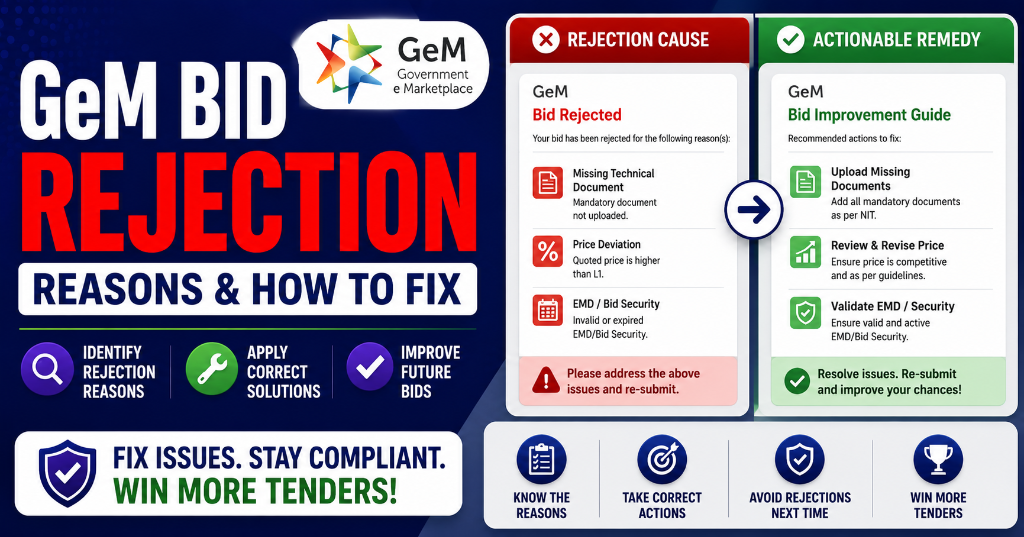
- Reason 1: Incomplete or Missing Documents To understand foundational rules, refer to our complete GeM portal guide.
- Reason 2: Technical Specification Mismatch
- Reason 3: Incorrect EMD or Invalid Exemption Documents
- Reason 4: Late Bid Submission
- Reason 5: Not Meeting Eligibility Criteria
- Reason 6: Pricing Errors & Unrealistic Bids
- Reason 7: Fake or Misleading Information
- Reason 8: Ignoring Corrigendum Updates
- Reason 9: Improper or Expired Digital Signature Certificate (DSC)
- Reason 10: Poor Seller Rating & Past Performance Issues
- GeM-Specific Rejection Reasons: Catalog, Category & Profile Issues
- How to Check Why Your GeM Bid Was Rejected
- Step-by-Step Fix Plan: From Rejection to Winning
- The Pre-Bid Compliance Checklist: Never Get Rejected Again
- How TenderFlow Pro Prevents GeM Bid Rejection Automatically
- FAQs About GeM Bid Rejection
- Conclusion: Turn Rejection Into Your Competitive Advantage
Introduction: Why 40% of GeM Bids Never Make It Past Technical Evaluation
The Government e-Marketplace (GeM) has transformed how Indian businesses sell to the government. With over 70,000 government buyers and 5 lakh+ registered sellers, GeM is India's largest B2G e-commerce platform. Yet, despite this massive opportunity, industry data suggests that approximately 35–40% of all bids submitted on GeM are rejected before reaching the financial evaluation stage.
The frustrating part? Most rejections are entirely preventable. They stem from documentation errors, specification mismatches, pricing mistakes, and compliance oversights — not from lack of capability or competitive pricing.
This guide covers every GeM bid rejection reason, why it happens, and exactly how to fix it. Whether you're a first-time GeM seller or an experienced bidder facing repeated disqualification, this is your complete playbook for turning rejections into wins.
🚫→✅Prevent GeM Bid Rejection Before It Happens
Upload any GeM tender and TenderFlow Pro's AI scans for 50+ rejection risks — missing documents, spec mismatches, pricing errors, and compliance gaps. Fix issues before submission, not after rejection.
Generate Your Protest Letter Now →
---
Get the GeM Success Toolkit
Register, list, bid, and win on GeM without losing a single rupee in deposits or caution money.
- ✓ 150-Point Pre-Submission Checklist (PDF)
- ✓ EMD & BG Format Verification Guide + Excel Checker
- ✓ GST / PAN / TAN Cross-Verification Guide
- ✓ MSME EMD Exemption Claim Letters (4 Formats)
🔒 256-Bit Secure Razorpay Checkout · Lifetime Access · Instant Digital Delivery
What Is GeM Bid Rejection? Understanding the Disqualification Process
GeM bid rejection (also called disqualification) occurs when a seller's bid fails to meet the mandatory requirements specified in the tender document, resulting in elimination from the procurement process before contract award.The GeM Bid Evaluation Stages:
| Stage | What Happens | Rejection Rate |
|---|---|---|
| Stage 1: Bid Submission | Seller submits bid online via GeM portal | ~5% rejected (late, incomplete upload) |
| Stage 2: Technical Evaluation | Buyer evaluates documents, specs, eligibility | ~25% rejected (most common) |
| Stage 3: Financial Evaluation | Price comparison among technically qualified bidders | ~8% rejected (pricing errors) |
| Stage 4: Contract Award | L1 bidder selected, documents verified | ~2% rejected (post-award verification) |
Types of GeM Bid Rejection:
| Rejection Type | Meaning | Common Causes |
|---|---|---|
| Technical Disqualification | Failed technical evaluation | Missing docs, spec mismatch, eligibility failure |
| Financial Disqualification | Failed financial evaluation | Pricing errors, arithmetic mistakes, GST issues |
| Non-Responsive Bid | Bid doesn't respond to tender requirements | Missing mandatory forms, incorrect format |
| EMD Disqualification | EMD issue | Wrong amount, invalid format, expired validity |
| Post-Award Cancellation | Contract cancelled after winning | False information, inability to furnish Performance Security |
The 10 Most Common GeM Bid Rejection Reasons (With Fixes)
Reason 1: Incomplete or Missing Documents
Frequency: ~30% of all rejections Impact: Immediate disqualification Fix Difficulty: EasyWhat Goes Wrong:
GeM buyers evaluate bids against a mandatory document checklist. Missing even ONE document results in automatic rejection. The most commonly missing documents are:
| Document | Why It's Required | Rejection Impact |
|---|---|---|
| GST Certificate | Tax compliance verification | Immediate disqualification |
| PAN Card | Identity and tax verification | Immediate disqualification |
| Udyam/MSME Certificate | MSME benefit eligibility | Loss of EMD exemption, price preference (learn how to claim them in our MSME Tender Benefits Guide) |
| OEM Authorization | Brand ownership/reseller rights | Disqualification for branded products |
| Experience Certificates | Proof of past performance | Eligibility failure |
| Financial Statements | Turnover and solvency proof | Eligibility failure |
| BIS/ISO Certifications | Quality standard compliance | Technical disqualification |
| Make in India Declaration | Local content compliance (Annexure XI) | Mandatory for tenders >₹5L |
| Border Country Declaration | Security compliance (Annexure XII) | Mandatory for all tenders |
How to Fix:
- Create a Master Document Folder on your system with sub-folders:
- Registration Documents (GST, PAN, Udyam, Incorporation)
- Financial Documents (ITR, Balance Sheet, Turnover Proof)
- Technical Documents (BIS, ISO, Test Reports)
- Brand Documents (OEM Authorization, Trademark)
- Compliance Documents (Make in India, Border Country)
- Past Performance (Work Orders, Completion Certificates)
- Set Expiry Alerts: Track certificate expiry dates (GST, Udyam, BIS, ISO) and renew 30 days before expiry
- Verify Before Upload: Cross-check the tender's "Document Checklist" against your folder before every submission
- Name Files Clearly: Use format like "GST_Certificate_2026.pdf" — evaluators appreciate organized submissions
[Infographic: GeM Document Checklist Template]
Printable checklist showing all mandatory documents with expiry tracking columns.
---Reason 2: Technical Specification Mismatch
Frequency: ~25% of all rejections Impact: Technical disqualification Fix Difficulty: MediumWhat Goes Wrong:
Your listed product or service does not exactly match the buyer's technical requirements. Common mismatches:
| Mismatch Type | Example | Fix |
|---|---|---|
| Wrong dimensions | Tender: 1200mm × 600mm desk; You: 1000mm × 500mm | Verify exact specs before bidding |
| Different brand/model | Tender: "HP LaserJet Pro"; You: "HP LaserJet" (different model) | Match model numbers exactly |
| Lower capacity | Tender: 5 HP motor; You: 3 HP motor | Never under-spec; over-spec is acceptable |
| Missing certification | Tender: ISI-certified cables; You: Non-certified | Update catalog with certified products only |
| Incorrect service scope | Tender: Includes installation; You: Excludes installation | Read scope of work carefully |
| Wrong category listing | Listed under "Wired Keyboard" but bidding for "Wireless Keyboard" | Re-categorize product correctly |
How to Fix:
- Create a Specification Comparison Table for every tender:
| Tender Requirement | Your Product | Match? | Action |
|---|---|---|---|
| Dimension: 1200×600 | 1200×600 | ✅ | Bid |
| Brand: HP LaserJet Pro | HP LaserJet | ❌ | Don't bid or update catalog |
| ISI Certified | ISI Certified | ✅ | Bid |
| 5 HP Motor | 3 HP Motor | ❌ | Don't bid |
- Update Your GeM Catalog Regularly:
- Ensure all technical attributes are filled (not "N/A")
- Use exact model numbers and brand names
- Upload current spec sheets and test reports
- Match attributes with procurement tender language
- Don't Bid If You Can't Match: It's better to skip a tender than waste time on a guaranteed rejection
Reason 3: Incorrect EMD or Invalid Exemption Documents
Frequency: ~12% of all rejections Impact: EMD disqualification Fix Difficulty: EasyWhat Goes Wrong:
| Error | Why It Happens | Fix |
|---|---|---|
| Wrong EMD amount | Miscalculated percentage | Use formula: Tender Value × EMD% |
| Expired Udyam certificate | Not renewed | Renew Udyam before bidding |
| Udyam not linked to GeM | Profile not updated | Link Udyam to GeM seller profile |
| Wrong EMD format | Used DD instead of BG | Follow tender-specified format |
| EMD validity too short | Didn't cover bid validity + 45 days | Extend validity before submission |
| BSD not on letterhead | Informal declaration | Use company letterhead with seal |
How to Fix:
- Verify Udyam Status:
- Visit udyamregistration.gov.in
- Check if your certificate is valid
- Link URN to GeM profile (Profile → MSME Details)
- Calculate EMD Correctly:
- Check tender NIT for exact EMD percentage (usually 2-5%)
- Verify amount with calculator
- For MSMEs: Submit Bid Security Declaration instead of cash EMD
- Check EMD Format Requirements:
- BG from scheduled bank
- DD in favor of exact payee name
- Validity covering bid period + 45 days minimum
Learn more about EMD in our complete EMD guide and EMD exemption guide.
---Reason 4: Late Bid Submission
Frequency: ~8% of all rejections Impact: Automatic rejection (no appeal) Fix Difficulty: Very EasyWhat Goes Wrong:
GeM's system automatically rejects bids submitted even one second after the deadline. Common causes:
- Waiting until the last hour to submit
- Slow internet during peak portal traffic
- Payment gateway failures
- Document upload timeouts
- Server congestion on deadline day
- Time zone confusion (IST vs local time)
Portal Congestion Data:
| Time Before Deadline | Upload Success Rate | Rejection Risk |
|---|---|---|
| 24+ hours | 98% | Very Low |
| 6-12 hours | 92% | Low |
| 2-4 hours | 75% | Medium |
| < 1 hour | 55% | Very High |
| Last 10 minutes | 35% | Critical |
How to Fix:
- The 24-Hour Rule: Submit bids at least 24 hours before the deadline
- The 48-Hour Rule for Large Bids: If uploading many documents, submit 48 hours early
- Set Multiple Reminders:
- T-7 days: Start bid preparation
- T-3 days: Complete document upload
- T-24 hours: Final review and submission
- T-6 hours: Verify submission status
- Test Upload Speed: Upload a test file before the actual bid to check portal speed
- Have Backup Internet: Mobile hotspot as backup for broadband failures
Reason 5: Not Meeting Eligibility Criteria
Frequency: ~10% of all rejections Impact: Eligibility failure Fix Difficulty: MediumWhat Goes Wrong:
Every tender specifies eligibility criteria. Bidders often assume they qualify without verifying:
| Eligibility Requirement | Common Mistake | Fix |
|---|---|---|
| Minimum turnover | Bidder turnover below threshold | Check exact requirement; don't bid if below |
| Prior experience | No proof of similar work | Collect completion certificates from past projects |
| OEM status | Trader bidding without authorization | Get OEM authorization letter |
| Specific certifications | Missing BIS/ISO/FSSAI | Obtain required certifications before bidding |
| Geographic restriction | Bidder from non-eligible state | Check if tender has location restrictions |
| Blacklist check | Bidder on debarment list | Check CPPP debarment list before bidding |
How to Fix:
- Create an Eligibility Checklist for every tender:
□ Minimum Turnover: Required ₹___ | My Turnover: ₹___ | Pass/Fail
□ Prior Experience: Required ___ years | My Experience: ___ years | Pass/Fail
□ Certifications: Required ___ | I Have: ___ | Pass/Fail
□ OEM Authorization: Required? ___ | I Have? ___ | Pass/Fail
□ Location: Restricted? ___ | My Location: ___ | Pass/Fail
□ Blacklist Status: Clear? ___ | Check Date: ___ | Pass/Fail
- Don't Stretch Eligibility: If you barely meet turnover requirements, consider whether you can execute the contract profitably
- Build Experience Portfolio: Start with smaller tenders to build completion certificates for larger ones
Reason 6: Pricing Errors & Unrealistic Bids
Frequency: ~8% of all rejections Impact: Financial disqualification Fix Difficulty: EasyCommon Pricing Mistakes:
| Mistake | Example | Consequence |
|---|---|---|
| GST not included | Quoted ₹10,000 (excl. GST) instead of ₹11,800 (incl. 18%) | Bid considered incomplete |
| Wrong unit price | Per-unit price doesn't match total × quantity | Arithmetic error disqualification |
| Unrealistically low bid | ₹1 lakh for work costing ₹5 lakh | Quality concern rejection |
| BOQ mismatch | Price in BOQ differs from uploaded price document | Non-responsive bid |
| Missing delivery/installation cost | Bid excludes logistics charges | Underpriced, unprofitable contract |
| Wrong currency/decimal | ₹10,000 entered as ₹1,00,000 | Immediate disqualification |
How to Fix:
- Use a Pricing Calculator Spreadsheet:
| Line Item | Quantity | Unit Cost | GST % | GST Amount | Total |
|---|---|---|---|---|---|
| Product A | 10 | ₹5,000 | 18% | ₹9,000 | ₹59,000 |
| Product B | 5 | ₹3,000 | 18% | ₹2,700 | ₹17,700 |
| Delivery | 1 | ₹2,000 | 18% | ₹360 | ₹2,360 |
| Grand Total | ₹12,060 | ₹79,060 |
- The 3-Price Rule: Before submitting, check your price against:
- Your cost + reasonable margin (don't bid at loss)
- Market rate for similar products
- L1 price from past similar tenders
- Include ALL Costs:
- Product cost
- Packaging
- Transportation/Delivery
- Installation (if required)
- GST
- Warranty/AMC (if applicable)
---Reason 7: Fake or Misleading Information
Frequency: ~3% of all rejections Impact: Disqualification + Blacklisting Fix Difficulty: N/A (don't do it)What Goes Wrong:
Some sellers submit:
- Fake experience certificates
- Manipulated turnover figures
- Forged OEM authorization letters
- Altered BIS/ISO certificates
- False declarations (Make in India, Local Content)
Consequences:
| Offense | Penalty |
|---|---|
| Fake documents | Immediate disqualification + blacklisting |
| False turnover | Blacklisting for 1-3 years |
| Forged certificates | Legal action + permanent debarment |
| Misleading declarations | Contract cancellation + recovery of payments |
How to Fix:
There is no fix. Don't do it.- Government buyers verify documents with issuing authorities
- GeM cross-checks GST, PAN, and Udyam data with government databases
- Post-award verification is standard for large contracts
- Blacklisting on CPPP affects ALL future tender participation
Reason 8: Ignoring Corrigendum Updates
Frequency: ~5% of all rejections Impact: Non-compliance Fix Difficulty: EasyWhat Goes Wrong:
Buyers issue corrigenda (corrections/clarifications) after publishing tenders. Changes may include:
- Extended deadlines
- Modified technical specifications
- Additional document requirements
- Changed eligibility criteria
- Updated BOQ quantities
If you submitted a bid BEFORE a corrigendum that changes requirements, your bid may be non-compliant.
How to Fix:
- Check for Corrigenda Daily: After submitting a bid, check the tender page daily until the deadline
- Set Corrigendum Alerts: Use TenderFlow Pro's alert system for corrigendum notifications
- Read Every Corrigendum: Even minor changes can affect your bid
- Withdraw and Resubmit if Needed: If a corrigendum affects your bid, withdraw and resubmit with corrections
Reason 9: Improper or Expired Digital Signature Certificate (DSC)
Frequency: ~4% of all rejections Impact: Submission failure Fix Difficulty: EasyWhat Goes Wrong:
| DSC Issue | Cause | Fix |
|---|---|---|
| Expired DSC | Validity period over | Renew DSC before expiry |
| Wrong signer | DSC registered to different person | Use DSC of authorized signatory |
| Token failure | USB token not detected | Check drivers, try different USB port |
| Not registered on GeM | DSC not linked to GeM profile | Register DSC in GeM profile settings |
| Class mismatch | Using Class 2 instead of Class 3 | Obtain Class 3 DSC for GeM |
How to Fix:
- Verify DSC Validity: Check expiry date on your DSC token
- Use Class 3 DSC: GeM requires Class 3 DSC (not Class 2)
- Register Correct Signatory: Ensure DSC is in the name of the person authorized to sign bids
- Test Before Deadline: Try signing a test document on GeM before the actual bid
- Keep Backup DSC: Have a second DSC as backup for emergencies
Reason 10: Poor Seller Rating & Past Performance Issues
Frequency: ~5% of all rejections (indirect) Impact: Reduced win rate, exclusion from premium tenders Fix Difficulty: Medium (requires time)How Seller Rating Affects Bidding:
| Rating | Impact |
|---|---|
| 4.5+ (Excellent) | Premium tender access, buyer preference |
| 4.0–4.5 (Good) | Standard tender access |
| 3.5–4.0 (Average) | Some tenders may filter you out |
| 3.0–3.5 (Below Average) | Limited tender visibility |
| Below 3.0 (Poor) | Excluded from most tenders |
Factors Affecting Rating:
- On-time delivery performance
- Product quality compliance
- Buyer complaint history
- Order cancellation rate
- Response time to queries
- Return/replacement rate
How to Fix:
- Deliver On Time: Never miss a delivery deadline
- Match Specifications Exactly: Quality complaints hurt ratings
- Respond Quickly: Answer buyer queries within 24 hours
- Avoid Cancellations: Once accepted, complete the order
- Start Small: Win small orders first to build positive feedback
- Track Rating Weekly: Monitor your GeM dashboard rating
Instant Tender Eligibility & Risk Audit
Upload any 500-page NIT / BOQ PDF. Extract hidden disqualification traps, EMD waiver clauses, and complete eligibility criteria in under 45 seconds.
GeM-Specific Rejection Reasons: Catalog, Category & Profile Issues
Beyond the 10 common reasons, GeM has platform-specific rejection triggers. To prevent catalog and brand registration issues, follow our detailed GeM Product Listing Approval Guide.
Catalog Rejection Reasons:
| Issue | Why It Happens | Fix |
|---|---|---|
| Wrong category | Product listed under incorrect GeM taxonomy | Use GeM's category search to find exact match |
| Missing mandatory attributes | Required fields left blank or "N/A" | Fill ALL mandatory technical attributes |
| Image rejection | Wrong background, wrong product, low quality | White background, correct product, high resolution |
| Price flagging | Unusually low/high price vs. market | Price within reasonable market range |
| Duplicate listing | Same product listed multiple times | Maintain single listing per product |
| Brand mismatch | Product brand doesn't match uploaded brand docs | Upload correct brand authorization |
Profile Rejection Reasons:
| Issue | Fix |
|---|---|
| GST-PAN mismatch | Ensure identical business name across all registrations |
| Bank account mismatch | Bank account name must match PAN/GST name |
| Inactive GST | Renew GST registration if suspended |
| Incomplete KYC | Complete all KYC verification steps |
| Wrong business type | Select correct type: OEM, Trader, Service Provider |
How to Check Why Your GeM Bid Was Rejected
Step 1: Check GeM Dashboard
- Log in to gem.gov.in
- Go to "My Bids" or "Bid History"
- Click on the rejected bid
- View "Bid Status" and "Rejection Reason"
Step 2: Read the Evaluation Report
If available, download the evaluation report which specifies:
- Which documents were missing
- Which specifications didn't match
- Which eligibility criteria failed
Step 3: Contact the Buyer
Use GeM's messaging system to ask the buyer for detailed feedback. Many buyers provide specific rejection reasons upon request. If you believe your bid was unfairly rejected due to restrictive specifications, use our standard Tender Protest Letter Format to file a formal representation.
Step 4: Review Your Submission
Compare your submitted bid against the tender requirements:
- Document checklist
- Technical specifications
- Eligibility criteria
- Pricing format
Common Rejection Status Messages:
| Status Message | Meaning | Action |
|---|---|---|
| "Technical Disqualification" | Failed technical evaluation | Check specs and documents |
| "Financial Disqualification" | Failed financial evaluation | Check pricing and calculations |
| "Non-Responsive" | Bid doesn't meet tender requirements | Review tender document thoroughly |
| "EMD Issue" | EMD problem | Verify EMD amount, format, validity |
| "Late Submission" | Submitted after deadline | Submit earlier next time |
| "Incomplete Documents" | Missing mandatory documents | Use document checklist |
Step-by-Step Fix Plan: From Rejection to Winning
Phase 1: Analyze (Day 1–2)
- Identify exact rejection reason from GeM dashboard
- Download evaluation report if available
- Contact buyer for detailed feedback
- Document the rejection in a spreadsheet for pattern analysis
Phase 2: Correct (Day 3–7)
- Fix the specific issue:
- Missing documents → Obtain and organize
- Spec mismatch → Update catalog or don't bid
- Pricing error → Create pricing calculator
- Eligibility failure → Build experience/certifications
- Update GeM profile if profile issues caused rejection
- Renew expired certificates (GST, Udyam, BIS, ISO)
- Verify Udyam-GeM linkage
Phase 3: Prevent (Day 8–14)
- Create a reusable pre-bid checklist
- Build a compliance matrix for every future tender
- Set up document expiry alerts
- Test DSC and portal functionality regularly
Phase 4: Win (Ongoing)
- Start with smaller tenders to build positive rating
- Use TenderFlow Pro's AI scanner before every submission
- Track competitor wins to understand market pricing
- Build relationships with buyers through prompt communication
The Pre-Bid Compliance Checklist: Never Get Rejected Again
Use this checklist before EVERY GeM bid submission:
Document Verification:
- GST certificate is valid and active
- PAN details match GST exactly
- Udyam/MSME certificate is valid and linked to GeM
- OEM authorization letter (if applicable) is current
- Experience certificates are relevant and verifiable
- Financial statements show required turnover
- BIS/ISO/FSSAI certifications are valid
- Make in India declaration (Annexure XI) completed
- Border Country declaration (Annexure XII) completed
- All documents uploaded in correct format (PDF)
Technical Compliance:
- Product specifications match tender requirements exactly
- Model numbers match exactly
- Dimensions/capacity meet or exceed requirements
- Certifications match tender specifications
- Service scope includes all required deliverables
- Product is listed in correct GeM category
Pricing Accuracy:
- Price includes GST
- Unit prices match BOQ
- Arithmetic calculations are correct
- All costs included (product + delivery + installation)
- Price is realistic (not too low or too high)
- Price in BOQ matches uploaded price document
Submission Readiness:
- EMD amount and format are correct
- EMD validity covers required period
- DSC is valid, Class 3, and registered
- Bid submitted at least 24 hours before deadline
- Corrigenda checked and incorporated
- Submission acknowledgement received
Eligibility Confirmation:
- Turnover meets minimum requirement
- Experience meets minimum requirement
- All mandatory certifications held
- Not on any debarment/blacklist
- Geographic restrictions (if any) met
How TenderFlow Pro Prevents GeM Bid Rejection Automatically
TenderFlow Pro eliminates rejection before it happens:
1. Document Completeness Scanner
Upload any GeM tender and our AI instantly checks:
- Which documents are mandatory
- Whether your uploaded documents match requirements
- Certificate expiry dates
- Document format compliance
2. Technical Specification Matcher
Our engine compares your GeM catalog against tender specs:
- Flags specification mismatches
- Identifies missing certifications
- Suggests catalog updates needed before bidding
- Recommends whether to bid or skip
3. Pricing Validator
Before submission, TenderFlow Pro validates:
- GST inclusion
- Arithmetic accuracy
- BOQ completeness
- Cost realism vs. market data
4. Eligibility Auto-Check
Enter your business details once. Our system:
- Compares your profile against tender eligibility
- Flags turnover/experience shortfalls
- Checks blacklist status
- Verifies geographic eligibility
5. Corrigendum Monitor
Our system tracks your submitted bids and:
- Alerts you to new corrigenda
- Highlights changes that affect your bid
- Suggests withdrawal/resubmission if needed
6. Seller Rating Tracker
Monitor your GeM seller rating:
- Track rating trends
- Identify factors dragging your score
- Get actionable recommendations to improve
FAQs About GeM Bid Rejection
Q1: Why do GeM bids get rejected?
A: GeM bids get rejected primarily for these reasons: (1) Incomplete or missing mandatory documents (GST, PAN, MSME certificates); (2) Technical specification mismatches where the product doesn't match buyer requirements; (3) Incorrect EMD amount or invalid exemption documents; (4) Late bid submission after the deadline; (5) Not meeting eligibility criteria (turnover, experience, certifications); (6) Pricing errors (wrong GST, arithmetic mistakes, unrealistic bids); (7) Fake or misleading information in documents; (8) Ignoring corrigendum updates; (9) Improper or expired Digital Signature Certificate (DSC); and (10) Poor seller rating from past performance issues.Q2: How can I check why my GeM bid was rejected?
A: To check why your GeM bid was rejected, log in to your GeM seller dashboard and navigate to the specific bid. The rejection reason is displayed in the bid status section. Common status messages include "Technical Disqualification," "Financial Disqualification," "Non-Responsive," or "EMD Issue." For detailed feedback, check the evaluation report if available. You can also contact the buyer through the GeM messaging system for clarification on the exact rejection reason.Q3: Can I resubmit a rejected GeM bid?
A: No, you cannot resubmit a rejected GeM bid for the same tender. Once a bid is rejected, the tender process moves forward without reconsideration. However, you can correct the issues that caused rejection and apply for future tenders. For corrigendum-based changes, if the buyer issues a corrigendum before the deadline, you may withdraw and resubmit. Always analyze rejection reasons and build a compliance checklist to prevent repeat disqualification.Q4: What documents are most commonly missing in rejected GeM bids?
A: The most commonly missing documents in rejected GeM bids are: GST registration certificate, PAN card, Udyam/MSME registration certificate, OEM authorization letter (for branded products), experience certificates or past performance proof, financial statements or turnover proof, product catalog with specifications, BIS/ISO certifications (where required), Make in India/Local Content declarations (Annexure XI), and Border Country declarations (Annexure XII) for tenders above ₹5 lakh.Q5: How does seller rating affect GeM bid success?
A: GeM seller rating significantly impacts bid success. Buyers can filter bids by seller rating, and many tenders automatically exclude sellers below a certain rating threshold. Factors affecting rating include: on-time delivery performance, product quality compliance, buyer complaint history, order cancellation rate, and response time to buyer queries. A low rating reduces visibility in search results and disqualifies you from premium tenders. Maintaining a rating above 4.0 is recommended for competitive bidding.Q6: What is the most common technical rejection reason on GeM?
A: The most common technical rejection reason on GeM is product specification mismatch. This occurs when the seller's listed product does not exactly match the buyer's technical requirements — including dimensions, brand, model number, certifications (BIS, ISO), capacity ratings, or service scope. Even minor deviations like offering a different model from the same brand can result in disqualification. Always cross-check your product catalog attributes against tender specifications before bidding.Q7: How do I fix pricing errors in GeM bids?
A: To fix pricing errors in GeM bids: (1) Always include GST in your quoted price — buyers expect inclusive pricing; (2) Verify unit pricing matches the Bill of Quantities (BOQ) exactly; (3) Check arithmetic calculations for totals and subtotals; (4) Factor in all costs including logistics, packaging, installation, and AMC; (5) Avoid unrealistically low bids that raise quality concerns; (6) Ensure your quoted price matches any uploaded price documents; (7) For reverse auctions, set a floor price before bidding to avoid winner's curse.Q8: What happens if I miss the GeM bid submission deadline?
A: If you miss the GeM bid submission deadline, your bid is automatically rejected with no exceptions. GeM's system closes bid acceptance precisely at the deadline time. There are no extensions for technical issues, slow internet, or payment failures on the bidder's side. To prevent this, submit bids at least 24 hours before the deadline, set multiple reminders, and complete document uploads well in advance. Never wait until the final hours.Q9: How do corrigendum updates affect my GeM bid?
A: Corrigendum updates on GeM can significantly affect your bid. Buyers may issue corrigenda to change specifications, extend deadlines, modify eligibility criteria, alter BOQ quantities, or update document requirements. If you submitted a bid before a corrigendum that changes requirements, your bid may become non-compliant. Always check for corrigenda daily after submitting a bid and before the deadline. If changes affect your bid, withdraw and resubmit with corrections.Q10: Can a low GeM seller rating be improved?
A: Yes, a low GeM seller rating can be improved over time. To improve your rating: (1) Deliver all orders on or before the committed date; (2) Ensure product quality exactly matches specifications; (3) Respond to buyer queries within 24 hours; (4) Avoid order cancellations once accepted; (5) Maintain accurate product catalogs with up-to-date pricing; (6) Resolve buyer complaints promptly; (7) Complete smaller orders successfully to build positive feedback; (8) Update certifications and documents before expiry. Ratings are calculated based on recent performance, so consistent improvement will raise your score. ---Conclusion: Turn Rejection Into Your Competitive Advantage
Every GeM bid rejection is feedback. It tells you exactly where your process is weak — documentation, specifications, pricing, or compliance. The sellers who win consistently are not luckier or cheaper. They are simply the ones who learned from rejection and built systems to prevent it.
The 10 rejection reasons in this guide account for over 90% of all GeM disqualifications. Master them, and you master GeM bidding.
Your action plan:- Today: Review your last 3 rejected bids and identify the exact reason
- This week: Create a master document folder with expiry tracking
- Before every bid: Run the Pre-Bid Compliance Checklist
- Ongoing: Submit bids 24+ hours before deadline, check corrigenda daily, maintain seller rating above 4.0
- Strategic: Use TenderFlow Pro's AI scanner to detect rejection risks before submission, not after
Rejection is not failure — it's a free audit of your bidding process. Use it.
🎯Never Get Rejected Again
TenderFlow Pro scans every GeM tender for 50+ rejection risks before you submit. Missing documents, spec mismatches, pricing errors, compliance gaps — detected and fixed in 45 seconds.